NETGEAR is aware of a growing number of phone and online scams. To learn how to stay safe click here.
Forum Discussion

sashki2
Apr 16, 2021Aspirant
SOS: Cannot access admin page
I've tried to post this before but could not address this issue till now. So sorry for the duplicate post. I cannot access the admin page. It seems like I'm authenticated correctly because I'm not p...
sashki2
Apr 16, 2021Aspirant
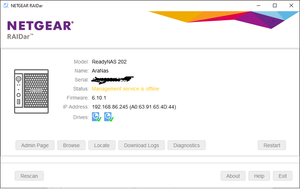
This is the error displayed after login when I'm trying to access admin page:

mdgm
Apr 16, 2021Virtuoso
rsyslog is not included in the firmware. My first guess would be therefore that logs from rsyslog are filling up the 4GB root volume and that's what's causing the management service to be offline and your other problems.
 StephenBApr 16, 2021Guru - Experienced User
Have you made a backup of your data? It is at risk.
If you have some knowledge of the linux command line, we can help you boot into tech support mode and take a closer look that way.
Another option is to contact paid support via my.netgear.com. Per-incident support might work for this - cost should be somewhere around $100 USD. Marc_V or JohnCM_S could facilitate.
You could also do a factory default on the NAS - which reformats the drives and builds everything from scratch. You'd need to then reconfigure the NAS and restore your files from backup. The benefit of doing this is that it gives you a completely clean system. It also is something you can do w/o waiting for assistance.
- sashki2Apr 16, 2021Aspirant
I don't have working Linux knowledge but with right guidance I could try to figure things out. Would you be willing to help?
I'll have to think if restore to factory is a good idea in my case as there was some rather significant things that I'd have to redo if I do that.
StephenB wrote:Have you made a backup of your data? It is at risk.
If you have some knowledge of the linux command line, we can help you boot into tech support mode and take a closer look that way.
Another option is to contact paid support via my.netgear.com. Per-incident support might work for this - cost should be somewhere around $100 USD. Marc_V or JohnCM_S could facilitate.
You could also do a factory default on the NAS - which reformats the drives and builds everything from scratch. You'd need to then reconfigure the NAS and restore your files from backup. The benefit of doing this is that it gives you a completely clean system. It also is something you can do w/o waiting for assistance.
- sashki2Apr 16, 2021Aspirant
Update... StephenB might be on the right track with the space! When I deleted the *.z1 files, diagnostic now produced a little more usefull info and it says the volume root is 100% full. I'll need to figure out how to free up some space there. Do you know?
It's a little suprising that space management is not automatically done by the firmware.
Successfully completed diagnostics System
- Disk 1 has 3 Command Timeouts
- Disk 2 has 1 Command Timeouts
- Volume root is 100.00% full
Logs
- No errors found.
System Management
- 2021-04-16 12:24:15: rndb_create() ==> 3 (126ms)
- 2021-04-16 12:24:15: Error create table (db)
- 2021-04-16 12:24:15: dba create failed
- 2021-04-16 12:24:14: DB (main) schema version: 24 ==> 24
- 2021-04-16 12:24:13: Failed to start ReadyNAS System Daemon.
- 2021-04-16 12:14:14: DB (main) schema version: 24 ==> 24
- 2021-04-16 12:14:14: rndb_create() ==> 3 (113ms)
- 2021-04-16 12:14:14: Error create table (db)
- 2021-04-16 12:14:14: dba create failed
- 2021-04-16 12:14:13: Failed to start ReadyNAS System Daemon.
- 2021-04-16 12:04:15: DB (main) schema version: 24 ==> 24
- 2021-04-16 12:04:15: rndb_create() ==> 3 (175ms)
- 2021-04-16 12:04:15: Error create table (db)
- 2021-04-16 12:04:15: dba create failed
- sashki2Apr 16, 2021Aspirant
mdgm wrote:rsyslog is not included in the firmware. My first guess would be therefore that logs from rsyslog are filling up the 4GB root volume and that's what's causing the management service to be offline and your other problems.
To test the "out-of-space" theory, I've moved *.gz files elsewhere. I think these are compressed old log files. The total occupied space for the folder is now less than 1.5gb. It didn't help
- StephenBApr 16, 2021Guru - Experienced User
sashki2 wrote:
mdgm wrote:
rsyslog is not included in the firmware. My first guess would be therefore that logs from rsyslog are filling up the 4GB root volume and that's what's causing the management service to be offline and your other problems.
To test the "out-of-space" theory, I've moved *.gz files elsewhere. I think these are compressed old log files. The total occupied space for the folder is now less than 1.5gb. It didn't help
This files are in a rsyslog share? Just wondering - if they are then they probably aren't in the 4 GB root volume. It is good that you are getting some more information though.
sashki2 wrote: I don't have working Linux knowledge but with right guidance I could try to figure things out. Would you be willing to help?Getting you booted into tech support mode isn't that difficult. Figuring out what can safely be deleted from the root can be quite a bit more difficult.
Do you recall what apps you've installed? Most of the time a full root is caused by a misbehaving app.
- sashki2Apr 16, 2021Aspirant
StephenB wrote:
sashki2 wrote:
mdgm wrote:rsyslog is not included in the firmware. My first guess would be therefore that logs from rsyslog are filling up the 4GB root volume and that's what's causing the management service to be offline and your other problems.
To test the "out-of-space" theory, I've moved *.gz files elsewhere. I think these are compressed old log files. The total occupied space for the folder is now less than 1.5gb. It didn't help
This files are in a rsyslog share? Just wondering - if they are then they probably aren't in the 4 GB root volume. It is good that you are getting some more information though.
sashki2 wrote: I don't have working Linux knowledge but with right guidance I could try to figure things out. Would you be willing to help?Getting you booted into tech support mode isn't that difficult. Figuring out what can safely be deleted from the root can be quite a bit more difficult.
Do you recall what apps you've installed? Most of the time a full root is caused by a misbehaving app.
Yes the files were in rsyslog share. Is rsyslog share part of the root volume? If it is, it'd explain why deleting them helped to make the baby step. How do I boot at a tech support mode? Is there a utility helping to free some space in the root volume?
Related Content
NETGEAR Academy

Boost your skills with the Netgear Academy - Get trained, certified and stay ahead with the latest Netgear technology!
Join Us!
