NETGEAR is aware of a growing number of phone and online scams. To learn how to stay safe click here.
Forum Discussion

Stuuk1
Oct 06, 2015Aspirant
Strange Folder Names...
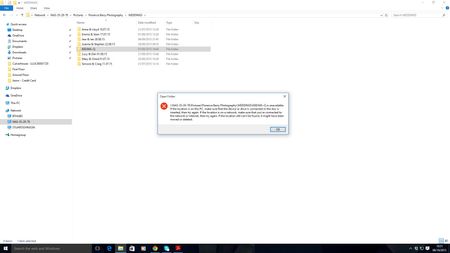
Hi All, I have encountered this before and someone tried to help but then stopped responding.. The issue I have is that on my ReadyNAS102 I have many folders containing large numbers of pict...
 Oct 07, 2015
Hi,
The reason you see those strange names in Windows is because Windows SMB does not support non-standard characters in the name, like colons. Windows uses colons to designate drives in path names. Windows won't let you save colons in file names, but Linux doesn't stop you from creating a colon in a file name. You should be able to access this through the GUI and rename the file/folder, or over something like FTP or SSH.

StephenB
Oct 06, 2015Guru - Experienced User
I don't think an OS reinstall is likely to fix change anything (other than resetting the admin password). FWIW, from a security perspective there is no harm in writing down the admin password and taping it to the NAS. Anyone stealing the NAS can do an OS reinstall anyway, so they don't need the password to get admin access to the box (if they have it in their possession).
I also don't think the NAS is creating those folders. I think something is creating them as temporary folders, but for some reason the deletion later on is failing.

Stuuk1
Oct 06, 2015Aspirant
Hi Stephen,
It certainly isn't me creating them as I never enter those folders. I went in there to check them today and noticed it. Its very strange and very annoying...
Regarding the admin password, thats exactly what I do anyway. Its not me thats forgotten the password as I know its 100% correct.
- StephenBOct 06, 2015Guru - Experienced User
Stuuk1 wrote:
It certainly isn't me creating them as I never enter those folders. I went in there to check them today and noticed it. Its very strange and very annoying...
I wasn't thinking you did it, just that some program you use is doing it (and that sometimes they aren't deleted properly). You can't ever navigate into these folders, correct? They just show up in your folder list?
Stuuk1 wrote:
Regarding the admin password, thats exactly what I do anyway. Its not me thats forgotten the password as I know its 100% correct.
This one is new to me, I haven't ever seen it (on any of my 5 ReadyNAS - two are OS6). Perhaps PM skywalker???
- kohdeeOct 07, 2015NETGEAR Expert
Hi,
The reason you see those strange names in Windows is because Windows SMB does not support non-standard characters in the name, like colons. Windows uses colons to designate drives in path names. Windows won't let you save colons in file names, but Linux doesn't stop you from creating a colon in a file name. You should be able to access this through the GUI and rename the file/folder, or over something like FTP or SSH.
- StephenBOct 08, 2015Guru - Experienced User
kohdee wrote:
Hi,
The reason you see those strange names in Windows is because Windows SMB does not support non-standard characters in the name, like colons. Windows uses colons to designate drives in path names. Windows won't let you save colons in file names, but Linux doesn't stop you from creating a colon in a file name. You should be able to access this through the GUI and rename the file/folder, or over something like FTP or SSH.
I'm not seeing any colons in the screen shot (or any other characters that are an issue for Windows).
But I agreed that it might be useful to look at these folders through the web ui.
Related Content
NETGEAR Academy

Boost your skills with the Netgear Academy - Get trained, certified and stay ahead with the latest Netgear technology!
Join Us!
