NETGEAR is aware of a growing number of phone and online scams. To learn how to stay safe click here.
Forum Discussion

gyves1
Jun 02, 2016Luminary
UPS issue on RN312 under OS6.5
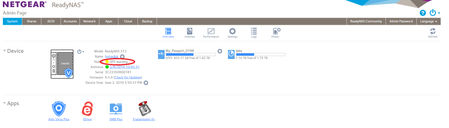
Hi, I have an issue with my UPS. My readyNAS shows me a warning about the UPS but it's not clear for me, the info is weak. An another strange thing the ups error event is not recorded in my log :-...

gyves1
Jun 07, 2016Luminary
An another strange events:
When the power was back (after power cut), the UPS was removed then detected...why?
|

StephenB
Jun 07, 2016Guru - Experienced User
gyves1 wrote:
An another strange events:
When the power was back (after power cut), the UPS was removed then detected...why?
Tue Jun 7 2016 10:49:17 System: New UPS on PortUSB detected. Manufacturer: EATON, Model: Ellipse ECO 1600, Serial: 000000000. Tue Jun 7 2016 10:49:15 System: UPS on PortUSB removed. Manufacturer: EATON, Model: Ellipse ECO 1600, Serial: 000000000. Tue Jun 7 2016 10:06:55 System: Antivirus scanner definition file was updated to 201606070638. Tue Jun 7 2016 10:02:38 System: UPS UPS () is on line power. Tue Jun 7 2016 9:20:55 System: UPS UPS () is on battery power.
The log info is below:
Jun 07 10:49:08 homedisk kernel: [608306.710990] usb 4-2: usbfs: USBDEVFS_CONTROL failed cmd usbhid-ups rqt 161 rq 1 len 5 ret -75
Jun 07 10:49:08 homedisk kernel: [608306.711180] usb usb4-port2: disabled by hub (EMI?), re-enabling...
Jun 07 10:49:08 homedisk kernel: [608306.711187] usb 4-2: USB disconnect, device number 6
After the port was re-enabled, the UPS is detected and added again. There is only one of these in the log file. This could be the UPS simply not responding for some reason.
BTW, I am also seeing a lot of errors like this one:
Jun 05 04:27:01 homedisk cron[2170]: (*system*php5) WRONG FILE OWNER (/etc/cron.d/php5)
Any thoughts on why these might be happening (some app you might have installled or some ssh work you did).?
- gyves1Jun 07, 2016Luminary
StephenB wrote:BTW, I am also seeing a lot of errors like this one:Jun 05 04:27:01 homedisk cron[2170]: (*system*php5) WRONG FILE OWNER (/etc/cron.d/php5)Any thoughts on why these might be happening (some app you might have installled or some ssh work you did).?Only these app are installed: AV+, SMB+, Transmission, iDrive.
Last week, an iDrive helpdesk specialist has taken the ReadyNas in SSH with Putty tthrough a remote control to check an update installation issue.
How we can to verify the root cause or the trigger of this error event?
- gyves1Jun 10, 2016Luminary
In conclusion, this issue still unknown correct?
- StephenBJun 10, 2016Guru - Experienced User
gyves1 wrote:
In conclusion, this issue still unknown correct?
Certainly its new to me, and I am not seeing it on my OS 6 systems. Perhaps PM Skywalker and/or kohdee with a link to the thread. Since it might be idrive, you could also ask whoever you are using for that.
Where did you get transmission from?
- gyves1Jun 10, 2016Luminary
I have got the Transmission app from built-in Readynas marketplace, why?
iDrive doesn't use the UPS, it's just a cloud backup.
Do you think there is third party bug with impact on OS ?
StephenB wrote:
gyves1 wrote:In conclusion, this issue still unknown correct?
Certainly its new to me, and I am not seeing it on my OS 6 systems. Perhaps PM Skywalker and/or kohdee with a link to the thread. Since it might be idrive, you could also ask whoever you are using for that.
Where did you get transmission from?
- StephenBJun 10, 2016Guru - Experienced User
gyves1 wrote:
I have got the Transmission app from built-in Readynas marketplace, why?
iDrive doesn't use the UPS, it's just a cloud backup.
Do you think there is third party bug with impact on OS ?
There are two issues, and probably not related. The first is the original UPS issue, with an unknown root cause. The second is the flood of homedisk cron[2170]: (*system*php5) WRONG FILE OWNER (/etc/cron.d/php5) errors in your logs.
The UPS problem (for better or worse) is not happening at the moment. I am more concerned about the log flood, since we have no idea what implications that error might have. That is quite likely to be a third-party problem.
- gyves1Jun 10, 2016Luminary
Do you know when this "cron[2170]: (*system*php5) WRONG FILE OWNER (/etc/cron.d/php5)" issue has started? Where can I find this information in the log?
My goal is to match the starting date of this issue with the Transmission or iDrive.
Thanks
StephenB wrote:
gyves1 wrote:I have got the Transmission app from built-in Readynas marketplace, why?
iDrive doesn't use the UPS, it's just a cloud backup.
Do you think there is third party bug with impact on OS ?
There are two issues, and probably not related. The first is the original UPS issue, with an unknown root cause. The second is the flood of homedisk cron[2170]: (*system*php5) WRONG FILE OWNER (/etc/cron.d/php5) errors in your logs.
The UPS problem (for better or worse) is not happening at the moment. I am more concerned about the log flood, since we have no idea what implications that error might have. That is quite likely to be a third-party problem.
- StephenBJun 10, 2016Guru - Experienced User
Look in system.log in the zip you submitted.
The first entry there is 04 June, but it clearly started before then.
- gyves1Jun 13, 2016Luminary
Hi StephenB,
You have right, after an investigation in my RN312 log files, I have found a link between the rror and iDrive
Jun 10 21:51:01 homedisk cron[2170]: (*system*php5) WRONG FILE OWNER (/etc/cron.d/php5)
S root 16372 2170 16372 0 1 80 0 1988 10627 wait Jun10 ? 00:00:00 /usr/sbin/CRON -f
S root 16373 16372 16373 0 1 80 0 668 1080 wait Jun10 ? 00:00:00 /bin/sh -c cd "/apps/idrive/web/idriveIt/user_profile/gyves@outlook.be/Backup/CloudBackup"; /usr/bin/perl /apps/idrive/web/IDrive/.scripts/Backup_Script_IDrive.plThanks a lot !
I will contact now the iDrive support for this third party app
Related Content
NETGEAR Academy

Boost your skills with the Netgear Academy - Get trained, certified and stay ahead with the latest Netgear technology!
Join Us!
