NETGEAR is aware of a growing number of phone and online scams. To learn how to stay safe click here.
Forum Discussion

Pianissimo84
Jun 29, 2016Aspirant
Windows 10 can't access from one user's login
I have 2 Win10 PCs and can access the ReadyNAS shares and map network drives from both users on one machine but only one user on the other machine. The NAS is running the latest OS (6.5.1). Some thin...

Pianissimo84
Jun 30, 2016Aspirant
First command response was 'no entries'
The command worked. However, on signing out and back in, it won't reconnect. This is my wife's user profile and there's no way I can instruct her to how to use the command prompt every time she logs in. What can I do to make this 'stick'?
Pianissimo84
Jun 30, 2016Aspirant
I tried using the persistance switch (/P:YES) and the share won't reconnect on new login.
- Pianissimo84Jun 30, 2016Aspirant
Now I'm stuck. The user can't reconnect to the mapped drive and I can't delete the connection either (see screenshot).
- Pianissimo84Jun 30, 2016Aspirant
- I was able to disconnect the unmapped drive on Computer 2. Still can't connect to the ReadyNas and map drives.
- Now, on Computer 1 I have lost connection for 1 of the 3 users. The only thing I have done since yesterday is to upgrade my ReadyCloud account to the myNetgear account. The installed app finds the ReadyNAS shares just fine, but I can't map the drives.
What am I missing?
- Pianissimo84Jul 01, 2016Aspirant
Now lost connection for both users on Computer 2. Please advise, this is getting worse, not better!
 StephenBJul 01, 2016Guru - Experienced User
It looks like you left out the space between the * and the /delete in the screenshot. That will create system 67 error
net use * /delete
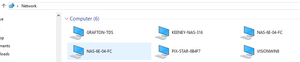
So we know that the command worked sucessfully once, but I am unclear about what happened when it failed. One possibility is that the Windows system is having trouble finding KEENEY-NAS-316. One option there is to use the IP address instead of the name when you access the NAS. If you want to do this, its best to reserve the IP address in your router.
Though of course if spaces were left out of the second net use command, it would also fail.
Overall I suggest specifying credentials when you map drive letters (admin being convenient).
If this is readycloud-related then hopefully someone from netgear will reply.
- Pianissimo84Jul 01, 2016Aspirant
Yes, I tried mapping to the IP address (static). Sometimes it works, sometimes it doesn't. Even when it does work, I still can't open the main network folder to see the entire share list as I could before.
Is there a way to revert the ReadyNAS OS to v6.5 from 6.5.1?
- Pianissimo84Jul 01, 2016Aspirant
Still unsuccessful mapping to IP address w/ admin credentials on Computer 2 with my wife's user account.
- JennCJul 01, 2016NETGEAR Employee Retired
- Pianissimo84Jul 01, 2016Aspirant
I reset most of the shares successfully. Still unable to get a persistent connection on a mapped drive on my wife's user account.
For two shares I get the following error when attempting to reset the permissions:


Related Content
NETGEAR Academy

Boost your skills with the Netgear Academy - Get trained, certified and stay ahead with the latest Netgear technology!
Join Us!
