NETGEAR is aware of a growing number of phone and online scams. To learn how to stay safe click here.
Forum Discussion

Andy_Larkins
Jan 31, 2016Aspirant
RND4000 WIn 10 Unexpected Network error
ReadyNas NV+ RND4000 Windows 10 Home ver 1511 I recently went through a windows update and have lost the ability to see my RND4000 When I map the drive, it sees it but upon clicking the ico...
- Feb 08, 2016
Hi Andy_Larkins,
It seems like that's our best hope of resolving this problem. Clearly, not a problem with your ReadyNAS.
Keep this thread updated on what happens.
Kind regards,
BrianL
NETGEAR Community Team


kohdee
Feb 01, 2016NETGEAR Expert
I don't have a RAIDiator box near me but if you use the UI to download the set of logs, then it should be there. It would either be called smbd or samba or smb.log. Maybe even something with "cifs"
Andy_Larkins
Feb 01, 2016Aspirant
[2016/02/01 13:08:40, 0] smbd/server.c:1143(main)
smbd version 3.5.22 started.
Copyright Andrew Tridgell and the Samba Team 1992-2010
[2016/02/01 13:26:16.532809, 2] auth/auth.c:304(check_ntlm_password)
check_ntlm_password: authentication for user [larks] -> [larks] -> [larks] succeeded
[2016/02/01 13:26:16.625555, 0] lib/util_sock.c:474(read_fd_with_timeout)
[2016/02/01 13:26:16.625895, 0] lib/util_sock.c:1441(get_peer_addr_internal)
getpeername failed. Error was Transport endpoint is not connected
read_fd_with_timeout: client 0.0.0.0 read error = Connection reset by peer.
[2016/02/01 13:26:17.281687, 2] auth/auth.c:304(check_ntlm_password)
check_ntlm_password: authentication for user [larks] -> [larks] -> [larks] succeeded
[2016/02/01 13:26:17.347839, 0] lib/util_sock.c:474(read_fd_with_timeout)
[2016/02/01 13:26:17.348180, 0] lib/util_sock.c:1441(get_peer_addr_internal)
getpeername failed. Error was Transport endpoint is not connected
read_fd_with_timeout: client 0.0.0.0 read error = Connection reset by peer.
[2016/02/01 13:32:32.223651, 2] auth/auth.c:304(check_ntlm_password)
check_ntlm_password: authentication for user [admin] -> [admin] -> [admin] succeeded
[2016/02/01 13:32:32.291006, 0] lib/util_sock.c:474(read_fd_with_timeout)
[2016/02/01 13:32:32.291326, 0] lib/util_sock.c:1441(get_peer_addr_internal)
getpeername failed. Error was Transport endpoint is not connected
read_fd_with_timeout: client 0.0.0.0 read error = Connection reset by peer.
[2016/02/01 13:32:32.711346, 2] auth/auth.c:304(check_ntlm_password)
check_ntlm_password: authentication for user [admin] -> [admin] -> [admin] succeeded
[2016/02/01 13:32:32.773390, 0] lib/util_sock.c:474(read_fd_with_timeout)
[2016/02/01 13:32:32.773711, 0] lib/util_sock.c:1441(get_peer_addr_internal)
getpeername failed. Error was Transport endpoint is not connected
read_fd_with_timeout: client 0.0.0.0 read error = Connection reset by peer.
[2016/02/01 13:35:10.053070, 2] auth/auth.c:304(check_ntlm_password)
check_ntlm_password: authentication for user [larks] -> [larks] -> [larks] succeeded
[2016/02/01 13:35:10.104092, 0] lib/util_sock.c:474(read_fd_with_timeout)
[2016/02/01 13:35:10.104413, 0] lib/util_sock.c:1441(get_peer_addr_internal)
getpeername failed. Error was Transport endpoint is not connected
read_fd_with_timeout: client 0.0.0.0 read error = Connection reset by peer.
[2016/02/01 13:35:10.491968, 2] auth/auth.c:304(check_ntlm_password)
check_ntlm_password: authentication for user [larks] -> [larks] -> [larks] succeeded
[2016/02/01 13:35:10.558781, 0] lib/util_sock.c:474(read_fd_with_timeout)
[2016/02/01 13:35:10.559102, 0] lib/util_sock.c:1441(get_peer_addr_internal)
getpeername failed. Error was Transport endpoint is not connected
read_fd_with_timeout: client 0.0.0.0 read error = Connection reset by peer.
[2016/02/01 13:35:28.723611, 2] auth/auth.c:304(check_ntlm_password)
check_ntlm_password: authentication for user [larks] -> [larks] -> [larks] succeeded
[2016/02/01 13:35:28.779182, 0] lib/util_sock.c:474(read_fd_with_timeout)
[2016/02/01 13:35:28.779503, 0] lib/util_sock.c:1441(get_peer_addr_internal)
getpeername failed. Error was Transport endpoint is not connected
read_fd_with_timeout: client 0.0.0.0 read error = Connection reset by peer.
[2016/02/01 13:35:29.182088, 2] auth/auth.c:304(check_ntlm_password)
check_ntlm_password: authentication for user [larks] -> [larks] -> [larks] succeeded
[2016/02/01 13:35:29.250685, 0] lib/util_sock.c:474(read_fd_with_timeout)
[2016/02/01 13:35:29.251006, 0] lib/util_sock.c:1441(get_peer_addr_internal)
getpeername failed. Error was Transport endpoint is not connected
read_fd_with_timeout: client 0.0.0.0 read error = Connection reset by peer.
- kohdeeFeb 01, 2016NETGEAR Expert
Do you have Jumbo Frames (mtu 9000) configured on the NIC?
Is this problem only happening with Windows 10? Do you have another Windows PC to try connection to?
If it is the Windows 10 with the problem, it might require some registry changes... - Andy_LarkinsFeb 01, 2016Aspirant
Would that be on the NIC on the Win 10 machine or on the NAS (or both)
I dont have a non W10 machine anymore to check it other than I can get to the NAS no problem from my Note 5 Cell phone
- Andy_LarkinsFeb 01, 2016Aspirant
Jumbo frames on the W10 machine are currently disabled.
- BrianL2Feb 01, 2016NETGEAR Employee Retired
Hi Andy_Larkins,
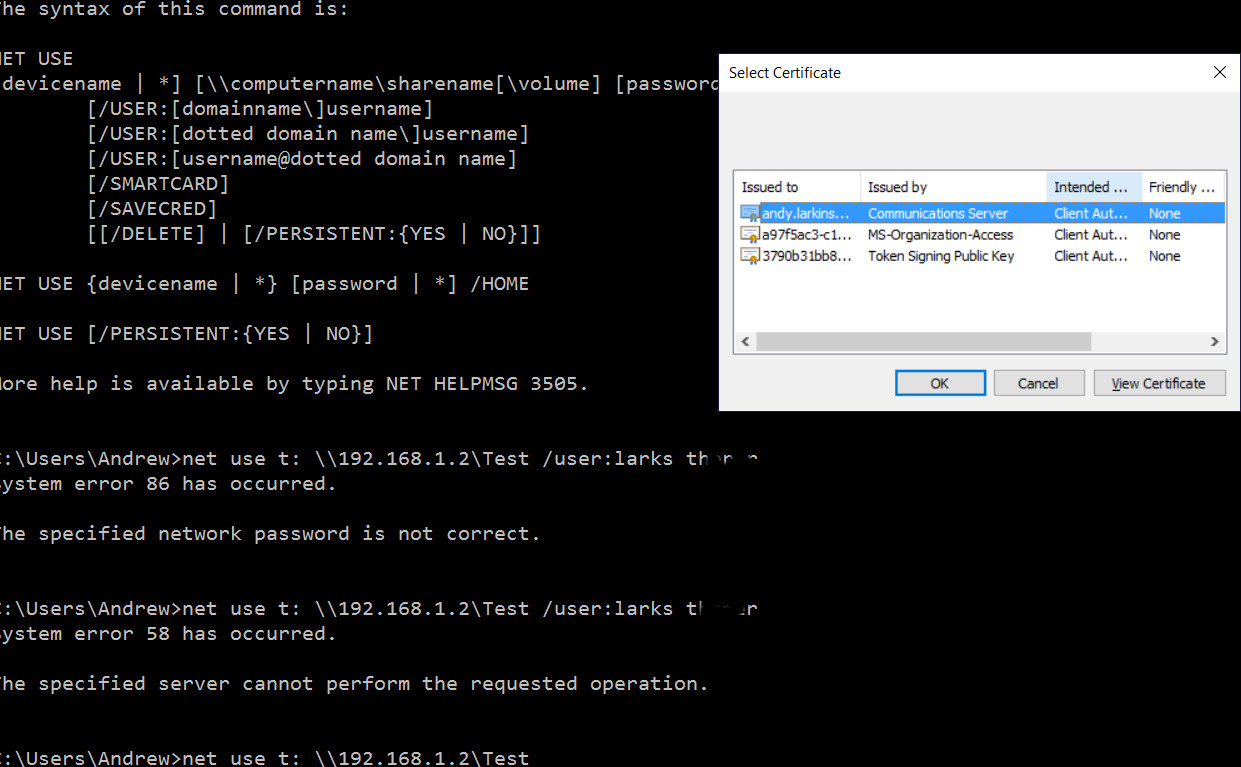
Could you post some screenshots of these certificates that your PC shows when trying to access your shares? Also, I would like you to try to create a new share in your ReadyNAS with guest (read-write) access and see if the same behavior shows.
Looking forward to your response.
Kind regards,
BrianL
NETGEAR Community Team - kohdeeFeb 01, 2016NETGEAR Expert
Andy_Larkins wrote:
Jumbo frames on the W10 machine are currently disabled.
Then you should not have Jumbo Frames enabled on the NAS.
ReadyNAS would try to send you packets that are 9000 but since Windows is 1500, the ReadyNAS'll have to resend the packets until they fit the 1500 window size.
Turn off jumbo frames on the NAS. They were really useful in slow networks but not as much anymore.
 StephenBFeb 01, 2016Guru - Experienced User
kohdee wrote:
Andy_Larkins wrote:
Jumbo frames on the W10 machine are currently disabled.
Then you should not have Jumbo Frames enabled on the NAS.
Kohdee is of course correct. You want to match the ethernet frame size across your local LAN.
So JF should be off if:
-you have a mix of fast ethernet and gigabit
-the nas connects to some equipment that doesn't support JF
-JF is turned off in some equipment.
Otherwise you either end up with packet fragmentation or (or as Kohdee says) packet retransmission. Both are bad, so you want to avoid them.
kohdee wrote:
Turn off jumbo frames on the NAS. They were really useful in slow networks but not as much anymore.
I basically do agree, and there are cases reported here where turning on JF actually reduced performance.
Its not really about the speed of the network though (JF is only for gigabit). Its about the speed of the devices that connect to the network. Every packet generates an interrupt and creates some processing load on the devices. When jumbo frames help, it is because they are reducing the CPU load on the devices. They don't help the network performance overall, and in some ways they actually hurt it.
Devices get faster over time (so the packet rate doesn't load them down as much), and modern NIC cards can do more on-board processing, which helps off-load the main CPU. So the performance gain is not as important as it used to be.
So it makes sense to test your performance both ways (on and off) before you commit to them.
- Andy_LarkinsFeb 01, 2016Aspirant
JF not enabled on NAS
- Andy_LarkinsFeb 01, 2016Aspirant
Have to step out a bit but will setup a new share and try that tonight. Im EST US. Thx
- Andy_LarkinsFeb 01, 2016Aspirant
Setup new Share called Test.
Same System Error 58
- Andy_LarkinsFeb 01, 2016Aspirant
- Andy_LarkinsFeb 01, 2016Aspirant
Tried NEt use on new share without a user name and got prompted with the 3 certs. Selected 1 and got error 58 again
- BrianL2Feb 01, 2016NETGEAR Employee Retired
Hi Andy_Larkins,
Thanks for this screenshot and the other details that you have provided. Could you tell us the exact OS version of this computer? Also, you haven't answered if the PC network ID is in a WORKGROUP or Domain.
Kind regards,
BrianL
NETGEAR Community Team - Andy_LarkinsFeb 02, 2016Aspirant
Thanks to all of you for continuing to help me dig through this.
The computer is not part of a domain
Workgroup ID on both the NAS and the Laptop is "WORKGROUP"
Hardware: Laptop is a Lenovo Y50-70
OS version is Win 10 Home ver 1511 OS Build 10586.71
- StephenBFeb 02, 2016Guru - Experienced User
Did you try "net use" with admin credentials?
net use t: \\192.168.1.2\C /user:admin nasadminpassword
Reboot first if you are nervous about the net use * /delete. Also, log in with your password, not PIN.
- Andy_LarkinsFeb 02, 2016Aspirant
Logging in with PW. I never set a pin up.
Tried command prompt run as administrator this time
net use t: \\192.168.1.2\Test /user:admin password
That generated a system error 58
- StephenBFeb 02, 2016Guru - Experienced User
Andy_Larkins wrote:
Logging in with PW. I never set a pin up.
Tried command prompt run as administrator this time
net use t: \\192.168.1.2\Test /user:admin password
That generated a system error 58
If you are using user mode security, try
net use t: \\192.168.1.2\C /user:admin password
The "C" was intentional, it should map the entire data volume (and requires administrator credentials).
- Andy_LarkinsFeb 07, 2016Aspirant
Welp - I tried another W10 pc and it connected no problem.
Obviously something is jacked up with this software load post last Windows Update.
Im entertaining a full re-load as this laptop will be with me a while.
UGH
- Andy_LarkinsFeb 07, 2016Aspirant
net use t: \\192.168.1.2\C /user:admin password generated a system error 58
- BrianL2Feb 08, 2016NETGEAR Employee Retired
Hi Andy_Larkins,
It seems like that's our best hope of resolving this problem. Clearly, not a problem with your ReadyNAS.
Keep this thread updated on what happens.
Kind regards,
BrianL
NETGEAR Community Team - Andy_LarkinsFeb 16, 2016Aspirant
Did A windows 10 "RESET THIS PC" which returned the laptop to original W10 load then stepped through the updates. It found the NAS immediately.
Sorry to kick this thing in circles this long but....W10 will with with RND4000 there is no doubt.
Related Content
NETGEAR Academy

Boost your skills with the Netgear Academy - Get trained, certified and stay ahead with the latest Netgear technology!
Join Us!
