NETGEAR is aware of a growing number of phone and online scams. To learn how to stay safe click here.
Forum Discussion

ReflectingMe
Mar 15, 2024Aspirant
ReadyNAS DUO V1 - issues trying to use RAIDar on Mac or Win11
Hi All - I have kindly been given a ReadyNAS DUO V1, but am experiencing some issues when trying to use RAIDar on my Mac Studio / iMac / Win 10 / Win 11. I have installed 2 * WD RED 4TB drives in th...
- Mar 23, 2024
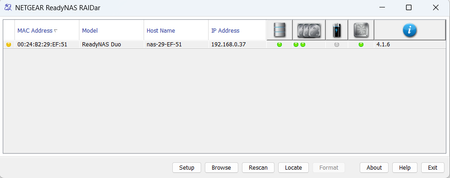
So the outcome of this is that I have set up the Netgear ReadyNAS in RAID 0 configuration with two new Seagate 2TB drives. It is a very old NAS, and apparently is also very slow, so I decided to put it to use as a scratch / temporary storage drive for unimportant and non essential files.
I have managed to update the ReadyNAS to the latest firmware, but given that SMB1 is not supported by default on Windows10 or Windows11 (which I use via parallels), and is also not supported on any recent MacOS version - this unit is not something I will spend much time using.
For the interim I have purchased a 2 bay WD drive with 2 x 4TB drives configured in RAID 1 while I research the whole NAS market in more detail. In time I will likely purchase a 4 bay QNAP / Netgear or similar.
Thanks to everyone who has replied here with what is superb information. Thank you.
ReflectingMe
Mar 15, 2024Aspirant
Yes, appreciate that Stephen. I meant I doubt I'll need to amend them regularly once they're set as I want them, so will revert that setting back to 3 until I need to refine the settings once more.
Also.. earlier I noticed that of the 2 disks, one green LED was on and the other green LED was flashing. Within the settings > Volumes - I noticed that 'Resync' was showing against this drive and I see now that the Volume Settings section, it says Resync 26% complete, then an estimated time before it finishes. Can I ask what is happening here Stephen, please?
I am not concerned, but curious. I thought when I ran the wizard to set X-RAID (which as I understand it, aggregates the drives into one drive) that would have been it, I guess not 🙂

StephenB
Mar 15, 2024Guru - Experienced User
ReflectingMe wrote:
I am not concerned, but curious. I thought when I ran the wizard to set X-RAID (which as I understand it, aggregates the drives into one drive) that would have been it, I guess not 🙂
After you set up the RAID mode (which turns into RAID-1 with a Duo), the NAS starts the mirroring process - which can take a while.
BTW, you want drives that are NOT SMR. WD Red Plus or Seagate Ironwolf are fine, but not WD Red. Also, most desktop drives in the 2-6 TB size range are SMR.
- ReflectingMeMar 15, 2024Aspirant
Sorry to ask... SMR...?
- StephenBMar 16, 2024Guru - Experienced User
ReflectingMe wrote:
Sorry to ask... SMR...?
Shingled Magnetic Recording.
With SMR, the tracks are spaced closer together than with conventional magnetic recording (CMR). As you might expect, this can make the drives cheaper if you can drop a platter. The result is when you write to track X, track X+1 gets erased. So if you want to write track X, the drive needs to
- read X+1
- write X
- read X+2
- write X+1
- ...
This "rippling" continues until you reach the end of a zone - where there is a track that is deliberately unused.
The drive attempts to compensate for the obvious write performance issue by having a large cache and a clever caching algorithm. But if you do sustained writes, you can overwhelm the cache - and when that happens, the write speed suddenly becomes glacially slow.
The only SMR drives that are marketed for NAS are the WD Reds. This is a result of a miscalculation on WDC's part - there were a lot of performance issues that showed up when they silently switched to SMR some years ago, and they needed to back-pedal. So they rebranded the CMR WD Reds as "Red Plus", and promised to disclose the use of SMR in all their drives on datasheets going forward. They do still sell the SMR WD Reds, but they've never introduced a new model (though they have introduced several new CMR drives in the WD Red Plus and WD Red Pro lines).
Although Seagate never marketed SMR models for NAS, they do use SMR in most of their consumer desktop drives in the 2-6 TB range. Seagate also agreed to disclose SMR as a result of the WDC debacle.
In any event, it is best to avoid SMR drives for NAS/RAID. 2 TB Ironwolf drives, and 2 TB Red Plus drives are both good options for your Duo. Enterprise-class drives would also work, but your Nas isn't fast enough to take advantage of them.
- ReflectingMeMar 16, 2024Aspirant
Thank you Stephen, for a superbly detailed reply, very much appreciated. I will look to purchase 2 of the drives you mentioned, probably the WD Red Plus.
Could you also please recommend an enclosure for the 2 x 4TB WD REDS I will then have...?
Thank you.
Related Content
NETGEAR Academy

Boost your skills with the Netgear Academy - Get trained, certified and stay ahead with the latest Netgear technology!
Join Us!
