NETGEAR is aware of a growing number of phone and online scams. To learn how to stay safe click here.
Forum Discussion

Zyberchief
Dec 16, 2015Aspirant
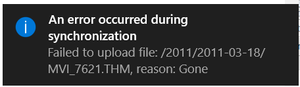
Ready NAS 202 "Failed to upload file", Reason: Gone
Hi there I have just installed a new ReadyNas 202, bacause I have had too much trouble with my STORA, and wanted a little more sterdy setup... but I must be doing something wrong, because it isn'...
- Dec 22, 2015
Hi Zyberchief,
Create a Windows TimeStamp backup job in your ReadyNAS and check this article on how to set your Windows drive as source path. Then select a local Share in your ReadyNAS as the backup destination.
Let me know if you have further question.
Kind regards,
BrianL
NETGEAR Community Team

BrianL2
Dec 22, 2015NETGEAR Employee Retired
Hi Zyberchief,
Create a Windows TimeStamp backup job in your ReadyNAS and check this article on how to set your Windows drive as source path. Then select a local Share in your ReadyNAS as the backup destination.
Let me know if you have further question.
Kind regards,
BrianL
NETGEAR Community Team
Related Content
NETGEAR Academy

Boost your skills with the Netgear Academy - Get trained, certified and stay ahead with the latest Netgear technology!
Join Us!
