NETGEAR is aware of a growing number of phone and online scams. To learn how to stay safe click here.
Installation & Upgrade
5105 Topics
Announcing a new project
Hi folks, I'm working on a new readynas related project. Let me start by saying I love these things. I have a bunch of Pro6 and RN516 particularly, but I've worked on lots of different models. I'm passionate about giving them a life, long after Netgear walked away and turned off the lights. The hardware has more to give. I've tried every series alternative OS that I know about. plain linux, TrueNAS, Unraid, OMV and others. They each have something that puts me off. No RAID, No ZFS, noisy fans, no LCD display, having to boot from USB, having to give over one or more precious bays for an OS disk, etc etc. With all the constraints around fixed BIOS (some models) and booting from flash, I want something that still operates a bit like an original Readynas. You turn it on. It boots from flash, starts an OS, and the fans and LCD aren't obviously missing. You dont need a keyboard or BIOS access to get the thing going. So, first, I've been working on creating a 'recipe' or set of instructions for installing plain-jane Debian 13 onto an x64 ReadyNAS box. I manually put GRUB on flash, and then slice my 6 disks thus:- Partition 1 - /boot - 2GB. /dev/md0 RAID1 mirror across 6 disks Partition 2 - swap - 2GB. /dev/md1 RAID10 across 6 disks (so swap = 6GB/more with more bays) Partition 3 - / - 8GB. /dev/md3 RAID10 across 6 disks (so root = 21GB/more with more bays) Partition 4 - rest of disk I then use ZFS to make a storage pool across the 6 disks /dev/sdX4. If you are interested in reviewing the rough notes for how to build a Debian 13 ReadyNAS, I can share them. But beware, blanking your flash is a one-way operation, unless you've taken an image - which is a fairly expert thing to do. All this is working fine. But I wanted the ReadyNAS experience. Quiet fans. LCD display. RAID rebuilds. Drive issue alerts via email. So, second, I started working on something else, a new project called RaidyNAS. A project to put back the missing ReadyNAS features. At the moment, I'm not covering users, shares, protocols etc. For that, I've simply installed OMV on top of Debian 13. But RaidyNAS is what I'm now developing. I'm looking to hear from interested parties who might like to contribute, or to test elements of it. I'm actually doing a bunch of testing from a Debian 13 live boot USB stick, in order to avoid blanking the flash on every single one of my NASs, just yet! So, if you're a bit of an expert with ReadyNAS hardware/OS, and like me, want something future proof, get in touch. If you're a decent coder and want to contribute, get in touch. Basically I'm at the early stages. I have an architecture framework, installer, start-up daemon, alerting, emails, hot plug detection, degrading detection alerts, auto rejoin upon re-presentaton of the same disc, guided partitioning and RAID rejoin for new drives, fan control, and LCD display (part complete). So far this has been tested on Pro6, with some elements in preparation for RN516 also (specific fan profile, LCD display, drive LEDs and front menu buttons). Other RN models can be added. I'm not looking to profit from this. At some point the code will be up on a public repo. So, thoughts, volunteers... go go go. Post below or direct message me. Cheersno update on RN 3312
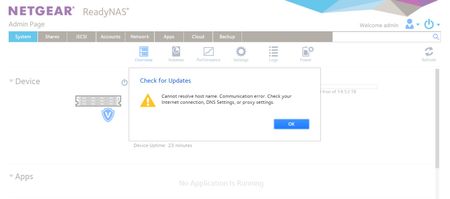
Hi all, I have a very old RN 3312 and can´t perform update (Error: "Hostname can´t resolved ..."). When I connect via SSH I could find ou, that connection to internet works fine (ping to several public servers in www). I could not understand this. Why doesn´t update works while internet is reachable? Thanks for your help Reinhard51Views0likes1CommentReady NAS 3312: Storage Space is not Showing correct
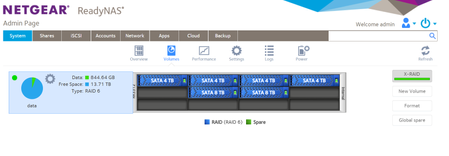
I have installed Ready NAS RS 3312 with storage space as 4TB HDD - 4 Nos. and 8TB HDD - 2 Nos. The system si showing RAID 6 and its showing storage 14.54 TB only. I am not able to figure out the problem behind this. Please help in solving this problem.OMV on Pro/Ultra series -- a project
For the Pro and Ultra series units with their limited RAM and processors, I think Open Media Vault (OMV) is the best option for an alternate OS. I'm looking at how to install it without needing the serial console, if possible. Most importantly, I want it to boot without having to hold the reset button to boot from USB. It won't be an "OMV on ReadyNAS for Dummies" exactly, but I hope will be for those with a minimum amount of Linux experience -- as close to a "cookbook" as possible. And I think the need for the console may scare away a lot of users, which is why I'd like to avoid it. I'm posting here to see if anyone has explored any aspects of my plan to make it easier for me to find an answer or realize what I want to do just won't work and stop wasting my time. So, if you're more of a Linux guru than I and would like to help, please reply. Though I know a lot WRT the Linux command line, I've never done an install other than the normal interactive one on a unit or VM with a display. My research says that the only way to have this drive/partition configuration in OMV is to install from an existing Debian instance. Otherwise, OMV expects a dedicated OS drive (which the flash is too small for). And it's also how to install OMV via SSH. So here is my thought: Using GRUB as the boot loader, install Debian with GRUB itself on the internal flash but /boot, / (root), swap, and /data on the drives in RAID. Specifically, I know GRUB can support MDADM RAID and I would make /boot and / EXT4 on MDADM RAID and /data as BTRFS on MDADM RAID, partly duplicating the ReadyNASOS partitioning scheme. / would obviously need to be bigger. /boot, /, and swap would be RAID0 with all drives included and /data would be a RAID type appropriate to the number of drives and desired redundancy. I believe that FAI (Fully Automated Installation) (see https://fai-project.org/FAIme/#) can be used to install Debian with that configuration without any interaction from the user and then OMV can be installed from that Debian instance via SSH. So, no console needed. FAI can definitely be configured to install Debian on MDADM RAID and EXT4 or BTRFS via a disk_config file. It's unclear to me right now if I need to add any GRUB commands to do so. FAI also allows you to install additional packages, so I believe openssh-server can be installed that way to allow SSH access without interaction. My plan is to try this first on a VM, maybe in steps (do an interactive install to the desired configuration before trying to do it with FAI). That won't be definitive because there is no real flash memory, but it will let me debug any major Oopses without bricking a real NAS. Then, I have several NAS on which I can try it, so long as I verify a USB recovery can go back to ReadyNASOS. This should also be able to serve as at least a starting point for other Intel based models -- maybe it can be made to work on all. While there is a lot more to do for it, it could even act as a starting point for some ARMHF based units (probably just 200 series, not 100). But I'm not the guy for ARM-based units. While I don't believe the current OMV works on ARMHF, some older ones do.179Views1like6CommentsAnnouncing a new project..
Hi folks, I'm working on a new readynas related project. Let me start by saying I love these things. I have a bunch of Pro6 and RN516 particularly, but I've worked on lots of different models. I'm passionate about giving them a life, long after Netgear walked away and turned off the lights. The hardware has more to give. I've tried every series alternative OS that I know about. plain linux, TrueNAS, Unraid, OMV and others. They each have something that puts me off. No RAID, No ZFS, noisy fans, no LCD display, having to boot from USB, having to give over one or more precious bays for an OS disk, etc etc. With all the constraints around fixed BIOS (some models) and booting from flash, I want something that still operates a bit like an original Readynas. You turn it on. It boots from flash, starts an OS, and the fans and LCD aren't obviously missing. You dont need a keyboard or BIOS access to get the thing going. So, first, I've been working on creating a 'recipe' or set of instructions for installing plain-jane Debian 13 onto an x64 ReadyNAS box. I manually put GRUB on flash, and then slice my 6 disks thus:- Partition 1 - /boot - 2GB. /dev/md0 RAID1 mirror across 6 disks Partition 2 - swap - 2GB. /dev/md1 RAID10 across 6 disks (so swap = 6GB/more with more bays) Partition 3 - / - 8GB. /dev/md3 RAID10 across 6 disks (so root = 21GB/more with more bays) Partition 4 - rest of disk I then use ZFS to make a storage pool across the 6 disks /dev/sdX4. If you are interested in reviewing the rough notes for how to build a Debian 13 ReadyNAS, I can share them. But beware, blanking your flash is a one-way operation, unless you've taken an image - which is a fairly expert thing to do.How to boot a Debian Live environment with active SSH on a ReadyNAS with no display or console
During my research for my project on installing OMV on an Intel-based ReadyNAS without the need for a console connection, I discovered GRML, which can serve as a Debian Live boot with SSH access on amd64 machines, including many ReadyNAS (legacy and newer) -- so no console connection needed. This may be helpful for anyone with a really messed up OS or boot flash but no easy way to mount the drives outside the NAS to do a recovery or for those looking to install a different OS. It only takes a couple very simple mods to make it work. I'm going to assume here that you are using a Windows machine to prep the USB. If you have Linux, how to create the USB is covered on the GRML web site and you can figure out how to make the mods. If you are using a Mac -- sorry, I don't speak Mac. You start by downloading the GRML ISO from grml.org Next, use RUFUS to create a bootable USB from that ISO. Use ISO mode to do so when prompted, not dd mode. The USB has to meet the same requirements as a ReadyNAS recovery USB: USB2 and <=32MB. As with a recovery USB, the legacy machines can be picky. Smaller and older is usually best. There are two simple changes you have to make: At top level on the USB drive, create a zero-length file named NTGR_USBBOOT_INFO.txt. Right-click in the USB top-level window and select "New> Text Document", then re-name it. In the \boot\grub folder, edit grml-full-amd64_default.cfg adding the ssh option at the end of the fourth line as shown below. Note that this must be all on one line. You should use an editor that can save a Linux-compatible file (LF instead of CRLF as EoL) such as Notepad++. linux /boot/grmlfullamd64/vmlinuz apm=power-off boot=live live-media-path=/live/grml-full-amd64/ bootid=grmlfullamd64202604 "${loopback}" ${kernelopts} nomce ssh=password This turns on SSH and sets the root and grml users' SSH passwords to password (or you can choose your own). Now you just insert it in the front USB port and boot. Depending on your unit and BIOS version, you may need to hold the backup button while it boots. It's loading via USB2, so give it a couple minutes and then SSH in. It should have the same IP address as it did running the native software unless it hasn't been booted in a very long time. If that's the case or the address you thought it had doesn't work, use device name grml or search the network. I did this on an OS6 sandbox system where I scanned and mounted the MDADM RAIDs (mdadm --assemble --scan) and then mounted the BTRFS file system for /data (which was actually data-0, as reported by the MDADM scan). If you have an expanded system, so also have a data-1, data-2, etc., you should only mount data-0. BTRFS will see and link the others in. Of course, if your main partition isn't /data, use the name you set. I believe it also supports LVM, so can work with OS 4.2.x systems, but I haven't done so. It may even work with OS4.1.x (SPARC) drives in an Intel unit -- I think it should. I also did a dd backup of the boot flash in case USB recovery doesn't work for some reason while I mess with alternate OSes. If you plan to put it on the same USB drive as the GRML boot, you have to re-mount the USB drive as read/write. I leave that for the student to research. Sorry, non-Intel-based ReadyNAS users. GRML only supports amd64 and arm6, not arm5 that the ReadyNAS use and definitely no SPARC. If you really want to try this on a 32-bit Intel unit like an NVX, there are old releases that support that, but I've not tried them.342Views0likes10CommentsLinks to instructions for installing TrueNAS with front panel display capability on some ReadyNAS
For those looking to install an alternate OS on their RN42x, 52x, or 62x unit, here is a link to some very good instructions on installing TrueNAS Scale: https://www.reddit.com/r/truenas/comments/1ozklya/truenas_installation_on_readynas_426_a_stepbystep/ Though it's included in that post, here is the link to a project that makes the front display useful in TrueNAS Scale: https://github.com/riplatt/truenas-rn426-panel Given it requires no special Kernel and TrueNAS Scale is Debian based, I suspect that the display project can be used as the basis for doing the same under other Linux OS's (at least Debian-based ones). I take no credit other than finding this and have not done the install myself, so cannot help you if you need it. Personally, I'm looking at OMV.Xpenology - ReadyNAS 628X
Hello! Since the ReadyNAS is no longer supported, has anyone installed Xpenology on a 628x? If so, are there any documented instructions or videos that you followed? I currently also have a Synology and am familiar with the GUI and like it, so putting Xpenology on my ReadyNAS seems logical to me. Any guidance would be appreciated. Thanks!388Views0likes14CommentsReady Nas 3312 not showing Internet
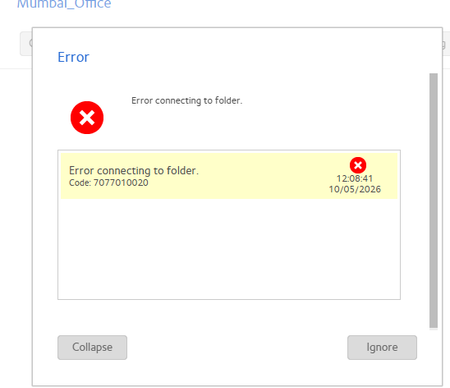
I have installed Ready Nas 3312 and its connected with internet using LAN but its showing error while updating as given below: All other devices conneted with the same switch are getting internet availability. If the same cable connected with ready nas is connected with other devices, the internet is functional. Please help to resolve this issue.