NETGEAR is aware of a growing number of phone and online scams. To learn how to stay safe click here.
M6100
2 Topics
Netgear M6100 backup port feature?
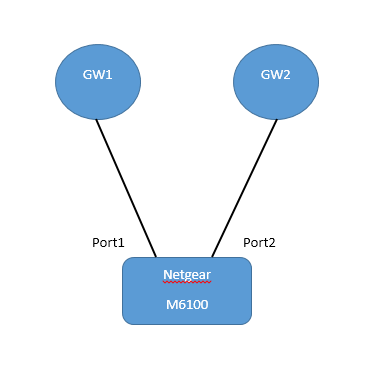
Hi guys. This is my first time writing in this forum, so please excuse me if I'm writing this at the wrong place. Anyway, my client has a Netgear M6100 chasis with a 24x10G blade attached. Right now, it is connected to two different routers, GW1 and GW2 as illustrated in the following image: What I want to do is, something like this: GW1 is the primary gateway while GW2 is the backup one. Since I just need to check for physical connections between the switch and the routers (they're directly connected), I want Port2 to be disabled while Port1 is connected is active. Only when Port1 somehow become disconnected will Port2 become active. Is there any way to do this automatically, using features available in the OS? I tried searching for "backup port feature" or some such name but found nothing so far.. :mansad: Thank you for your help.3.3KViews0likes6CommentsM6100 Gbic 10GBase BiDi
Hi, We have two M6100 Switches connected via a single-mode fibre cable. Is there a gbic available with 10GBase Bidi functionality to use both fibres with rx and tx traffic to double up the speed? Or should i take a third-party-module? Kind regards, Alex736Views0likes1Comment