NETGEAR is aware of a growing number of phone and online scams. To learn how to stay safe click here.
Readyshare
37 Topics
ReadyShare SMB1 Error
Connecting a USB Storage to my router I get the following error when I try to connect. I updated to the latest firmware, but that had no effect. Any ideas? System error 384 has occurred. You can't connect to the file share because it's not secure. This share requires the obsolete SMB1 protocol, which is unsafe and could expose your system to attack. Your system requires SMB2 or higher. For more info on resolving this issue, see: https://go.microsoft.com/fwlink/?linkid=852747SolvedPassword READYSHARE differente
Buongiorno Ho da poco installato una piccola rete domestica, utilizzando il mio D6220 per condividere una chiavetta USB con dei documenti. Al momento la password che si può inserire è solo quella di amministrazione del modem. Però a questo punto un ospite, potrebbe accedere al modem e cambiare i settaggi! Suggerisco di inserire la possibilità di usare una password differente per READYSHARE, quindi non la stessa del modem. Spero prendiate in considerazione questo suggerimento!17KViews2likes1Commentreadyshare mount error(13): Permission denied
I'm using Linux Mint 18.1 Mate. This WAS working. Used: sudo mount -t cifs //###.###.###.###/USB_storage /media/public -o sec=ntlm Prompted for password and I'm in. That's NOT WORKING anymore. Nothing I've tried seems to work. I'm NOT using Windows, connecting to ANYTHING Windows. This is STRICTLY a LINUX problem. I CAN connect directly to the USB drive. In, plain english (please), what can I do to troubleshoot this and fix it? ThanxSolved11KViews0likes6CommentsReadyshare OR NOT / configure thru OS vs the App
I would like to be able to have the choice between installing readyshare or configure the feature directly thru the OS! I hate to have to install useless programs witch can be dealt with the OS. A 17y/o SMC modem router is better equipeted than a shinny R8500. What do you think about it?11KViews0likes0CommentsReadySHARE USB Printer for macos High Sierra - Installation Is Incomplete
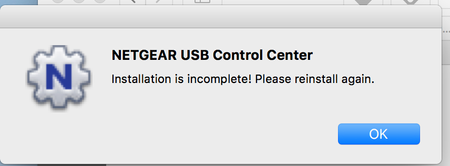
Hi, I am having trouble installing the ReadyShare USB Printer (ReadySHARE USB Printer MAC_V2.36) on macOS High Sierra. Whenever the installation completes and the machines reboots, Netgear USB Control Center is giving the following error message " Installation is incomplete! Please reinstall again. " How do i fix this? Or is the software incompatible with High Sierra? Kindly advice. Thanks, DarrenSolvedReadyShare vault doesn't recognise USB drive
I've bought a new R7000 and hooked up a Samsung M3 (2TB) USB drive. The router recognises the drive perfectly and works fine for accessing files through e.g. Windows Explorer. But, Ready Share Vault does not recognise my backup drive and says "No ReadySHARE device detected". I've also tried another Samsung drive (1TB), but it also wasn't recognised. After reading all related posts, I'm unable to get the drive recognised. Please help.Solved9.4KViews0likes6Comments
r7000 readyshare when used as access point
Note that the R7000 ac1900 doesn't show in the product list - somebody in NetGear please fix this. Comcast just upgraded my cable modem to one that includes a router, so I have to "demote" my previous main router, and R7000 to access point status. I've done this by setting a fixed IP address, and connecting it to the new main router via an ethernet cable to one of the LAN ports on the R7000. Now when I fire up Netgear Genie, and pick readyshare, I'm told my router doesn't support readyshare. Clearly nonsense - worked fine before. I have to specify the IP manually. Is Genie still going to 192.168.1.1 even though I specify 192.168.1.222? That seems likely. How do I get readhshare working again - it's my son's only backup for his laptop. Also the readyshare drive no longer appears in my win 10 "My computer" listings.Solved6.6KViews0likes4CommentsUSB attached storage with WNDR4500
I have a Netgear WNDR4500 that has two USB ports on the back for USB attached storage or printers. I have a new Seagate Expansion external USB hard drive I'd like to use with it to create network attached storage. I've formatted the drive (I'm on MacOS Sierra) but when I plug it in the USB light on the front doesn't turn on and I can't see the drive from the computer. Is there some trick to this I need to know? The documentation on this seems rather thin.Solved
problem with netgear R6100 ReadyShare with WD My Book 2TB to Sony TV and PS3
I have recently upgraded my Router from a lynksis wirless N router to a Netgear Wireless AC 1200 (R6100). With it I purchased a WD My Book 2 TB HDD for use as a NAS Device. Everything was working fine until about a week ago I had some trouble uploading a file from my Win10 PC to the drive via the network. Afterwords I could not access the drive from any of my families 3 windos PC's (Win 7SP2, 8.1, and 10). I could still acces the drive via DLNA through my Sony Bravia and my PS3. I did a power cycle of my modem and router and from then on I could access the drive from my computers but not through the Sony TV or PS3. I have removed the corrupted file from the drive, as well as the previous upload (law and order season 20). I have cycled the power on my WD Drive as well as edited all of the network settings through the netgear genie, the TV and the PS3. I have not reformated the drive since I don't have the space on my computer for all of the files (1.6TB worth of files, 500GB free space on my PC). Any help would be apreciated. *Netgear StreamPro AC1200 ---Model No. R6100 ---Router Firmware Version V1.0.0.60 *Sony Bravia TV ---Model No. XBR-65x850B ---Software Version PKG2.303AAA *Western Digital My Book 2TB External HDD ---Model No. WDBF JK0020HBK-NESNSolvedPrinting using Netgear ReadySHARE Printer function is not working.
Hi, Printing using Netgear ReadySHARE Printer function is not working. Router firmware is the latest: V1.0.1.12_1.0.11 My printer is a HP LaserJet 1020 USB printer, connected properly. In Netgear USB Control Center (Software Version 1.36, Driver Version 1.83.35) it shows the printer is connected to R6400. When I inititate printing from PC, the printer starts to roll rollers for about 3-4 seconds and stops without feeding in the sheet. On PC in printer properties / printer status first shows Printing and after cca 30 seconds goes to: Error - printing. After deleting the queued document, and try to print again, I get Error printing on HP LaserJet without printer roller activity. Roller rolls only first attempt after the printer is powered on. If I connect the printer trough USB to my PC, the printing is working properly. Please suggest solution, or how to troubleshoot this. Thanks, mloriSolved5.8KViews0likes3Comments