NETGEAR is aware of a growing number of phone and online scams. To learn how to stay safe click here.
Unmanaged
24 TopicsGS308EP sends management traffic outside configured Management VLAN
Hello, I would like to report a possible VLAN isolation issue with my GS308EP. Environment Device: NETGEAR GS308EP Firmware: V2.0.0.11 (latest as of writing) Configuration: The uplink port is configured as an IEEE 802.1Q trunk. Management VLAN is configured as VLAN 8. Management IP address is 192.168.8.18. The uplink is connected to a Linux router with multiple 802.1Q VLAN interfaces. The VLAN interfaces share the physical NIC's MAC address, which is the default behavior of Linux VLAN interfaces. The router also has arp_ignore=1 and arp_announce=2 configured to prevent ARP flux-related issues. Observed behavior Although the management VLAN is configured as VLAN 8, the GS308EP sends management-related traffic on VLANs other than VLAN 8. For example, packet captures show the switch sending ARP requests on multiple VLANs: VLAN 19: ARP Request: who-has 192.168.8.1 tell 192.168.8.18 Sender MAC: 28:94:01:XX:XX:XX The same ARP request appears to be sent on the VLANs configured on the GS308EP, in ascending VLAN ID order. In addition, management traffic generated by the switch, such as NTP, DNS, and UPnP/SSDP traffic, is observed on non-management VLANs. Expected behavior I would expect: - Management traffic generated by the GS308EP to be sent only through the configured Management VLAN. - ARP, NTP, DNS, UPnP/SSDP, and other management-plane traffic to use VLAN 8 only. - No traffic sourced from the management IP address (192.168.8.18) to appear on other VLANs. I can provide packet captures if needed. Thank you.297Views2likes12Comments
Network switch selection for VLAN design
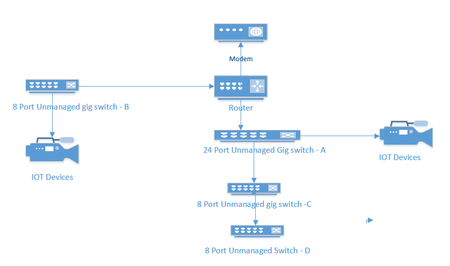
I currently have an unmanaged network consisting of a 24 port switch, 3 - 8 port switches, a Netgear RS series router and a cable company supplied modem. Several IOT devices reside on this network, and I would like to redesign to include managed switches to facilitate the use of VLANS to segment my IOT and streaming devices. A rough picture of the current design is below. My Questions. Should I consider replacing Switches A and B with new managed switches or can I get away with replacing the 8 port Port switch at B and put a new 4 port switch between the IOT devices and my main 24 port switch. ( and no, because of location and wiring constraints switch B must also connect to router. For the purpose of establishing simple VLANs for IOT, would the GS 3xxseries (GS 308E and GS305E) easy smart managed switches from Netgear work?561Views0likes26CommentsGS605AV replacement
My old GS605AV switch worked great as a simple Home Theater and network switch until yesterday. Now it will not power up. According to the GA605AV installation guide the GS605AV would “optimize audio/video streaming prioritization if it can recognize the pattern … otherwise you can use port based QoS to manually configure priority… .” Port 5 was highest priority and Port 1 the lowest. Considering getting a GS105 but what would be the best 5-port replacement for this situation?Solved593Views0likes5CommentsPort 1 causing switch to not communicate?
Ok so I recently got better internet at my house and now actually trying to hook up connections using a switch. I can plug directly into my router and things are fine. I plug switch in and connect to switch and nothing. I have rebooted everything a few times and no luck. I did get the switch used and was told port 1 doesn't work. No worries don't need all 24 ports. However port 1 light is orange 10/100 even with nothing plugged into it. And one of the reboots I decided to plugged my laptop into port 3 right next to it and port 1 didn't light up and my laptop worked. So, it is like that single port that is saying it is on at 10/100 with nothing plugged into is screwing up the passing of traffic. My laptop and uplink is green - 1G connect. Any advice? At this point I think I bought a paperweight. I did look at the port and physically the port looks fine.164Views0likes3Comments