NETGEAR is aware of a growing number of phone and online scams. To learn how to stay safe click here.
Unmanaged
24 Topics
No internet after switch is plugged in
I have a GS305v3 unmanaged switch that I just bought and attempted to use. It is connected to my internet via cat6 cable that I ran from my office in my house where my router/modem is located, to my bedroom. When I connect any device to the ethernet port that I put in the bedroom, I have no issues connecting to the internet. But if I plug the switch into the port, then any device to the switch, no internet is passing through. All lights on the switch illuminate as they should according to the manual, but I can't seem to find any info as to what the problem possibly is. For a clear picture of how all the hardware is set up: Fiber internet direct to router/modem in office Cat6 cable to ethernet port in office Cat6 cable from office ethernet port to bedroom ethernet port through the attic Any device connected directly to ethernet port in bedroom works perfectly with 1000mbps+ download Switch plugged direct to ethernet port, devices plugged into switch, no internet to any devices Any advice would be greatly appreciated and thank you in advance to anyone who offers advice.1.6KViews0likes17CommentsNetgear XS508M/Router GT-BE98 Pro Slow with one Intel NUC
Hello. I have the switcher XS508M its LAN Port 1 is connected to the Lan Port 10G port of my router GT-BE98 Pro, and the NUC is connected to LAN Port 2 of the XS508M in other words, in switch XS508M the LAN port 1the router 10G lan Port of my router and in the XS508M LAN port 2 the NUC, when I use fast.com via I have speeds of 400 mbps around, and if I connect directly the NUC to the router to Port 10G, skipping totally the switch I have speeds of 600-900 mbps totally much better. Why if is supposed the XS508M supports 10G ports I have such speeds when browsing or in transfers? As this other similar devices. For example in one MYQ Garage opener if I connect to the Switch simply is not recognized I need to plug directly to the router to work. But mainly what I would ike to know is why the speed issue or how can I fix or configure in any place something to improve this? Or why happens this?799Views0likes20CommentsGS605AV replacement
My old GS605AV switch worked great as a simple Home Theater and network switch until yesterday. Now it will not power up. According to the GA605AV installation guide the GS605AV would “optimize audio/video streaming prioritization if it can recognize the pattern … otherwise you can use port based QoS to manually configure priority… .” Port 5 was highest priority and Port 1 the lowest. Considering getting a GS105 but what would be the best 5-port replacement for this situation?Solved500Views0likes5CommentsGS324 stopped working, wrong port LEDs illuminated
There was a power outage this afternoon. Once the power came back on, my devices could not connect. After checking every component, I realized the GS324 was the point of failure. At first glance, everything seemed fine: The PWR LED was green and the various ports were lit up. Upon further inspection, however, I noticed that the LED ports were off, shifted one row to the left. I tried a simple setup to validate: 1) A direct connection from the server to the laptop worked well. 2) An indirect connection from the server to port 6 and the laptop to port 10 did not work. The GS324 shows that the PWR and LEDs 4 and 8 are illuminated. Powering off did not work. The device is about 30 months old. Any suggestions?500Views0likes8CommentsNetwork switch selection for VLAN design
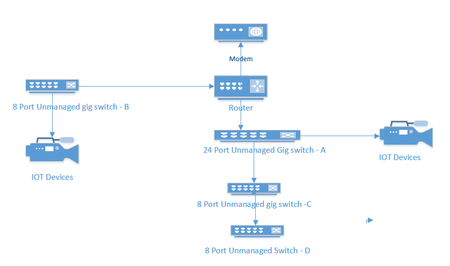
I currently have an unmanaged network consisting of a 24 port switch, 3 - 8 port switches, a Netgear RS series router and a cable company supplied modem. Several IOT devices reside on this network, and I would like to redesign to include managed switches to facilitate the use of VLANS to segment my IOT and streaming devices. A rough picture of the current design is below. My Questions. Should I consider replacing Switches A and B with new managed switches or can I get away with replacing the 8 port Port switch at B and put a new 4 port switch between the IOT devices and my main 24 port switch. ( and no, because of location and wiring constraints switch B must also connect to router. For the purpose of establishing simple VLANs for IOT, would the GS 3xxseries (GS 308E and GS305E) easy smart managed switches from Netgear work?498Views0likes26CommentsXS505m will not start with DAC cable inserted
When I have a DAC cable linking my XS505m with my ubiquiti switch, it does not boot. All the lights go solid and it doesn't do anything. The workaround is you unplug the cable, start the switch, then insert it, then it works fine. Is there a supported DAC cable I can buy? I've tried 3 different ones. (though 2 might be a rebranding of the same 10gtek one). The one I have claims netgear support.Solved400Views0likes5CommentsXS508M Crashed. No Longer Have Any Confidence in This Device
My XS508M stopped working whilst I was away for work which is when I need my office network working reliably so caused me a lot of issues. Basically I use this as my main switch. My WAN router and my NAS (which hosts a number of key services) connect to it. All other switches, servers and clients are off that switch, so the loss of that switch meant all other LAN traffic stopped, as well as no incoming internet traffic which was what knackered me. When I returned and started my investigation, I was careful not to do anything that might lose the root cause so I fired up a laptop (no DHCP), set a static IP and then tried to connect to different appliances/devices. It was clear the XS508M was dead, anything connected to it was down and as it is unmanaged, nothing else I could do but unplugging/reconnected the AC lead, which immediately resulted in the entire LAN coming back to life and being contactable from the WAN once more. Since it is unmanaged I obviously cannot get any logs, cannot upgrade/downgrade the FW, what else can I do to determine the cause? Has anyone has this with a XS508M? Is this an unreliable switch? If it is not totally reliable, I will need to replace it, what a waste of money. What else should I use?399Views1like7CommentsNetgear GS316P - Switch - unmanaged - 16 x 10/100/1000
Hello community friends, I’m looking for a 12-port switch for home use. Could you please let me know whether such a switch can be installed in a 12-inch rack, and what accessories I would need for that? It’s a simple question, but I’m sure you can help me out with it. The background is: I’m searching for an affordable switch that supports PoE+. If you know of another product I haven’t come across yet, feel free to mention it — I haven’t made a purchase yet. Thanks300Views0likes3CommentsNew GS305 Switch - no power light after 15 minutes of use
Bought a new GS305 unmanaged switch from Amazon. Plugged it in today - it had power light and 1 device connected (besides the cable to the internet router). All CAT6 cables. It was working good for about 15 minutes before it suddenly lost connection. Now, the switch will not turn on, no activity, and importantly no power light is on. Tried to reconnect it to different power sources directly and also with different surge protectors, but the switch will still not turn on. All other devices that are pulling power from the same power sources are working fine. Is this a bad switch? A bad power supply (the one that came with the switch)? Something else? Is this a common occurrence to receive hardware that fails within 15 minutes of opening the box? Any help would be appreciated.299Views0likes2Comments