NETGEAR is aware of a growing number of phone and online scams. To learn how to stay safe click here.
proav over ip
11 Topics
VLAN Routing - AES67 and Dante
Hi, I have two VLANS set up on a system with 16 switches. I am using the Video with AES67 Audio profile for my main VLAN VLAN 95). This VLAN has all of the Crestron control and NVX devices on it as well as the control side of the Symetrix DSP units. I also have a Dante Audio VLAN (VLAN 201) which has all of the Dante ports of the Symetrix DSP units as well as the Dante peripherals like Bluetooth devices and Dante XLR io devices. I need to be able to route the AES67 audio from several of the NVX devices to the Symetrix Dante units. How do I enable VLAN routing so those NVX devices can stream AES76 audio to the Symetrix audio processors? Attached are some screen shots of the switch configuration... Thanks, David10Views1like1CommentM4250-26G4F-PoE++ - No opening browser nor AV UI - only USB Connection
Hi ! Any Netgear Specialist who could help us? We could just get access once to this switch . It has a qscsystems pass and we wanted to change the pass. It is an M4250-26G4F-PoE++ . This switch had 13.0.2.21 Firmware version and AV UI version 1.0.6.6 We did a Factory Reset by browser and then was impossible to get into the switch. We tried to access by USB by putty because we have ping but not browser neither AV UI. But with no exit What should it be the procedure to have access and see the browser and the AV UI again?235Views0likes4CommentsCan't find switch after reset
Hi, I have 3 Netgear AV Switches and I have reset all 3 with the reset button on the front. I have found 2 via the OOB socket on 192.168.0.239 and re-configured them but the third can't not be found on the 239 address or via a search with the Netgear Discovery tool either plugged into the OOB socket or Port 1. To confirm I only have my computer plugged directly into the switch and I have set the computer to a static IP of 192.168.0.201 and a gateway of 192.168.0.1 and I can't find the switch either via the OOB Port or Port 1. It is the same cable I used to find the other 2 switches. FrankSolved237Views0likes1CommentPort Description with the VLAN ID
As of writing (7.5.2026) it seems that Engage is over writing the Port Description with the VLAN ID and profile name (VID:10,Livewire+). Kind of handy when you want to know which AV profile is in use in which port, but I still miss the opportunity to name fixed install devices. Anyway to combine these? Like "VID:10,This is my custom text".132Views1like0CommentsNo Sales service in Switzerland ?
Hi Netgear has no before sales support for AV products in Switzerland ?? Their phone number is out of service, the email doesn't give any answer ([email protected]) and their sales email just get an automated email in german stating to call them.... Vincèn234Views0likes2CommentsM4250 Switches Power Outages and UPSs
Hello, I am working in a new theatre that was setup in some interesting ways. We are currently working our way back through the system and altering things to follow better practices. As it is a new building we are still dealing with power shutdowns as new equipment is installed/changed. Everytime there is an outage it feels like something new breaks. We have UPSs that our "critical" devices are (sometimes) attached to. This includes our network switches. But the batteries can only supply power for ~40 minutes at current load. Our UPSs have an expansion slot that we can add an SNMP network card into. Is it possible for our network switches to monitor for outages and power off nicely? Is there such a thing as shutting down the switches nicely? What is the best practice for shutting down a NetgearAV switch? Another thing that causes outages for us is the fire alarm. We are required by the fire marshal to shutdown our whole system as soon as the fire alarm goes off. So currently everything loses power (except the UPSs which I think goes against the fire code... like I said... interesting setup) and I am trying to find better ways to manage shutting down the PA system but keeping critical equipment online long enough to shut down correctly before powering down entirely. We've had some false alarms from a poorly placed smoke detector in a catering kitchen and I would love to have a system that can shutdown according to code but do so nicely in case it is a false alarm. I've had a bad experience with shutting down the M4250 switches. Early on when we opened we had a switch catch on fire after flipping the power switch to reboot it (following instructions from the installer) I want to prevent having this happen again. I'm just interested in how people manage outages and turning equipment on and off.169Views0likes0CommentsPC sending NDI to another PC...what QOS ?
We have a PC1 sending video using NDI app to Another PC2(receiver). PC1 is on Port 10, PC2, is on port 20. We assigned Port 10 to Queue 5, but we have no idea if this is even working or if we need to modify more things ? We have a M4300 series switch What should the Global Trust Mode setting be? Trust dot1p or IP-DSCP? Do we modify anything in 802.1p to Queue Mapping 802.1p Priority for such a setting? Do we modify anything in IP DSCP to Queue Mapping ? Lastly how can we verify if the settings are working correctly?427Views0likes3CommentsIssue configuring VLANS
Hi, I am attaching a M4250 switch to a corporate network and am assigned the IP address rage of 172.30.0.1 to 172.30.254.254. There is a DHCP server that uses the 172.30.0.1 to 172.30.0.254. The rest of the IP addresses are available for me to use as static IPs I would like to have 3 VLANS - control, Crestron NVX, and Dante. When I setup the Crestron NVX using 172.30.30.X with DHCP for 8 of the ports I receive the message "VLAN IP address and Default Router must be in the same subnet." I set the VLAN IP as 172.30.30.1 and the DHCP range to 172.30.30.100 to 120. I tried several different variations but still seem to generate this same error. Why do I keep getting the "VLAN IP address and Default Router must be in the same subnet." error message? Any advice on what IP scheme to use to work with the 172.30.0.x network? Thanks, David610Views0likes2CommentsM4300/M4250 - Keeping multicast on switch
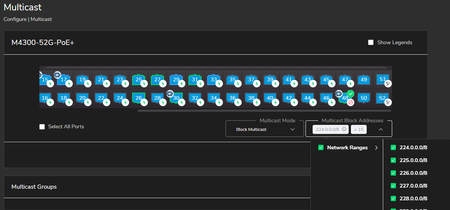
I have several M4300 / M4250 switches set up for a customer with various Crestron NVX implementations, all of which is working well. We have a very basic connection to the customer's existing network by simply connecting a standard gigabit port on the M4300/4250 (port 48) to one of their switches, used only for remote access and diagnostics. We are not directly trunked to their switches or stacks, in effect we appear as a simple unmanaged switch to their equipment (BPDU filter, disabling STP on that port - I know, I know, not good things to do, and will ultimately be resolved properly). We want to make sure multicast does not leave our dedicated M4300/4250 switch, and block all multicast traffic from leaving (or entering) port 48. In effect, I want to make sure all multicast is blocked inbound and outbound on that single switch port, but allow other TCP/IP traffic for remote diagnostics, etc. I've tried using the Configure>Multicast -> Block Multicast method in the AV GUI webpage: But I still see multicast traffic entering and leaving the switch on port 48: Does anyone have any suggestion on ensuring that all multicast traffic (even if it's by IP/range) stays on the switch and does not traverse my "uplink" port 48? Thanks Jay754Views0likes1Comment