NETGEAR is aware of a growing number of phone and online scams. To learn how to stay safe click here.
Forum Discussion

presidentskroob
Jul 18, 2018Tutor
RBR50 experiencing slow wired connection and frequent router reboots
I purchased the RBR50 some months ago, and I've recently begun to see two significant issues, one that I think people have quite a bit of experience with (frequent router reboots, even on the latest firmware 2.1.4.16), but another that I haven't seen on here.
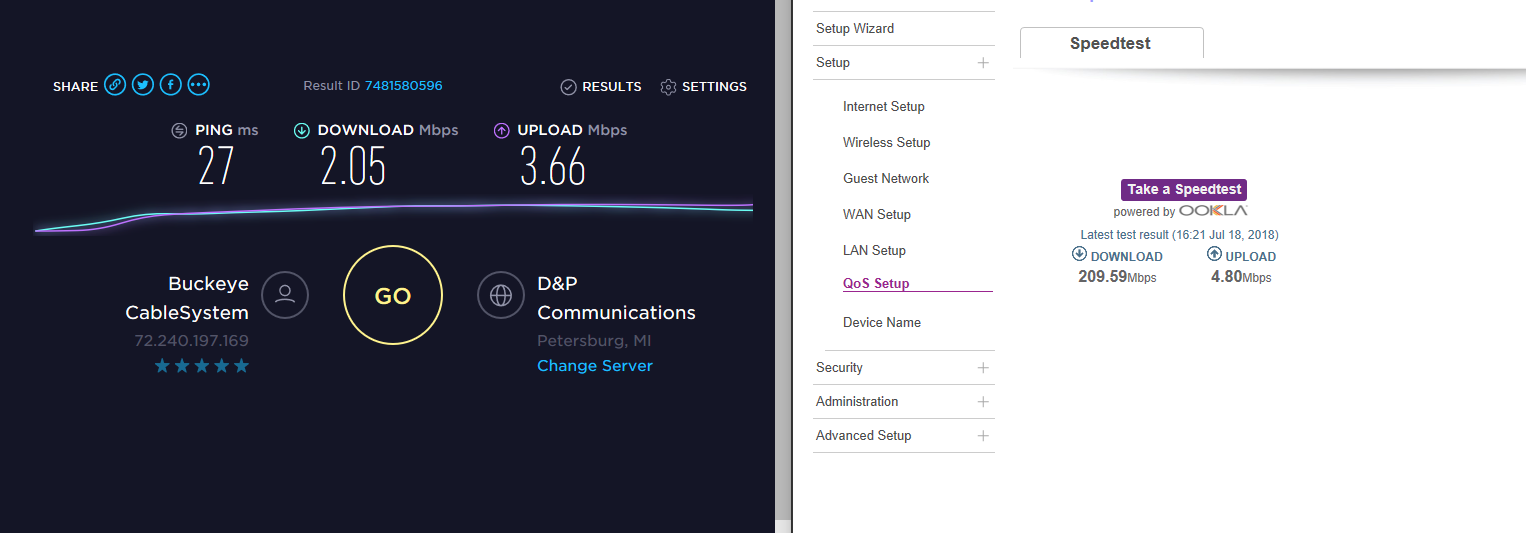
Essentially, I have a 200mbps connection from my ISP, and that comes through a modem/router supplied by them that is in bridge mode and through to the Orbi router. The speedtest on the router interface shows that expected 200mbps.
However, generally on my PC, which is wired into the main router, I will generally see speeds of only 5mbps. If I restart my computer or if I disconnect and reconnect my ethernet adapter, I will get 200mbps speeds for a time, and then (I have not determined the trigger) later I will be down at 5mbps again.
It doesn't appear like the Orbi has a bandwidth limiter, and I'm definitely still seeing normal wireless connections, but just this wired connection keeps slipping down to 5mbps and requiring a refresh. Any idea what would cause this? It seems like for the time being we have to live with the disconnects, but at least I'd like to get my full speeds when the thing is online...
9 Replies
- FURRYe38Guru - Experienced User
Is the PC the only wired device to experience this?
Try a different wired PC to see if problem follows?
Was a full power cycle of the Orbi system performed after the FW was updated?
- I started a series of bandwidth tests over time using a simple online app at testmy.net on the two computers in my office, which are the only machines using wired connections in the house. For about an hour the connection stayed fairly stable, but then the Orbi had a disconnect and reconnect, and since then the speeds on both computers have been poor, around 2-5mbps. I just power cycled the router a moment ago, and interestingly enough the slow speeds remained.
- FURRYe38Guru - Experienced User
Are these the only devices connected to the orbi?
Whats the Mfr and model# of the ISP modem the Orbi is connected too?
I would do a Factory erase and set up from scratch. I would first set up the router, dont' enable the speedtest app on the router. Just set it up and run a couple of tests from the PCs first...
- These are the only two wired devices, but there are about twenty other devices on the network, mostly IoT stuff but also our work laptops and various other things connected to either the router or one of the two satellites. The ISP modem I do not believe is related, as it's been happening with two different ISP modems. That was the first thing I expected to be the culprit, and I was due for a modem swap due to upgrading to the 200mbps plan about a month ago. After swapping the modem, though, the same problem persists.
- FURRYe38Guru - Experienced User
Whats the Mfr and model# of the ISP modem the Orbi is connected too?
I would do a Factory erase and set up from scratch. I would first set up the router, dont' enable the speedtest app on the router. Just set it up and run a couple of tests from the PCs first...
- I had been putting off the factory reset for a while, but the router somehow reset itself two nights ago and I had to set it up from scratch. The issue still persists. The router periodically reboots for no apparent reason, and that seems to coincide with torpedoing the network speeds on my wired machines. I restart the wired machines and they get their normal speed again.
- FURRYe38Guru - Experienced User
What is the Mfr and model# of the ISP modem the NG router is connected too?
Last resort you should try this: