NETGEAR is aware of a growing number of phone and online scams. To learn how to stay safe click here.
Forum Discussion

sdunnin68
Sep 23, 2016Aspirant
Satellite Connection Status
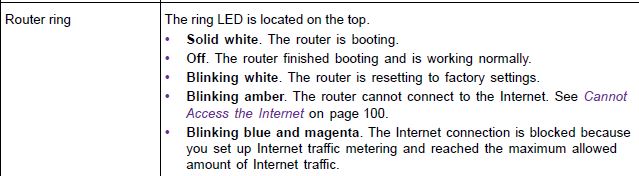
Is there a way to determine what the connection status is between router and satellite? Devices are showing as attached to the Satellite on the Attached Devices page. Not really sure if I can tell if the placement is optimal or not. I assume it is ok becuase the Satellite LED ring is off. The Router ring slow blinks magenta but that scenario does not seem to be covered in the LED Behavior section of the manual and I don't really know what that means.
14 Replies
 th3w01fApprentice
If you watch the satellite for about a minute after reconnecting you should see the final color. It's kind of a pain and I don't know how accurate it is. Mine was blue, when I finally caught it.
After that you can go under Advanced -> Advanced Home -> Internet Port -> Show Statistics. At the bottom you'll see Internet Backhaul. Mine shows 1733 and moving it a bit hasn't changed it so again, I'm not sure how accurate it is. The Rx and TX Bytes don't look correct for any of my radios. After 20 hours I’m showing 7 total for b/g/b, 159 total for a/n/ac and 124 million for backhaul.
;-)
 loomis1975Luminary
The 1733 for the backhaul appears to be a "label" and not a moving statistic, just like the 400 and 866 above it for the 2.4 and 5 ghz.
- sdunnin68Aspirant
I definately see Tx and Rx counts incrementing for the Backhaul so that must mean they are working. Connections with Satellite are strong and have good speed. Router still pulsing magenta so I don't know what that means though.
- th3w01fApprentice
@loomis1975, I think you're 100% correct that those are just labels, so there doesn't appear to be a way to see the quality of the backhaul connection. Support said there was so hopefully I'm just missing it or it's coming in a new FW.
@sdunnin68, I can't find anything on that status either, and I never saw that behavior.
From the main manual - Orbi Full Manual
- SocalgasAspirantI having similar problems with the satellite. It blinks amber then turns solid blue. I looked in my devices connection but it only shows my router and other devices. Except for my satellite.I live at 1500 sq ft townhouse which is three floors. Router located on first floor and sarellite on third. What's the deal?
 DarrenMSr. NETGEAR Moderator
Hello socalgas
Have you tried to move the Satellite to the second floor and see if it will connect?
DarrenM
This is my gripe about the RBS50 - it needs its own log in page just like the router has. Even if the router controls all its actions, it would be nice to be able to log on to it while it was live and graphically see what speeds it is pushing out, what directions, what bands, and what it is connecting to. That way you could move it around for best placement. Once the lights go off you really have no idea if the satellite is doing anything.
- st_shawMaster
Jryan619 wrote:This is my gripe about the RBS50 - it needs its own log in page just like the router has. Even if the router controls all its actions, it would be nice to be able to log on to it while it was live and graphically see what speeds it is pushing out, what directions, what bands, and what it is connecting to. That way you could move it around for best placement. Once the lights go off you really have no idea if the satellite is doing anything.
A log in page is already there with some of the data you want. You just need to connect to the satellite IP with a web browser.
- Thank you very much, I guess that's why we come here! I know have three book marks set up, one to take me to the Router Log in, one for the Satellite log in, and one for my ISP's set top box / high speed modem log in.
This may sound like a silly question, but I could not find the answer on line. Do you know if there is a certain direction the router and the satellite each broadcast their web of wifi? Does it shoot out through the top, the front, the back, or in a circle? Just want to know if the front face it the Orbi needs to be aimed in one direction.