NETGEAR is aware of a growing number of phone and online scams. To learn how to stay safe click here.
Forum Discussion

kouya
Feb 21, 2017Aspirant
Ethernet Ports 1 and 11 (Dead), Not recognizing #show command in terminal mode
In terminal mode I can log into the switch but the show command comes back as error , tried to save config to NVram, the unit respond as can't save. I tried reset, reload, clear via terminal (usb) a...
kouya
Feb 22, 2017Aspirant
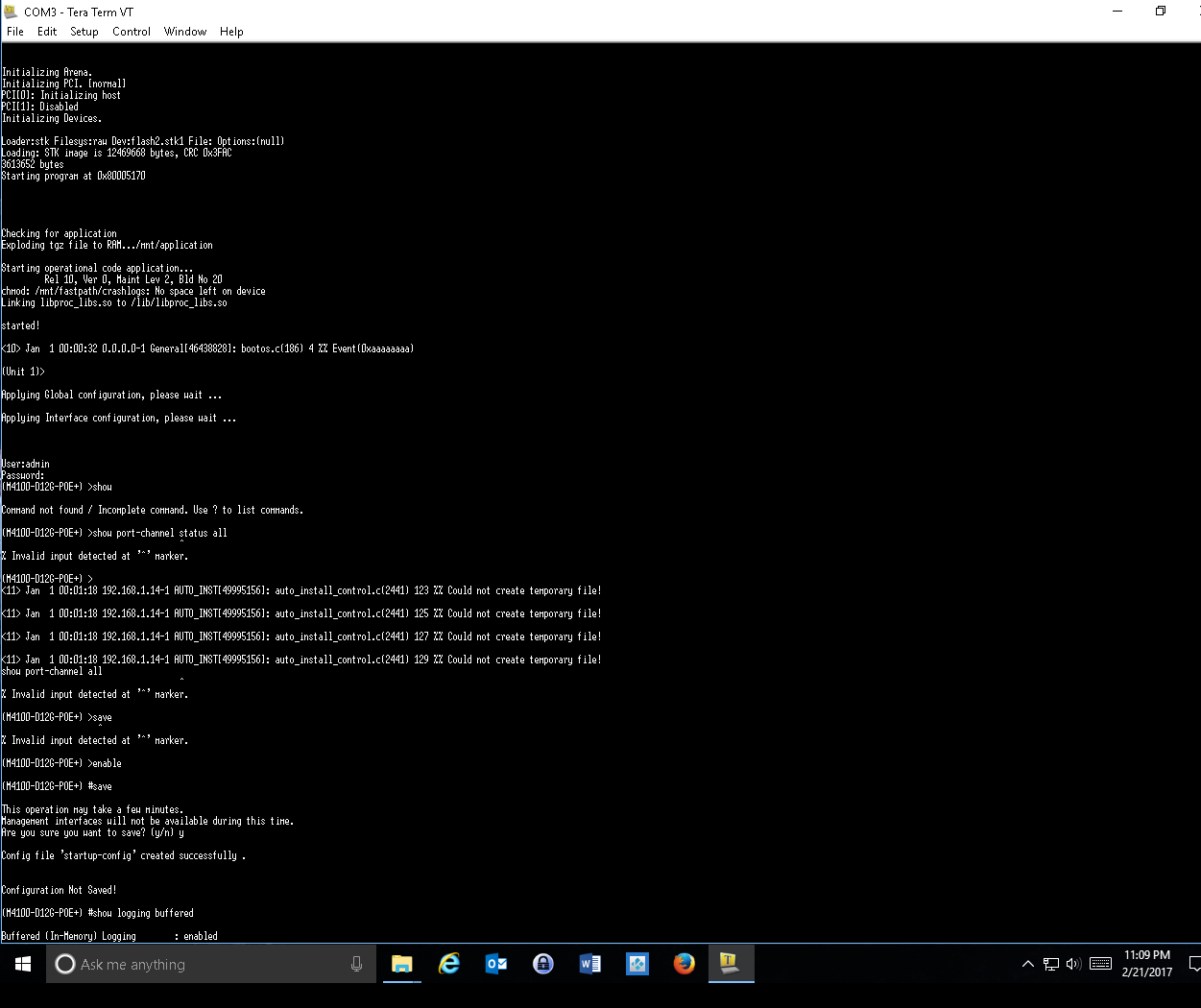
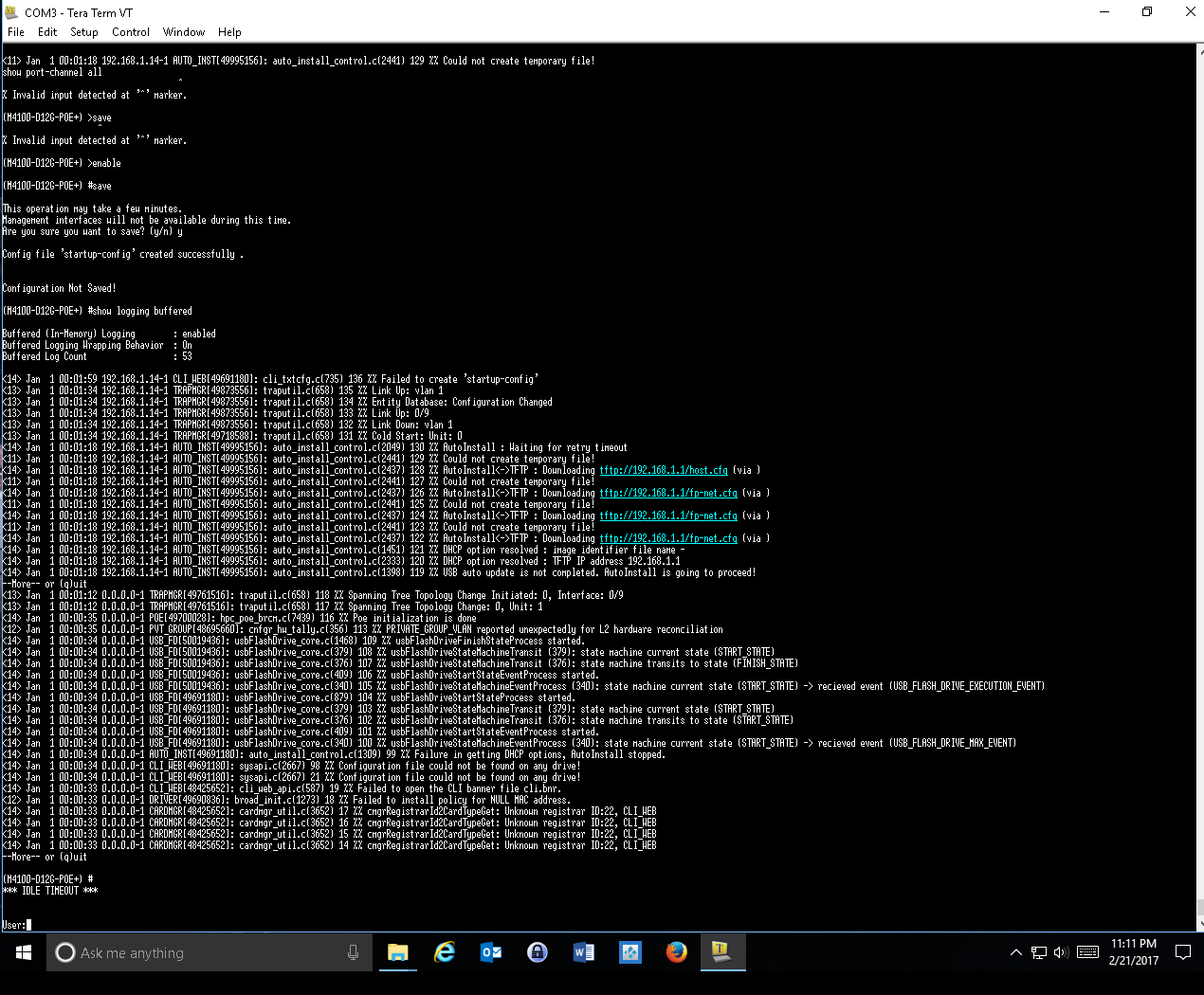
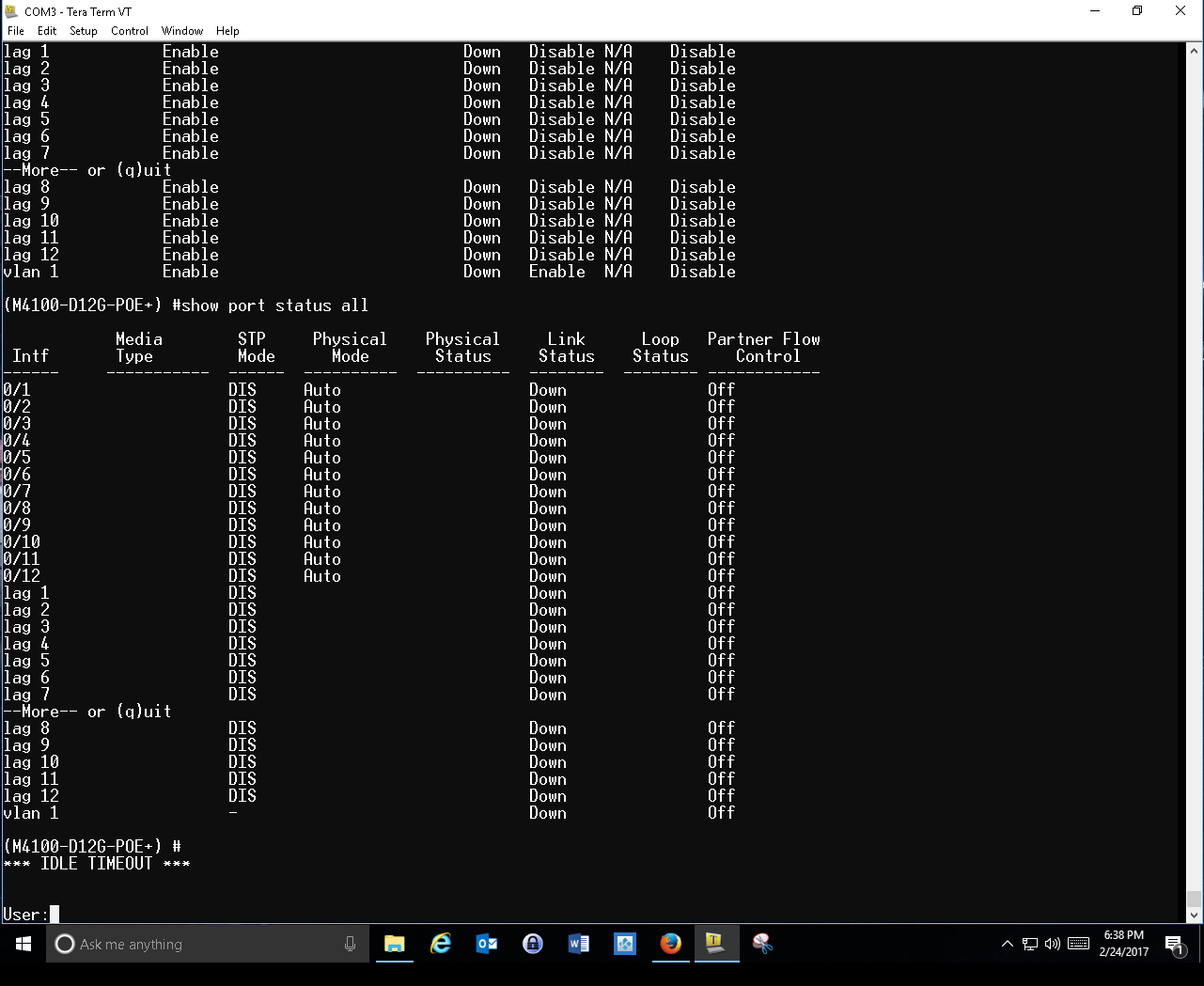
Switcher is currently bench checking without any network connections. I can connect w/PC on all ports except #1 and #11. Switch is M4100-D12-POE+ (GSM5212P) with the current FW 10.0.2.20 attached are screen shots. None of the "show" commands work.

DanielZhang
Feb 22, 2017NETGEAR Expert
Hi Kouya,
It seems that AutoInstall work in processon GSM5212P.
So the config file could not save to local.
Do you want to deploy the "AutoInstall" function on GSM5210P?
please input belows commands to disable this function and reload GSM5212P If you don't want to AutoInstall the GSM5210P
- Login GSM5212P.
- input Enable
- boot autoinstall stop
- no boot host dhcp
- no boot host autosave
- save(confirm with Y)
- reload
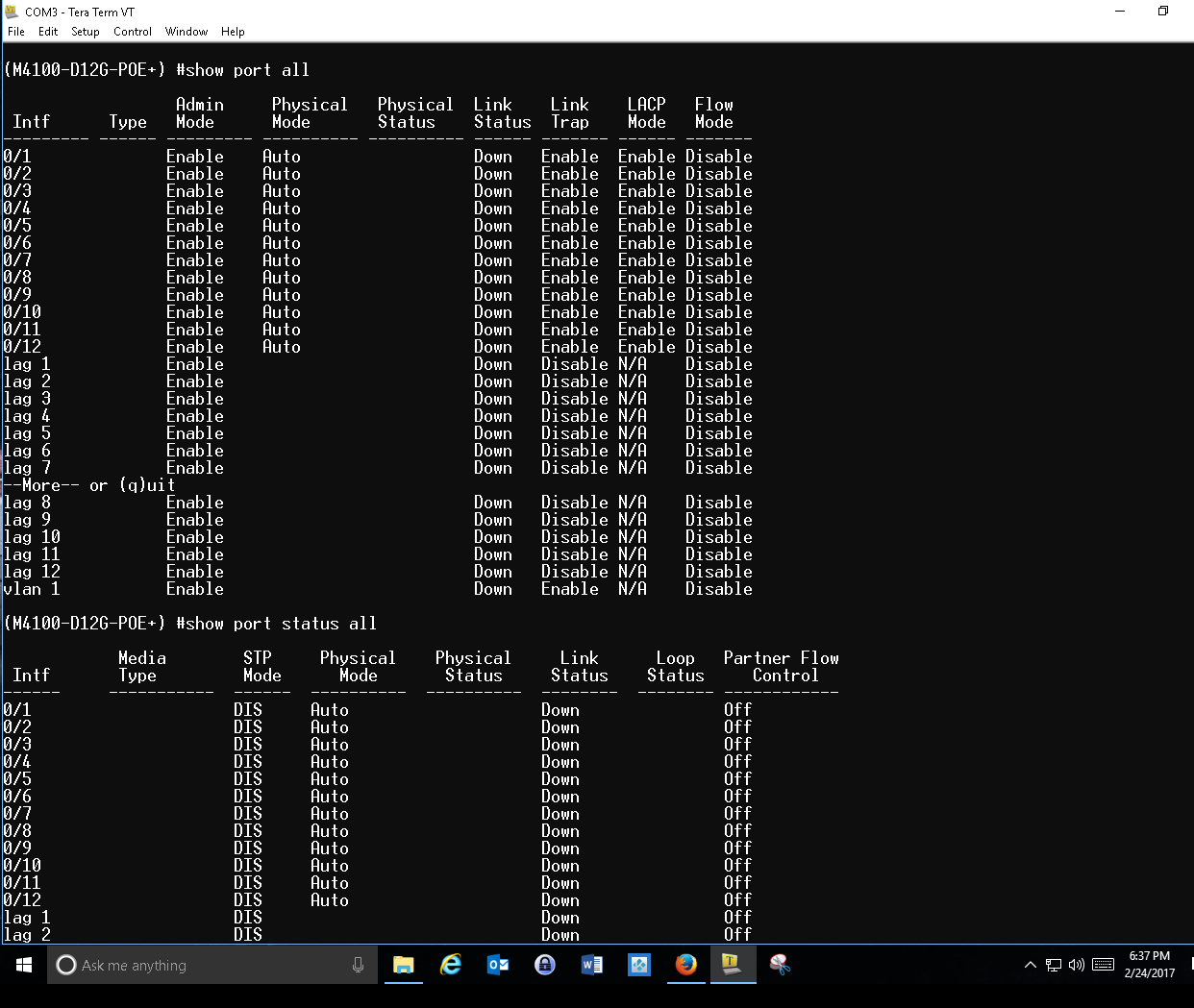
Did any configuration on port #1 and #11?
You can input below command to check.(before you input any command , please enter enable mode by “enable”)
1. show run interface #1(#1 is the port name of switch)
2. show run interface #11(#11 is the port name of switch)
3. show port all
4. show port status all.
- kouyaFeb 25, 2017Aspirant
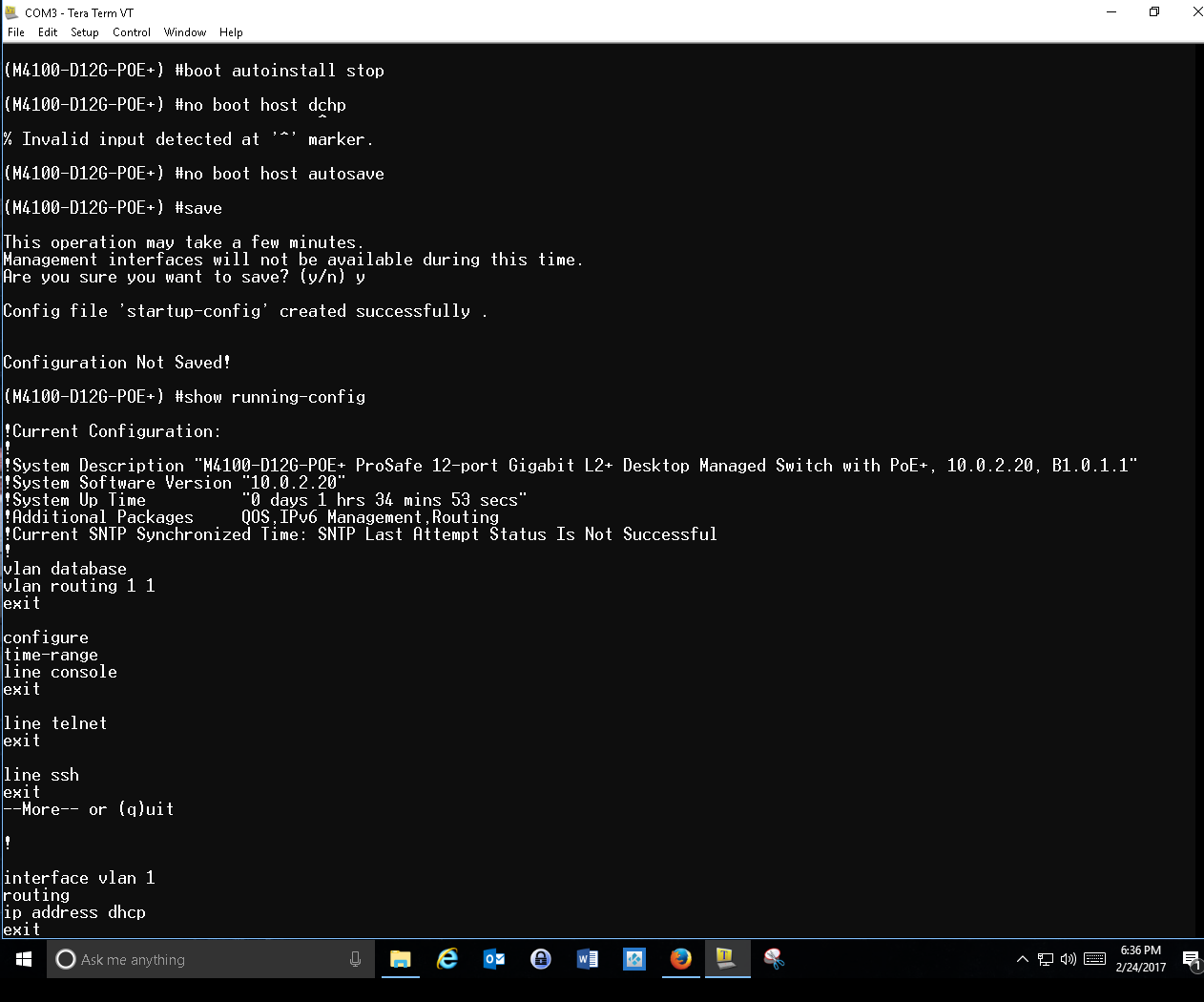
Okay I tried the commands and the "Show run" commands will auto complete to "show running-config" > Also can't save the config file due to not enough room in the save location. Ports 1 and 11 still not active. I there a way to clear out the save locations?
- DanielZhangFeb 27, 2017NETGEAR Expert
Hi Kouya,
Could you please get full display after you input command "show running-config”
I want to confirm if any special configuration on this M4100.
You can also follow below step If you want to totally wipe everything and rebuid.
1. Remove the USB flash on M4100 and other cable on M4100(expect this terminal console cable)
2. Power cycle M4100.
3. Wait for M4100 start completely.
4. Login M4100.
5. Input command "enable".
6. Input command "Clear Config" and confirm yes.(this operation will remove all configuration on M4100 that you have deploy before)
7. Input command “Save” and confirm yes.
8. Input "Reload" and confirm yes.
9. Wait for M4100 start completely.
10. Login M4100.
11. Input command "enable".
12. Input command "show running-config"
13. Send the command echo to me.(all of display echo from this command)
- kouyaFeb 28, 2017Aspirant
Thanks Daniel, Here's the log file (below)
Initializing Arena.
Initializing PCI. [normal]
PCI[0]: Initializing host
PCI[1]: Disabled
Initializing Devices.
Loader:stk Filesys:raw Dev:flash2.stk1 File: Options:(null)
Loading: STK image is 12469668 bytes, CRC 0x3FAC
3613652 bytes
Starting program at 0x80005170
Checking for application
Exploding tgz file to RAM.../mnt/application
Starting operational code application...
Rel 10, Ver 0, Maint Lev 2, Bld No 20
chmod: /mnt/fastpath/crashlogs: No space left on device
Linking libproc_libs.so to /lib/libproc_libs.so
started!
<10> Jan 1 00:00:33 0.0.0.0-1 General[46438828]: bootos.c(186) 3 %% Event(0xaaaaaaaa)
(Unit 1)>
Applying Global configuration, please wait ...
Applying Interface configuration, please wait ...
User:admin
Password:
(M4100-D12G-POE+) >enable
(M4100-D12G-POE+) #clear config
Are you sure you want to clear the configuration? (y/n)y
Clearing configuration. Please wait for login prompt.
(Unit 1)>
User:admin
Password:
(M4100-D12G-POE+) >enable
(M4100-D12G-POE+) #reload
The system has unsaved changes.
Would you like to save them now? (y/n) y
Config file 'startup-config' created successfully .
Configuration Not Saved!
Are you sure you would like to reset the system? (y/n) y
Reference platform resetting ...
syncing filesystems....This may take a few moments
/mnt/application
Rebooting system!
The system is going down NOW!
Sent SIGKILL to all processes
Requesting system reboot
Initializing Arena.
Initializing PCI. [normal]
PCI[0]: Initializing host
PCI[1]: Disabled
Initializing Devices.
Loader:stk Filesys:raw Dev:flash2.stk1 File: Options:(null)
Loading: STK image is 12469668 bytes, CRC 0x3FAC
3613652 bytes
Starting program at 0x80005170
Checking for application
Exploding tgz file to RAM.../mnt/application
Starting operational code application...
Rel 10, Ver 0, Maint Lev 2, Bld No 20
chmod: /mnt/fastpath/crashlogs: No space left on device
Linking libproc_libs.so to /lib/libproc_libs.so
started!
<10> Jan 1 00:00:33 0.0.0.0-1 General[46438828]: bootos.c(186) 3 %% Event(0xaaaaaaaa)
(Unit 1)>
Applying Global configuration, please wait ...
Applying Interface configuration, please wait ...
User:admin
Password:
(M4100-D12G-POE+) >enable
(M4100-D12G-POE+) #show running-config
!Current Configuration:
!
!System Description "M4100-D12G-POE+ ProSafe 12-port Gigabit L2+ Desktop Managed Switch with PoE+, 10.0.2.20, B1.0.1.1"
!System Software Version "10.0.2.20"
!System Up Time "0 days 0 hrs 1 mins 4 secs"
!Additional Packages QOS,IPv6 Management,Routing
!Current SNTP Synchronized Time: SNTP Last Attempt Status Is Not Successful
!
vlan database
vlan routing 1 1
exit
configure
time-range
line console
exit
line telnet
exit
line ssh
exit
--More-- or (q)uit
!
interface vlan 1
routing
ip address dhcp
exit
exit
(M4100-D12G-POE+) #
Related Content
NETGEAR Academy

Boost your skills with the Netgear Academy - Get trained, certified and stay ahead with the latest Netgear technology!
Join Us!
