Forum Discussion

KelvinFu
Nov 18, 2016Aspirant
M4300 SFP Port Trunking Issues
Hi all, I recently purchased 2 new M4300 and form a stack. After stacking the SW, I started to setup the switch as normal, the management VLAN, IP, the rest of vlan, subnet of those VLAN. Since i...
 Nov 23, 2016
Hi Kelvin,
It's a good news that the failover problem resolved.:smileyhappy:
Let's carry on the VRRP scenario.
I have checked the maintenance file just you sent to us.
1) Congratulation!The address (192.168.100.2 ) is the virtual IP address of VRRP on Firewall.
Because this IP have same prefix mac-address header just like (00:00:5E:00:xx:xx).
It's the standard of VRRP for mac-address behavior.
2) Good finding! The "Link state detection” is very useful for VRRP status.
So we need to set the IP for heartbeat on each Firewall that could monitor VRRP all the time.
But 192.168.100.1 is not the heartbeat address for Firewall that is VLAN interface on M4300-Stack.
So Could you set an IP address on Firewall A and B that is not VRRP protocol.
Such as:
192.168.100.10 /24 on Firewall A.
192.168.100.20 /24 on Firewall B.
Then,
Set Link state detection IP address to 192.168.100.20 on Firewall A.
Set Link state detection IP address to 192.168.100.10 on Firewall B.
That will make Firewall detect each other with this configuration.
3) Could you share me the configuration page or command on your Firewall about LAG/Port/IP address/VRRP configuration?
The private message is RECOMMENDED.
I'm not very professional on Firewall of other company.
Just want to help analyze.:smileyhappy:
Look forward to your reply.
Regards,
Daniel.
DanielZhang
Nov 21, 2016NETGEAR Expert
Hi Kelvin,
Please find the instruction about Trunk mode with native VLAN as below:
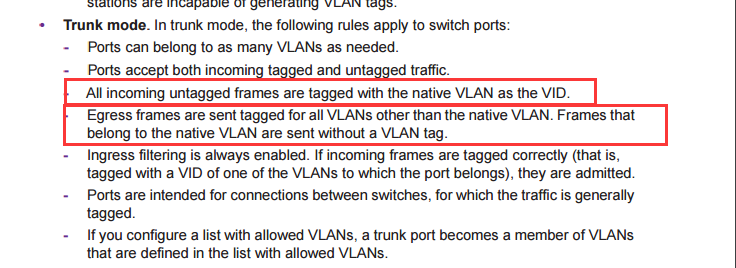
So you can see the VLAN member is "U" on VLAN 1 due to 1 is native VLAN.
For other VLAN (2-4093) it will be "T" due to it is allowed trunk VLAN.
For your addition question,
It work as a whole switch after M4300 get stacked.
So you might treat the stack master and standby as a whole switch which have multi port.:smileyhappy:
Regards,
Daniel.
KelvinFu
Nov 21, 2016Aspirant
Hi Daniel,
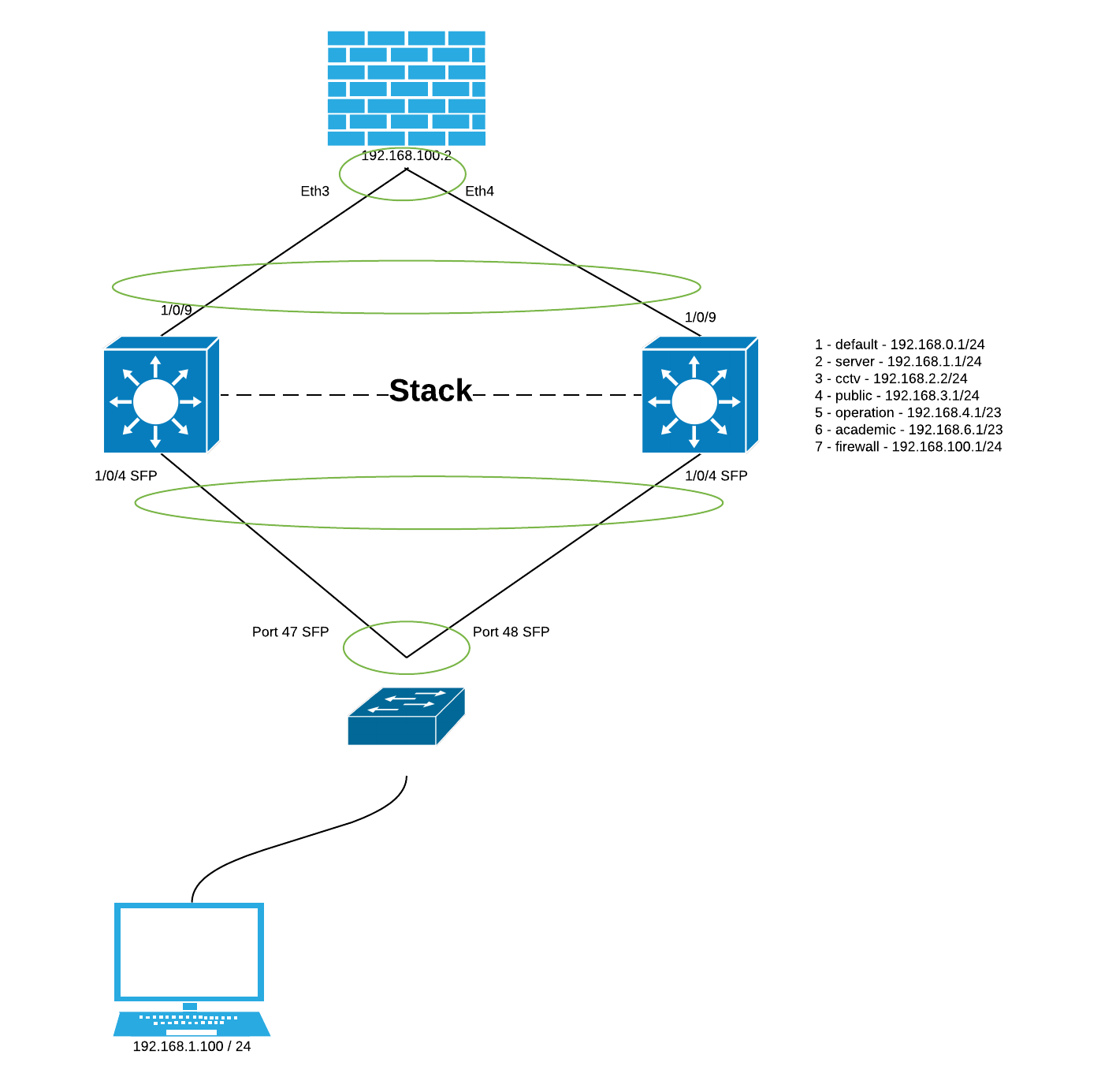
thx for your patience~I will try to fix it by following your advise. Also, I have GS series switches in layer 2, like GS748T / GS724T etc. is it possible to connect it with SFP port to M4300? let's say, port 47 to stack master and port 48 to stack 2 (both ports are set to trunk port)
- LaurentMaNov 21, 2016NETGEAR Expert
Hi KelvinFu
Yes absolutely you can LAG ports on your M4300 stack across the master and the redundant management unit; and connect to individual Smart Managed switches GS724T or GS748T using their SFP ports each time in a LAG as well.
First, please use 1Gbps SFP GBICs on both side, since M4300 SFP+ ports must run in Gigabit mode when connecting to Gigabit-only other switches. If multimode fiber, you can use NETGEAR AGM731F 1000BASE-SX SFP transceiver.
Second, please try to use same LAG settings on both side: by default, LAGs are dynamic (LACP mode). Given Smart Managed switches only provide Layer 2 (destination MAC addresses) hashing, you should use Layer 2 hashing algorithm with your Fully Managed M4300 series stack as well. (M4300's can offer L2 / L3 / L4 hashing, but here hashing must be the same on both ends)
For M4300's, you will find LAG configuration examples (both Web GUI and CLI) in Software Administration manual on page 68.
Regards,
- DanielZhangNov 21, 2016NETGEAR Expert
Hi Kelvin,
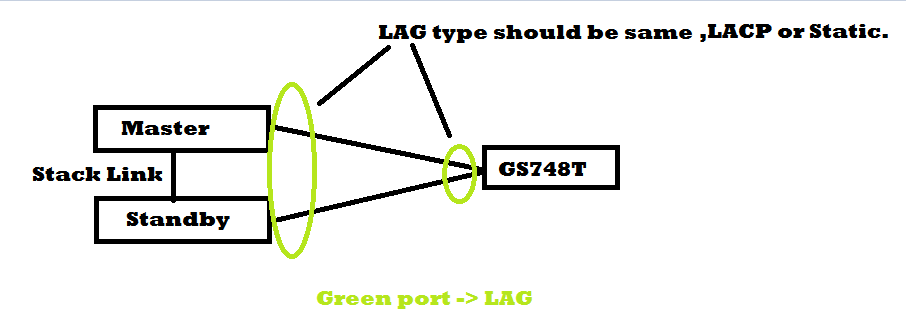
So you want to connect two port from GS748T to M4300 Stack as a redundancy link.
Both Port 47 or port 48 are fine to deploy your requirement.
I suggest you to create a LAG on both side and add connected port into it.
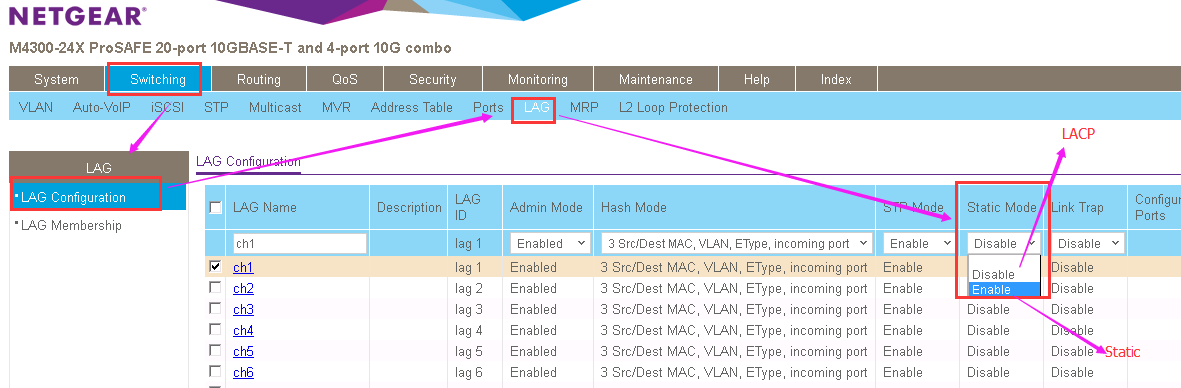
But The LAG type is LACP(dynamic) on M4300 by default and GS748T is static by default.
You need to make the LAG type to a same value as dynamic or static on both switch.(dynamic is RECOMMENDED )
Please check below document about how to creat LAG and set LAG type to dynamic and static.
-->chapter 3,page 68.
Please see my example as below:
Let us know if you have any further concern.
Regards,
Daniel.
- KelvinFuNov 21, 2016Aspirant
thx both, I will try it tomorrow !!!! :cathappy::cathappy::catvery-happy:
- KelvinFuNov 22, 2016Aspirant
almost done, but I cannot ping the firewall >_<, LAG is up, but connect connect from the layer 2 switch, my pc can ping reach every vlan interface
- KelvinFuNov 22, 2016Aspirant
should I mark port 9 / 10 to access port instead of trunk port?
- DanielZhangNov 22, 2016NETGEAR Expert
Hi Kelvin,
Thanks for your update.
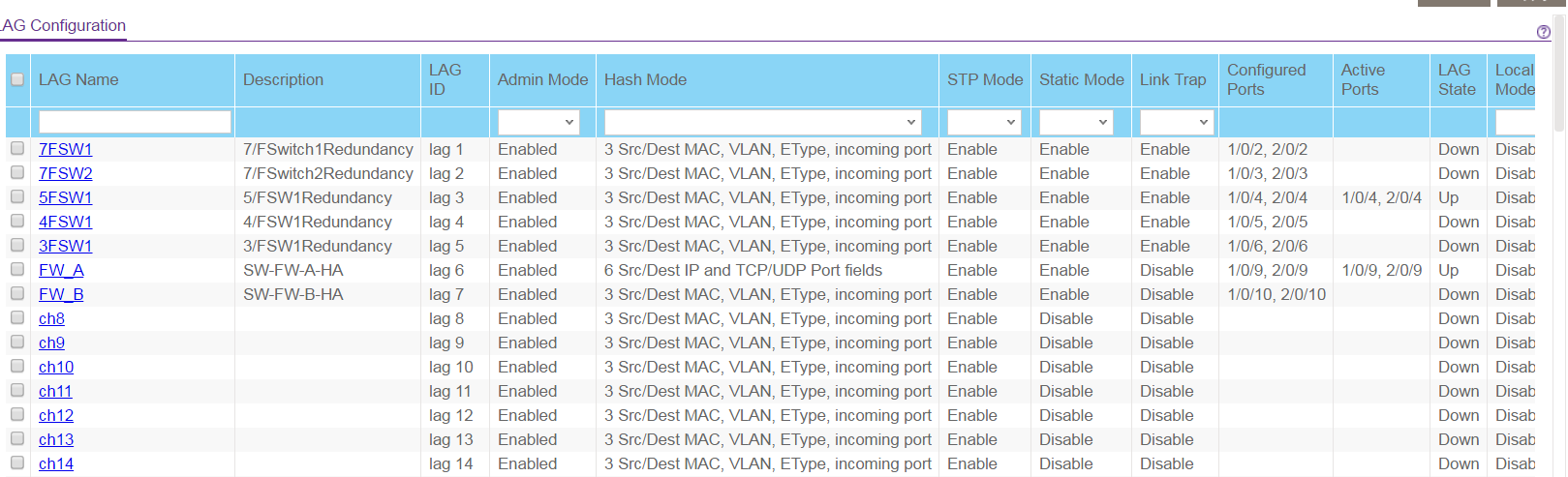
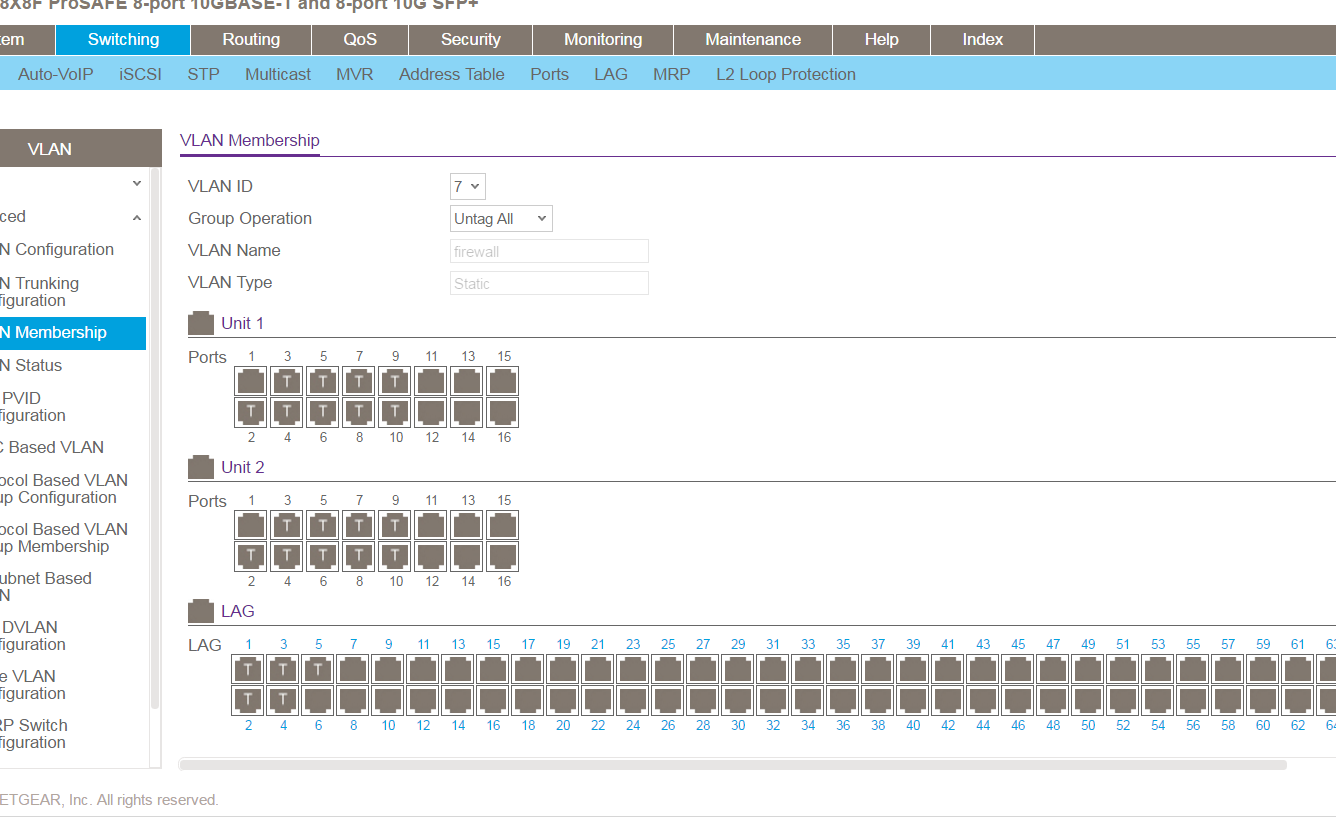
The VLAN configuration will only effect on LAG port after you add 1/0/9,2/0/9 into LAG 6.
So we should mark the LAG 6 into VLAN 7 with Tag or Untag (according with your Firewall support to accept Tag packets or not)
I think most of Firewall just support untag mode of layer 3 interface just like yours.
So Could you please add LAG 6 into VLAN 7 with untag mode?
You can chose one of the three ways to deploy this configuration:
1) Set LAG 6 to general mode,
Set PVID 7 on LAG 6
Add LAG 6 into VLAN 7 with untag mode (U)
2) Set LAG 6 to Access mode,
Access VLAN 7.
3) Set LAG 6 to Trunk mode.
Allowed VLAN 7
Native VLAN 7
Let us know if you get new update:smileyhappy:
Regards.
Daniel.
- KelvinFuNov 22, 2016Aspirant
Hi Daniel,
thx for your help, I took option 1 as my choice. but then i found that i can only ping 192.168.100.2 with the same vlan in layer 2 switch /w ip 192.168.100.3, if i plug to vlan 2 /w ip 192.168.1.3, then i cannot ping 192.168.100.2, it seems the routing problem?
- DanielZhangNov 22, 2016NETGEAR Expert
Hi Kelvin,
It seems to be a routing problem.
Please check the following steps on your network:
1) The route to the special subnet on Firewall.
Such as:
192.168.0.x/24 192.168.100.1
192.168.1.x/24 192.168.100.1
192.168.2.x/24 192.168.100.1
192.168.3.x/24 192.168.100.1
192.168.4.x/23 192.168.100.1
192.168.6.x/23 192.168.100.1
Please add route for every subnet if thr firewall don't have these routes.
2) The default gateway on PC.(The gateway should be the IP address on VLAN of Stack)
Or you can add static route for every special subnet above if you don't want to set default gateway on your PC.
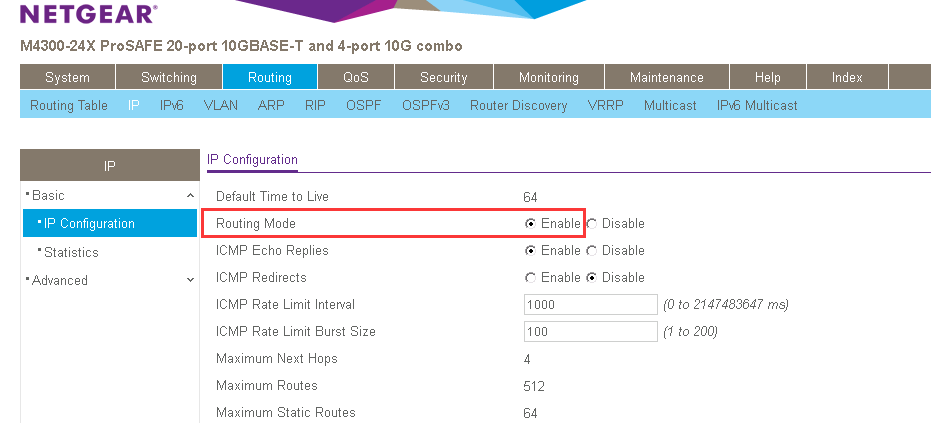
3) Make sure the IP routing is "enable" on Stack
Please try again after above checklist has been done.
Regards,
Daniel.
- KelvinFuNov 22, 2016Aspirant
Hi Daniel,
Yes, that's the point, I've fixed it. Now I have the rest of 2 questions I think ( hopefully no more T_T)
1. HA Question
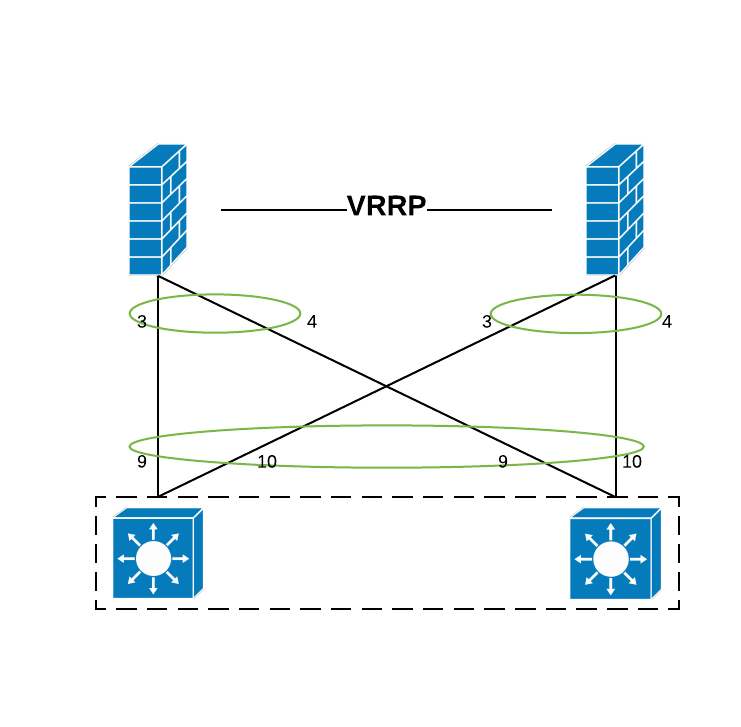
I now have 2 LAG, and connect to 2 firewalls that in VRRP mode, Firewall A is active while B is standby, eth3 and eth4 are formed as active/standby LAG wiht IP: 192.168.100.2/24.
as you can see at the previous post, I have 2 LAGs in switch stack.
1/0/9 and 2/0/9 in LAG1 and connect to eth 3 / 4 (aggr 1) of Firewall A
1/0/10 and 2/0/10 in LAG2 and connect to eth 3 / 4 (aggr 1) of Firewall B
LAG1 and LAG2 are in VLAN 7
Scenario 1.
unplug only eth 3 in firewall A, work well
Scenario 2.
upplug only eth 4 in firewall A, work well
Scenario 3.
unplug both eth 3 / 4 or poweroff firewall A, cannot switch to firewall B which is my expection
Scenario 4.
poweroff firewall B, work well
Since Firewalls are in VRRP protocol, i expect all traffic will be redirected to firewall B, but seems I have some conceptual mistake
2. Failover
I found that if stack master is failure, I cannot ping the vlan interface whether it is resumed or not. I have to poweroff the slave once to make it work again. is it normal?
- DanielZhangNov 22, 2016NETGEAR Expert
Hi Kelvin,
It's all right.
Any posts is welcome :smileyhappy:
1. HA Question
For scenario 3,
Please check the VRRP status on Firewall B after you unplug both eth 3 / 4 or poweroff firewall A.
The VRRP status on Firewall B should be Master after Firewall A is down.
Please check VRRP function and configuration on Firewall A&B If above function don't work as expected.
I also have some suggest step for you to check VRRP function and configuration on Firewall:
1) VRRP need two router(Firewall) add in same virtual router group with same subnet IP address
such as:
Firewall A: 192.168.100.10 /24
Firewall B: 192.168.100.20 /24
2) A virtual IP address must be assigned in this virtual group.
such as:
Virtual IP: 192.168.100.30 /24
(you can also set virtual IP same with Firewall A or Firewall B, that will make the Firewall to be VRRP IP owner which have same address as Virtual IP)
3) All clients must set the gateway to Virtual IP instead of the IP on Firewall A or Firewall.
Such as:
PC: 192.168.100.201 /24, Gateway: 192.168.100.30.
4) Set LAG mode to LACP(dynamic)
This mode will detect&switch link status automatic when the link is down or unavailable.
(LACP mode of LAG must support on both side of Switch and Firewall as same time.).
such as:
Set LAG mode to dynamic LACP on Switch: Static mode-->Disable (Go to Switch--->LAG--->LAG configuration-->Select LAG port--->Static Mode)
Set LAG mode to dynamic LACP on Firewall A&B.(Please check manual document of firewall)
5) <*Optional>these extra function will help you to monitor and control VRRP more Reliable.
Set VRRP track interface on Firewall(if supported)
Set VRRP Router Priority and Preemption on Firewall(if supported)
2. Failover.
1) Please check the LAG configuration on both side(stack and GS748T)
All LAG member and LAG port should have same VLAN configuration.
2) Please modify the LAG type to dynamic LACP mode on stack.
such as:
Set LAG mode to dynamic LACP on Switch: Static mode-->Disable (Go to Switch--->LAG--->LAG configuration-->Select LAG port--->Static Mode)
On GS748T, the same LAG type should be configured.
Let me know if you have any update.
BTW,
Please send your maintenance to us if possible.
We can analyze your scenario more carefully with configuration file and topology.
Please follow as below step to send maintenance information.
How do I send diagnostic files from my Smart Switch to NETGEAR community moderators?
http://kb.netgear.com/app/answers/detail/a_id/31438
How do I send diagnostic files from my Managed Switch to NETGEAR community moderators?
http://kb.netgear.com/app/answers/detail/a_id/31439
Regards,
Daniel.
- KelvinFuNov 23, 2016Aspirant
Hi Daniel,
thx for your professional support, since I'm off today, I will follow your advise and then test again tmr. Thx very much again.
- KelvinFuNov 23, 2016Aspirant
Hi Daniel,
I fixed the failover problem by enabling the dynamic LACP mode in both stack and layer 2 switch. Awesome!
for the question 1, I would like to reply the your suggestion first
1. Yes, master and slave a connect with same subnet address and has 1s heartbeat to detect each other
2. and 3. The firewall doesn't have virtual IP, it not the same as the VRRP standard protocol, instead, they sync the setting from each other, that means firewall A and B has the exact same setting except the heartbeat interface, so the only way I can identify them are the heartbeat interface. also, when I have switch and connect both firewall at the same time with the eth ip address, i'm always connected to the firewall A if it is in normal state, once it failed, i will redirect to firewall B. in this situation, the virtual ip is not a must I think?
4. I cannot find any setting on the Firewall about dynamic LACP (I think this is the key), the firewall has the option called "Link state detection" which allow me to set an IP address to have periodic check like heartbeat, I set 192.168.100.1 in that field
5. Yes, I have this setup and it's already enabled
Test
1. unplug eth 3 / 4 at the same time in Firewall A
yes, Firewall B became Active, and LAG to Firewall A was down in switch stack, LAG to Firewall B is still up, when I plug back eth 3 and 4 at Firewall A, it become Active again, and B to standby (So, it obviously detect the link failure!!!!)
2. set LAG to Firewall A and B to dynamic LACP
since I don't have any setting that allow me to enable dynamic LACP, yes, the state was changed to down as expected
I think LACP is the key but I cannot prove it, I'm going to upload my log, you may have a check on it. Thanks for helping me a lot
- KelvinFuNov 23, 2016Aspirant
all related log and config are sent to [email protected] already~
- DanielZhangNov 23, 2016NETGEAR Expert
Hi Kelvin,
It's a good news that the failover problem resolved.:smileyhappy:
Let's carry on the VRRP scenario.
I have checked the maintenance file just you sent to us.
1) Congratulation!The address (192.168.100.2 ) is the virtual IP address of VRRP on Firewall.
Because this IP have same prefix mac-address header just like (00:00:5E:00:xx:xx).
It's the standard of VRRP for mac-address behavior.
2) Good finding! The "Link state detection” is very useful for VRRP status.
So we need to set the IP for heartbeat on each Firewall that could monitor VRRP all the time.
But 192.168.100.1 is not the heartbeat address for Firewall that is VLAN interface on M4300-Stack.
So Could you set an IP address on Firewall A and B that is not VRRP protocol.
Such as:
192.168.100.10 /24 on Firewall A.
192.168.100.20 /24 on Firewall B.
Then,
Set Link state detection IP address to 192.168.100.20 on Firewall A.
Set Link state detection IP address to 192.168.100.10 on Firewall B.
That will make Firewall detect each other with this configuration.
3) Could you share me the configuration page or command on your Firewall about LAG/Port/IP address/VRRP configuration?
The private message is RECOMMENDED.
I'm not very professional on Firewall of other company.
Just want to help analyze.:smileyhappy:
Look forward to your reply.
Regards,
Daniel.
- KelvinFuNov 23, 2016Aspirant
PM was setn:smileyhappy:

Related Content
NETGEAR Academy

Boost your skills with the Netgear Academy - Get trained, certified and stay ahead with the latest Netgear technology!
Join Us!
