Forum Discussion

akira168
Mar 02, 2017Aspirant
Unable to add ports to LAG
Hi, I couldn't find any similar discussion. That's why I am asking. I have succeeded with setting up link aggregation using HP 5800AF, Allied Telesis CentreCom GS908M, Switch Blade x908, CentreC...
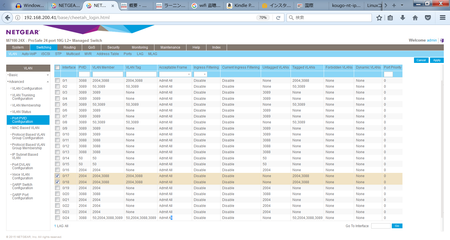
 Mar 07, 2017
Hi Akira,
Please try to configure same VLAN setting on LAG not only the physical port.
Actually the configuration only effect on LAG when physical port added into LAG.
Such as:
configure same VLAN PVID/VLAN member/VLAN Tag For the LAG which port 17/18 will add into.

akira168
Mar 07, 2017Aspirant
I see. We will do that.
Thank you.
Best regards,

Jedi_Exile
Mar 07, 2017NETGEAR Expert
I hope this helps, it is more of tip to troubleshooting LAG configuration between switches.
For LAG Issues or troubleshooting, here is basic way to validate and test for issues.
1. Add only 1 member port on both switch to the LAG and then check if the LAG status is up. (1 Port member only) You can choose you settings to match (Static, LACP, (Active, Passive --some one should be active and not both be passive), common hash method)
2. If LAG is UP and you can get traffic across, then add second Port member to the LAG and see if the LAG is up. If LAG is not up, you have mis-match or cross cabling which is most common problem we see with LAG configuration. Mis-match means the cable going to the port is not really connected the member LAG port so you have both a LAG port and non LAG port connected between the 2 switches.
To determine mis-match or bad cabling, disable (shutdown) one of port in the LAG and see if LAG is up. Attempt the same on second port if still no change.
- akira168Mar 07, 2017Aspirant
Hi Jedi_Exile,
Thank you for your comments.
>1. Add only 1 member port on both switch to the LAG and then check if the LAG status is up.
The both switches are connected without LAG setting. They are perfectly fine. When the LAG setting is enabled on the Netgear switch, the connectivity between them is lost. I have tried all kinds of the settings such as Admin Mode, Link Trap, STP Moe, Static Mode and Hash Mode.
It cannot go to 2.
Do you think I missed something?
Best regards,
- DanielZhangMar 07, 2017NETGEAR Expert
Hi Akira,
Please try to configure same VLAN setting on LAG not only the physical port.
Actually the configuration only effect on LAG when physical port added into LAG.
Such as:
configure same VLAN PVID/VLAN member/VLAN Tag For the LAG which port 17/18 will add into.
- akira168Mar 07, 2017Aspirant
Hi Daniel_Z,
Thank you for your advice.
Even though I have changed the VLAN settings of the lag_3, the situation is still same.
Whenever the ports are added to the LAG, the connectivity is lost.
Please let me know if I made any mistake about the settings.
Best regards,
- Jedi_ExileMar 08, 2017NETGEAR Expert
Maybe attempt the following instead.
If switches work fine with one port connected between them without LAG settings on, then I suggest you do some more troubleshooting detailed below.
1. When the LAG is enabled, check the LAG status. If it is down, we have negotiates issues since both sides need to be configured for LAG. On Juniper side also verify the LAG configuration shows up or down.
2. If LAG is up but traffic won't go then check the STP state to make sure neigther side is BLK (if you using MST or PVST) then make sure to check STP per vlan that is tagged on the port to verify they are are not in BLK state even though LAG is up.
Here is steps I normally do to add a LAG memeber.
1. Reset the port that will be LAG member to default state. Meaning PVID 1 and participation vlan 1 only. Change the mode of port to General instead of access or trunking mode.
2. Add the port as member of the LAG.
3. Configure the LAG setting to match on both sides (Static vs Dynamic (LACP), matching hash mode)
4. Configure the LAG port with required settings (PVID, participation, tagging, trunking, etc)
5. Connection or no shutdown the port to bring it up.. and see if LAG is up.
6. If LAG is down, I limit the membership to single port only and make sure LAG comes up and traffic passes. If LAG is up but traffic fails to pass, I verify membership of LAG .. show vlan x shows particaption and tagging status. If LAG is down but port is up, I look at port status (after resetting the counters) to see if there is traffic going across.
7. For older switches, I save config and reboot them one a time on each side to see if that fixes them.
8. I also make sure atleast one side is active member for dynamic LAG (LACP)
Beyond this, I suggest opening a support case as this will need to troubleshoot by debugging further..
debug commands are on the switches to dig beyond this level.
- akira168Mar 12, 2017Aspirant
Thank you for your support.
Our IT infrastructure team could connect M7100-24X and AT CentreCom GS909M with LAG setting which is physical 1000Base-T. And also we could connect M7100-24X and HP 5800AF-48G with LAG setting which is physical 10G fiber cable.
The reason of the failure was that VLAN of LAG and Static mode were not properly chosen.
We appreciated your warm advices.We referred to the manual below. (If there is any newer manuals, please let me know.)
https://www.netgear.jp/support/manual/M7100/M4100-M7100_SWA_15Feb2013.pdf
The contents are not updated along with the current GUI. Moreover the VLAN setting of LAG is missing in P.55-P59. If there is anybody who can contact to the Netgear employees who is responsible for updating the documentations, we are very pleased.Best regards,
Akira

Related Content
NETGEAR Academy

Boost your skills with the Netgear Academy - Get trained, certified and stay ahead with the latest Netgear technology!
Join Us!
