NETGEAR is aware of a growing number of phone and online scams. To learn how to stay safe click here.
Forum Discussion

yaboy713
Dec 26, 2016Aspirant
Setting up a VLAN
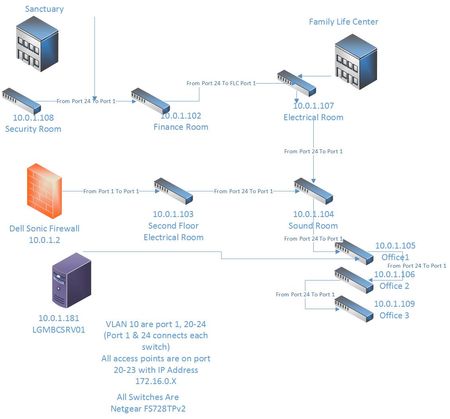
Hello All, I have a Netgear FS728TPv2 and I'm to setup a VLAN to seperate my WiFi guest from my local network. I have attched my network diagram, as well as a picture of what I have done so far. ...

DaneA
Dec 27, 2016NETGEAR Employee Retired
Hi yaboy713,
Welcome to the community! :)
Kindly answer the questions below:
a. Since ports 20-23 are all tagged on VLAN 10, is the PVID set to 10?
b. Is VLAN 10 specified on the corresponding SSID configured on the access points?
c. Are the access points also NETGEAR devices? If yes, what is the model and current firmware of it?
Regards,
DaneA
NETGEAR Community Team
yaboy713
Dec 28, 2016Aspirant
Thanks for responding.
I did not do anything in the PVID. When I had my 90 warranty, the tech that I spoke with told me that I did not have to do anything in that section.
I did setup one access point on VLAN10, but lost it when I applied the setting. I set it back to factory settings when I could not see it on the network.
I'm using Cisco WAP561 access points.
I guess what I need to know is:
What ports need to be tagged and untagged on the switch for VLAN10? Should the
PVID be configured? If so, what should I do in there? I have multiple switches, how should they be tagged on VLAN10? Thanks.
- DaneADec 29, 2016NETGEAR Employee Retired
On the FS728TPv2, the ports that should be tagged are ports 1, 20-24. Ports 1 and 24 should be tagged because both are trunk ports with a PVID of 1. Ports 20-23 should be tagged because the Cisco WAP561 access points are connected to it. Access points are VLAN-aware devices. Ports 20-23 should be set with a PVID of 10.
Here are my follow-up questions:
a. Is the Dell Sonic Firewall the main router of the network? Does it support VLANs?
b. If ever the Dell Sonic Firewall is the main router and VLAN 10 is configured on it, are you able to get a valid IP address (172.16.0.x) on the VLAN10 through the FS728TPv2? You may verify this by setting another port on the FS728TPv2 to be a member of VLAN10. For example, set port 19 as member of VLAN10 and it should be untagged with a PVID of 10. Port 19 should be untagged because you will connect a PC to it. A PC is a VLAN-unaware device. Check if the PC will get a 172.16.0.x IP address. Then, check if you are able to access the Cisco WAP561 access points and finally, check if you could access the internet via VLAN10.
Regards,
DaneA
NETGEAR Community Team
- yaboy713Jan 01, 2017Aspirant
By tagging ports 1, 20-24 being tagged, is that on VLAN1? What about tagging or untagging on VLAN10? On VLAN1, I tagged port 1 and 24 since they are my link ports to the next router, and all others where untagged. On VLAN 10, ports 1 and 24 where tagged and ports 20-23 where untagged and all other ports where blank. On the PVID, 20-23 where labled as 10, the rest where labled 1.
VLAN10 is configured on the router, along with the 172.x ip range.
Related Content
NETGEAR Academy

Boost your skills with the Netgear Academy - Get trained, certified and stay ahead with the latest Netgear technology!
Join Us!
