NETGEAR is aware of a growing number of phone and online scams. To learn how to stay safe click here.
Forum Discussion

Thanatos889
Aug 23, 2017Aspirant
VLAN Configuration between Netgear and Unifi
I am reaching out in the hope that somebody can assist me with this. Trying to get more coverage in our existing office block by allowing devices to roam om diffrent AP'...

Hopchen
Aug 24, 2017Prodigy
Hi again,
This makes more sense :)
So, let's say we have Building A and Building B.
Building A:
4 AP's broadcasting (LSA and LS Guest). Connected to its own lan with internet/dhcp/firewall etc
Building B:
3 AP's broadcasting (LSP) -- Connected to their own lan with own internet/dhcp/firewall etc
You want to deploy 3 (NEW) APs in Building A, but broadcasting the LSP SSID. Those clients connecting to the LSP network still needs DHCP, Internet, etc from Building B. So, yes VLANs would help you here. Do you have VLANs aready setup anywhere in your network (in either "building")? It does not sounds like it?
Thanatos889
Aug 24, 2017Aspirant
Hi Man ,
Yes currently there is no vlan's setup this would need to be done from scratch.
- HopchenAug 24, 2017Prodigy
Cheers sounds good!
That would be easy enough I think - on your setup (granted your other switches can do VLANs as well). Acutually, you don't need to do a whole lot with that VLAN setup. Just a question.
How are these two "buildings" connecting to each other? Is there a cable from one switch - on one side, to other side or? In other words, do you have a more visible topology?
Thanks
- Thanatos889Aug 24, 2017Aspirant
Basically the two server rooms are right next to each other split with a steel mesh
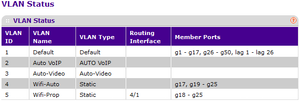
Currently there is a cable from switch one ---->> switch two plugged in port 18 on my Netgear GS748Tv5 switch ( Port 18 is assigned a vlan off 5 ) but due to my limited vlan knowledge i dont know if i did it correctly.
- HopchenAug 24, 2017Prodigy
Hi,
This makes sense now.
So, we have this setup.
Server Room A:
4 AP's broadcasting (LSA and LS Guest). Connected to its own lan with internet/dhcp/firewall etc
The Netgear switch is in Server Room A, right?3 NEW LSP Access Points
Server Room B:
3 AP's broadcasting (LSP). Connected to its own lan with internet/dhcp/firewall etcThe two networks (Server Room A/B) are completely separated right? They don't share any traffic?
The LSP network needs to get DHCP and Internet through Server Room B, correct?In that case, simply make the LSP network run separated in Server Room A, but bridged over to Server Room B.
You can use VLAN 5 I guess. VLAN 5 is not used on any other ports?
Do this config on the Netgear:On port 18 on the Netgear (connecting to Server Room B) do this:
Untag "U" for VLAN 5 and set the PVID to 5.On the three ports that connects to the NEW LSP access points, do this:
Untag "U" for VLAN 5 and set the PVID to 5.
Cheers!
Related Content
NETGEAR Academy

Boost your skills with the Netgear Academy - Get trained, certified and stay ahead with the latest Netgear technology!
Join Us!
