NETGEAR is aware of a growing number of phone and online scams. To learn how to stay safe click here.
Forum Discussion

bfowler9024
Apr 30, 2016Aspirant
VLAN traffic forwarding
I have a M4100-26G-POE switch with several vlan trunk ports. Port 1 is the uplink and ports 3,4,5,6 are downlinks, all with same tagged vlans. The traffic forwarding looks more like a hub than a swi...

DaneA
May 01, 2016NETGEAR Employee Retired
Hi bfowler9024,
Kindly answer the questions below:
a. How is everything connected? It would be best to post a screenshot or image of your detailed network setup.
b. What is the current firmware version of your M4100-26G-POE switch?
c. Does same problem occur if you will reboot the M4100-26G-POE switch?
Regards,
DaneA
NETGEAR Community Team
bfowler9024
May 05, 2016Aspirant
Hello Dane,
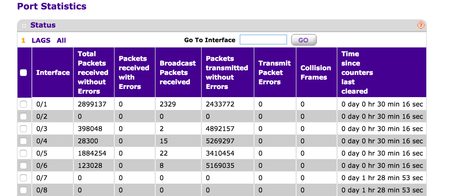
Sorry for the delay. Firmware is10.0.2.13. I have attached a diagram and traffic graphs. You will see that the traffic coming in from the uplink port 26 is replicated out ports 3,4,5,6 much like a hub rather than a switch.


- DaneAMay 08, 2016NETGEAR Employee Retired
Hi bfowler9024,
It seems that you did port mirroring. So far there are no issues logged using firmware v10.0.2.13 just like what you have described here. Can you try to downgrade the firmware to v10.0.2.11 then check if same problem will occur. Make sure to reset the M4100-26G-POE switch back to factory default settings after a successfully downgrading the firmware then reconfigure it from scratch.
Here is the link where to download v10.0.2.11.
Regards,
DaneANETGEAR Community Team
- bfowler9024May 08, 2016Aspirant
Port mirroring is not configured:
- DaneAMay 08, 2016NETGEAR Employee Retired
Hi bfowler9024,
Kindly try also to configure port mirroring before and after you have downgraded the firmware. Select port 26 as a source port on the M4100-26G-POE switch. Then, select another port(s) as a destination port on the M4100-26G-POE switch where a PC with Wireshark installed in it is directly connected. It would be best that Wireshark could capture the packets on the event the problem occurs from the source port.
You may download Wireshark on this link. As reference guide, you may check this link I found online on how to use Wireshark. Once the problem recurs, download the packet capture to your PC.For the captured packets to be analyzed, open an online case with NETGEAR Support and state your concern. Attach the captured packets from Wireshark as well as the traffic graphs on the online case you have opened for it to be analyzed by the engineering team.
Regards,
DaneA
NETGEAR Community Team

Related Content
NETGEAR Academy

Boost your skills with the Netgear Academy - Get trained, certified and stay ahead with the latest Netgear technology!
Join Us!
