NETGEAR is aware of a growing number of phone and online scams. To learn how to stay safe click here.
Forum Discussion

WebsterWebster
Aug 15, 2018Aspirant
XS716T and Jumbo Frame MTU
I actually have an XS716T but that model didn't appear in the drop-down list or models.
I am looking at Configuring jumbo frames on NETGEAR ProSAFE switches . It shows to set a jumbo frame MTU ...
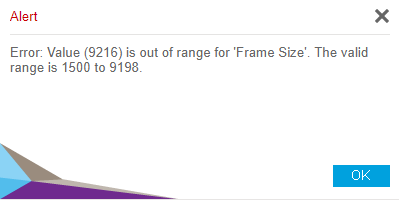
WebsterWebster
Aug 22, 2018Aspirant
Should the 1G ports also have extra padding for frame headers? The original article I linked shows the 1G ports with an MTU of 1518.
Thanks
Webster

schumaku
Aug 22, 2018Guru - Experienced User
While the XS716T has no GbE ports, in general, a basic Ethernet frame does start with 14 Bytes of Ethernet header, can take max 1500 Bytes of payload, and has a trailing four Bytes CRC ... this makes up the 1518 Bytes. It can be four Bytes more if 802.1q VLANs are in the play, and much more...
Rergards,
-Kurt
- WebsterWebsterAug 22, 2018Aspirant
I have no VLANs (and have no idea how to create or use one) so I should set the MTU to 1518 for the ports that will operate at 1G.
Thanks
- schumakuAug 22, 2018Guru - Experienced User
Please explain me why you want to limit the max frame size on any port. One day you might want to run Jumbo Frames between say Windows or macOS computers and a NAS/storage server/Windows Server what does create massive relief on the protocol overhead ... just as one example.
This problem is somewhere between academic and non-existing. Put all ports to the max allowed frame size. You won't experience any issues.
Should there be a problem with a connected device, a network link to wherever, you can still apply a limitation on that port.
Related Content
NETGEAR Academy

Boost your skills with the Netgear Academy - Get trained, certified and stay ahead with the latest Netgear technology!
Join Us!
