NETGEAR is aware of a growing number of phone and online scams. To learn how to stay safe click here.
Forum Discussion

Gary-W
Mar 07, 2018Aspirant
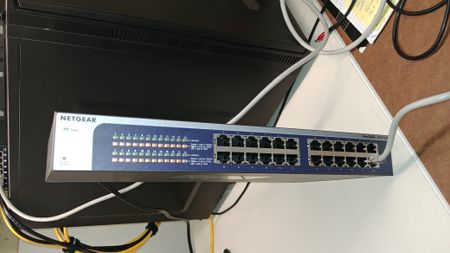
All lights lit up and the switch is not available on the network. Can I fix it?
Hit the restore to factory settings button the the switch went to this. All lights lit up as per the photo. Unplug it, wait 30 seconds, and plug it back in, same result. Push the factory reset again...
- Mar 08, 2018
Hi Gary-W,
Welcome to the community! :)
It seemed that there is a hardware fault on the JGS524Ev2 switch. Kindly try to access the JGS524Ev2 support page here then click on the 'reddish/pinkish' button that says Guided Assistance. Follow the online instructions and you could process a replacement from there.
Regards,
DaneANETGEAR Community Team

DaneA
Mar 08, 2018NETGEAR Employee Retired
Hi Gary-W,
Welcome to the community! :)
It seemed that there is a hardware fault on the JGS524Ev2 switch. Kindly try to access the JGS524Ev2 support page here then click on the 'reddish/pinkish' button that says Guided Assistance. Follow the online instructions and you could process a replacement from there.
Regards,
DaneA
NETGEAR Community Team
- Gary-WMar 08, 2018Aspirant
Thank you so much guys, I have created a support ticket using the link provided by LaneA.
- DaneAMar 12, 2018NETGEAR Employee Retired
I just want to follow-up on this. If ever you were able to use the Guided Assistance and processed a replacement as well as you have no further inquiries, I encourage you to mark the appropriate reply as the “Accepted Solution” so others can be confident in benefiting from the solution. The NETGEAR Community looks forward to hearing from you and being a helpful resource in the future!
Cheers,DaneA
NETGEAR Community Team
Related Content
NETGEAR Academy

Boost your skills with the Netgear Academy - Get trained, certified and stay ahead with the latest Netgear technology!
Join Us!
