NETGEAR is aware of a growing number of phone and online scams. To learn how to stay safe click here.
Forum Discussion

XDRich
Feb 15, 2017Guide
STP Leak using Broadcast packet 01:80:c2:00:00:1c
Netgear Support, Please take note that the community and several customers have discovered a possible flaw in your STP implementation that causes CPU panic and circular broadcasts that disable sw...
- Jun 07, 2017
LarryV and to others,
Since a firmware fix is not yet available, the MAC ACL workaround can be used as described on the article below:
Regards,
DaneA
NETGEAR Communtiy Team

Retired_Member
Mar 04, 2017Hi elderone
Welcome to NETGEAR community.
Can you kindly provide us the detailed GS728TXS/GS752TX/M7100-24X topology when you saw the same issue with Unifi AC-Pro access points?
elderone
Mar 05, 2017Aspirant
Here's network layout:
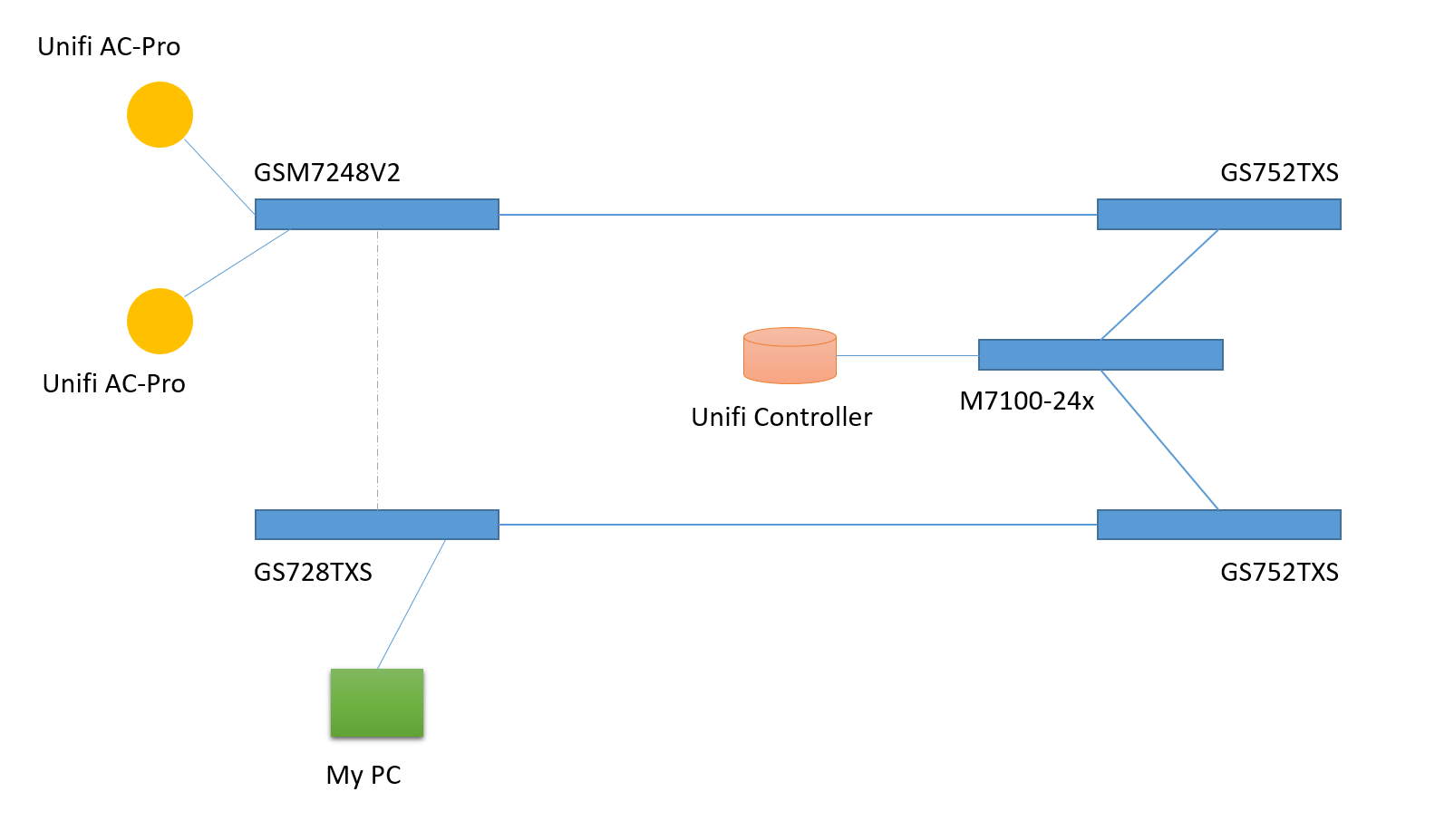
RSTP keeps link open between GS728TXS and GSM7248v2.
Tried also connecting AP-s to GS728TXS, at the same time I did block MAC 01:80:c2:00:00:1c on GS728TXS uplink ports. "My PC" did get access to Unifi AP-s fine, but most of the time Unifi controller didn't get data from AP-s - controller showed that AP-s missing heartbeats, disconnected and occasionally connected.
- RedTechieMar 05, 2017Aspirant
Same problem here with the new Ubiquiti UAP-AC-HD with 3x GS752TXS in a stack and 3x XS712T's hanging off of the strack in a LACP trunk.
- RedTechieMar 05, 2017Aspirant
For the workaround is it sufficent to just apply the MAC ACL to the port that the AP is plugged into? or do I need to apply it to all ports across all switches?
- XDRichMar 05, 2017Guide
Hi, Welcome Red Techie.
I am patient zero on this even.
Yes putting the mac acl will work on the port, but that will kill the purpose of the packet, which is quick notify to other AP's.
The problem is the STP leak of this packet on the LAGS.
Pick one of the lags that create your circular network and add it there. That prevents the reflection in the network while allowing the packet to get out and be used.
Netgear ... Whats the update to this issue? When can we expect a FW fix? I suspect you will be getting more users figuring out this is a problem.
-Rich
- RedTechieMar 05, 2017Aspirant
I have a few LAGs and the native stacking functioanlity of the GS752TXS's enabled. See Image.
Do I need to add it to all of them (including the stacked links)?
Also the "quick notify" is that the zero-handoff config? As I am not using that:
Or is quick notify something completely different with the UBNT hardware?
- adinstrumentsMar 05, 2017Aspirant
We have the same issue.
Our Netgear switch setup looks like this:
- Level One: Switch Stack of 2 x NetGear GS752TS Switches
- Level Two: Switch Stack of 5 x NetGear GS752TS Switches
These stacks are connected via a 6 port LAG. Could we please add the GS752TS to the list of switches needing a FW fix for this issue.
- Retired_MemberMar 13, 2017
We didn't reproduce the issue locally with 1* M7100 (v11.0.0.28) and 2* GS728TXS (v6.1.0.35), 2 GS728TXS are in stacking, and connect to M7100 through LACP, enable RSTP on all ports and LAGs.
Then use two IXIA ports to simulate broadcast packet 01:80:c2:00:00:1c (1Mbps), all 3 DUT Web GUI can be accessable without hanging.
So appreciate if you could help confirm below?
1> Did you DUTs upgrade to the latest FW? If no, please download center to get
2> What about throughput of broadcast packet 01:80:c2:00:00:1c (generated by AP)?
3> Yous issue is DUT hang without Web access?
4> If possbile, can you help send back config of all DUTs for our further debugging?
How to get config for smart switch GS752TXS and GS728TXS - http://kb.netgear.com/31438/How-do-I-send-diagnostic-files-from-my-Smart-Switch-to-NETGEAR-community-moderators
How to get config for M7100 - http://kb.netgear.com/31439/How-do-I-send-diagnostic-files-from-my-Managed-Switch-to-NETGEAR-community-moderators
- elderoneMar 13, 2017Aspirant
I do have latest firmware on GS728TXS and GSM7248v2 switches (where AP-s where connected). Other 3 switches are not with the latest firmware.
I don't have LAGs or LACP in use.
During that time when Unifi AP-s where on 3.7 firmware and inaccessible, there was constant 110 Kbit/s traffic from switch port where AP was connected.
Also somewhere in than timeframe my M7100 switch WEB GUI stopped working. Otherwise switching works, snmp monitoring and remote loggin also works. Only web gui won't respond.
Downgraded Unifi firmware back to 3.4 for now. - RedTechieMar 13, 2017Aspirant
Retired_Member, I'm not sure what DUTs are? I'm assuming thats a technical name for a switch? I'm confused as I thought a previous post mentioned that Engineering was able to reproduce the issue?
1. My three GS752TXS's are on FW v6.1.0.27 and boot vB6.1.0.1. My XS712T's are all at FW v6.1.0.34 and boot vB6.1.0.3
2. I don't know... I noticed ALL status lights on all the switches blanking WAY faster than they do normally and the fact that the AP was only responding to a single ping every 1min with constant heartbeat signal misses to the controller. Other than that everything else was working fine (including Switch GUIs). I only found the issue when I turned on wireshark after noticing the abnormally fast blinking lights.
3. No, my switche's Web GUI always worked even durring the issue.
4. When I follow those steps to get the logs on any of my switches I get an Error 404 when i hit apply to download (upload, is what its called in the Gui) the logs.
- Retired_MemberMar 13, 2017
Hi @RedTechie and @elderone,
Very appreciate for the information providing, our development team are working on it and will provide the fixing soon.
- LaurentMaMar 27, 2017NETGEAR Expert
Hi RedTechie
We have worked on this issue with top priority, warm thanks to all contributors (tech support file exports, configuration file exports etc..) on this post.
Yes we have internal new software releases for M4100, M5300, M6100, M7100 Managed Switches and for FS728TPv2, GS728TS/TPS, GS752TS/TPS, S3300 and XS708T/XS716T Smart Switches that are in the process of heavy validation testing before web posting. We will come back here asap to deliver more precise expected public release ETA on the above.
For M4200, M4300 Managed Switches and for all other impacted Smart Switches, we are working hard on the fix as I speak.
Regards,
- LaurentMaApr 18, 2017NETGEAR Expert
Our initial firmware rollup fixing this issue is mostly done, after testing/validation and internal processes for publishing online. Please download new firmware and plan for maintenance window / upgrade at your convenience.
For instance GS752TXS firmware version 6.1.0.36 and XS712T same version 6.1.0.36
Thanks for all your inputs regarding this issue, it was instrumental for NETGEAR team.
Regards,
- adinstrumentsApr 18, 2017Aspirant
LaurentMa, did you have an ETA on the new firmware for the GS752TS that resolves this issue?
Thanks :)
- LaurentMaApr 18, 2017NETGEAR Expert
Checking on this! The new firmware isn't online yet despite it was ready alongside others. I will come back asap on this.
Regards,
- LaurentMaApr 19, 2017NETGEAR Expert
OK we have the internal patch for GS728TS/GS752TS/GS728TPS/GS752TPS but the code is being merged with another urgent fix for imminent maintenance release. The ETA will be in one week from now for web publishing.
Regards,
- adinstrumentsApr 19, 2017Aspirant
- LaurentMaMay 22, 2017NETGEAR Expert
I just wanted to provide final update on this very important topic, all maintenance releases fixing the issue were published on http://downloadcenter.netgear.com/
Smart Managed Switches:
- FS728TPv2: 5.0.2.46
- GS728/752TS/TPSB: 5.3.0.31
- GS748Tv4, GS7xxT, GS1xxT, FS752TP, GS510TP: 5.4.2.30
- GS752TXS, XS712T: 6.1.0.36.
- GS716Tv3/GS724Tv4/GS748Tv5: 6.3.1.17
- S3300, XS708T/XS716T: 6.6.1.7
- GS418TPP, GS510TLP/GS510TPP: 6.6.2.7
Regards,
- elderoneMay 22, 2017Aspirant
What about fixed firmware for GSM7248v2 and M7100-24X switches?
- LaurentMaMay 23, 2017NETGEAR Expert
Hi elderone
Technical validation and QA took longer for denser products like Fully Managed Switches and we expect to see final maintenance releases published before the end of this week. For now there are in e-room accessible by our Technical Support teams, so please don't hesitate to contact them and request the new firmware in advance:
Fully Managed Switches:
- M4100 like your GSM7248v2: 10.0.2.25
- M5300, M6100, M7100 like your XSM7224 : 11.0.0.29
Regards,




Related Content
NETGEAR Academy

Boost your skills with the Netgear Academy - Get trained, certified and stay ahead with the latest Netgear technology!
Join Us!
