NETGEAR is aware of a growing number of phone and online scams. To learn how to stay safe click here.
Forum Discussion

sktn77a
Aug 11, 2016Virtuoso
Using wifi router as an access point
OK, this is an oldie but a goldie! I have an old Netgear FWAG114 a/b/g wireless router that I'm using as an access point. I've disabled DHCP (my Netgear WNR2000 is assigning IP addreses) and connec...
- Aug 14, 2016
Hi sktn77a,
As far as I know, the proper way is to connect the WiFi router configured as Access Point to the LAN port of the main router. It is because the main router (in your setup, its the WNR2000) is the one that will provide local IP addresses to the wireless clients connected to the SSID of the WiFi router configured as Access Point that is why it should be connected via the LAN port.
Regards,
DaneA
NETGEAR Community Team


sktn77a
Aug 16, 2016Virtuoso
Here is a picture of my other system using an R7000 as a wireless router and a WNR2000 as a remote access point. The instructions with the WNR2000 say to connect the AP via its WAN port and this setup is working fine. Both routers' default IP addresses are 192.168.1.x.
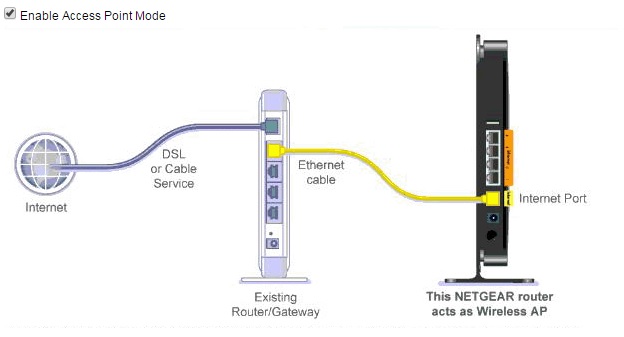
On my other system, the default IP address of the WRN2000 is 192.168.1.1 but the default IP address of the FWAG114 is 192.168.0.1. Unlike the above system, I can't access the FWAG114 via the WNR2000 as it doesn't show up under the WNR2000's attached wire devices (even though it is working fine as an access point).
Curiouser and curiouser.
Anyone else got any ideas???

TheEther
Aug 16, 2016Guru
Netgear's newer routers that have an AP mode setting repurpose the WAN port to behave like a LAN port.
Older routers that don't have an AP mode setting do not repurpose the WAN port, so the router must be connected through a LAN port.
If you want to use the FWAG114 as an AP, then you will need to change its IP address to belong to the subnet of the main router. For example, if the main router is using 192.168.1.1/255.255.255.0, then you can the FWAG114 to use 192.168.1.254 or 192.168.1.2. Whatever address you use, make sure that cannot be assigned as a DHCP address by the main router. Otherwise, you risk the possibility of an IP address conflict.
- sktn77aAug 16, 2016Virtuoso
Thank Ether. With my old setup, I'm pretty sure it was on the same subnet (192.168.0.x) and that I had also assigned it a static IP address. Tha t would appear to answer the question.
Thanks All
- JohnRoAug 16, 2016NETGEAR Employee Retired
Hello sktn77a,
We are glad to know that TheEther 's response answered your question. If your issue is now resolved we encourage you to mark the appropriate reply as the “Accepted Solution” so others can be confident in benefiting from the solution. The Netgear community looks forward to hearing from you and being a helpful resource in the future!
Thanks,
- sktn77aAug 18, 2016Virtuoso
Unfortunately, this was not the answer to the question. I just got an old WNR200v2 off CraigsList which appears to have the same generation hardware/firmware as my FWAG114 (and very different from the WNR2000v3). The latest firmware upgrade for the WNR2000v2 still has the old Netgear SmartWizard setup GUI in the firmware (like the FWAG114) and not the Netgear Genie (like the WNR200v3). The WNR200v2 has the default IP address of 192.168.1.1 so this was not the cause of the original problem I am having with the FWAG114 (and now the WNR2000v2). Like the FWAG114 (and unlike the WNR2000v3) the WNR2000v2 requires the cable from the main router to be connected to the LAN port and not the WAN port, thereby placing some major limitations on its use as an access point.
Pity Netgear can't provide a more informed response to basic questions like this on their products.
:(

Related Content
NETGEAR Academy

Boost your skills with the Netgear Academy - Get trained, certified and stay ahead with the latest Netgear technology!
Join Us!
