NETGEAR is aware of a growing number of phone and online scams. To learn how to stay safe click here.
Forum Discussion

demarlio25
Oct 06, 2023Aspirant
MR60 Disconnecting
Hello,
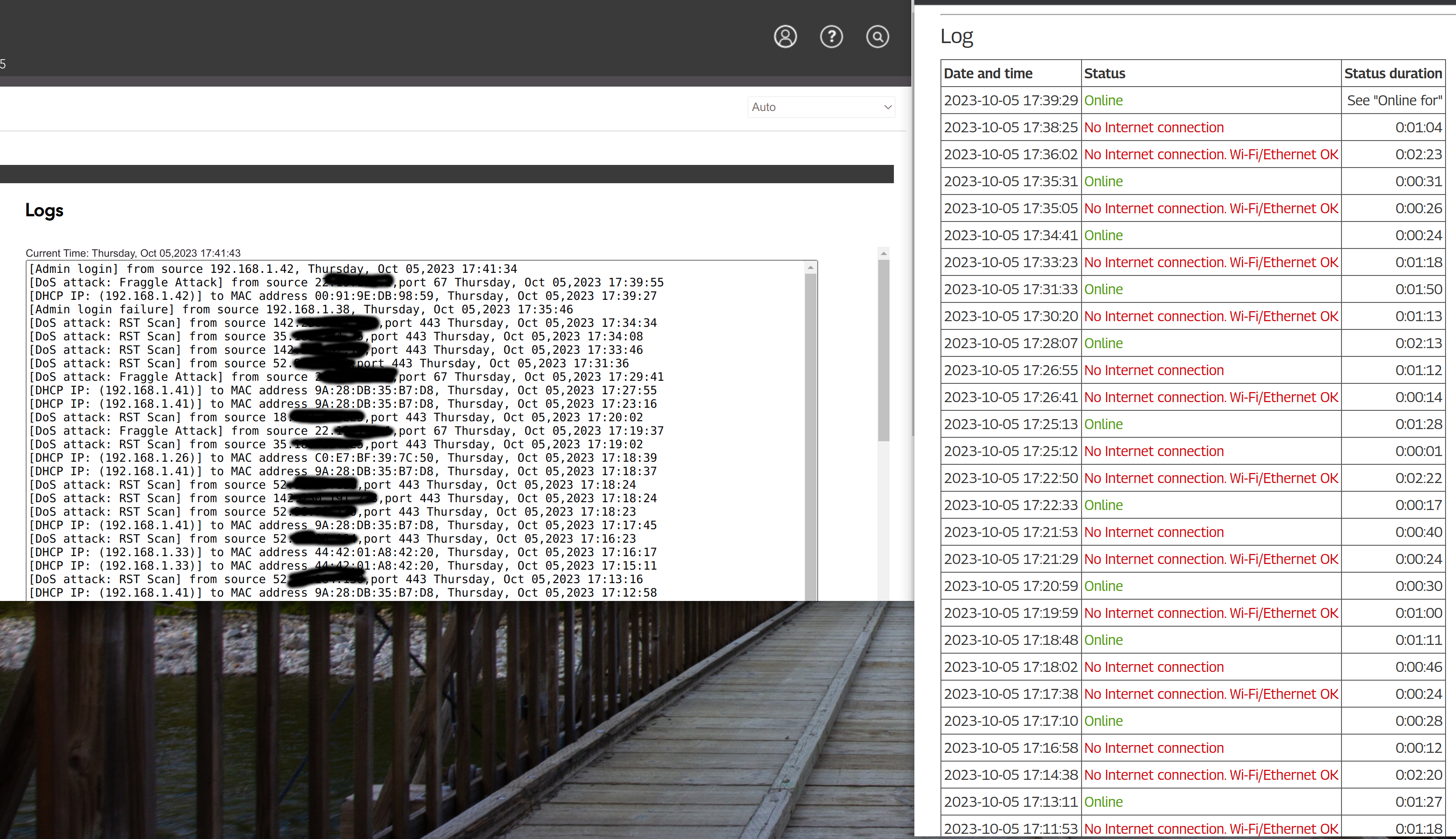
For some amount of time I've been having issues with my computing disconnecting from remote sessions though VNCSERVER or SSH. I had thought that maybe it was my VPN causing the issues but I stopped using the VPN and found that I was disconnecting very often. I started logging my internet connection and found that the computers (tested multiple machines in my house) were getting disconnected. I dug a little further and started looking at the logs from my MR60 and was seeing that often the disconnects would be associated with DoS attack notifications in the log. I did see others in this forum having similar issues but I did not see a result that actually fixed the disconnect problem. Anyone have an idea on how to stop the MR60 from disconnecting my devices?
In the attached image, the Netgear logs are on the left and the internet logs are on the right.
12 Replies
- FURRYe38Guru - Experienced User
What Firmware version is currently loaded?
What is the Mfr and model# of the Internet Service Providers modem/ONT the NG router is connected too?
Be sure your using a good quality LAN cable between the modem and router. CAT6 is recommended.Any MS deployed? If so, how many and distanced in between the MR and MS?
Do a online WhoIs lookup on those IP addresses to see where they are coming from.
Are devices wireless or ethernet connected to the MR?
- demarlio25Aspirant
Thanks for the response! By the way, this happening to multiple PCs (windows and Linux)
Firmware Version V1.1.7.134_2.0.65 Hitron Technologies EN2251 - I just got this a few months ago but was also happening with the previous modem.
I am using a CAT 5e cable. I will try some other cables that I have.
I have 4 MS installed. They are scattered throughout the house. The closest is probably 30 feet away and the farthest might be 60 feet away from the MR.
The IPs have NetName of GOOGLE, MSFT, GOOGLE-CLOUD, AT-88-Z (Amazon is the organization).
Devices are wireless to the MR/MS, but I've previously had them wired to the MS.
- FURRYe38Guru - Experienced User
What is the size of your home? Sq Ft?
Definitely try CAT6 cabling.
Has a factory reset and setup from scratch been performed since last FW update?
- michaelkenwardGuru - Experienced User
demarlio25 wrote:
I dug a little further and started looking at the logs from my MR60 and was seeing that often the disconnects would be associated with DoS attack notifications in the log.
Netgear's firmware is great at creating false reports of DoS attacks. Many of them are no such thing.
Search - NETGEAR Communities – DoS attacks
Use Whois.net to see who is behind some of them and you may find that they are from places like Facebook, Google, even your ISP.
Here is a useful tool for that task:
IPNetInfo: Retrieve IP Address Information from WHOIS servers
If these events are slowing down your router, that may be because it is using up processor time as it writes the events to your logs. Anything that uses processor power – event logging, QoS management, traffic metering – may cause slowdowns. Disable logging of DoS attacks and see if that reduces the problem. This does not prevent the router from protecting you from the outside world.
- demarlio25Aspirant
Thanks for the tips. I will try to remove the logging and see if that helps.
- demarlio25Aspirant
After removing 2 of 4 satellites and making sure they are within a reasonabl range, I've gotten the disconnects to go down to about 1 a day. I can handle that whereas before it was disconnecting fairly often and dropping SSH connections for me.
- demarlio25Aspirant
I spoke too soon. Today I am getting significantly more disconnects. I mght need to try going back to a trusty router and checking the stability
- FURRYe38Guru - Experienced User
Are the MS disconnecting or just the MR?
Does the front LED turn AMBER when this happens?
Be sure your using a good quality LAN cable between the modem and router. CAT6 is recommended.
Has a factory reset and setup from scratch been performed since last FW update? A complete pull of the power adapters for a period of time after the factory reset then walk thru the setup wizard and setup from scratch with a wired PC and web browser. https://kb.netgear.com/22697/How-do-I-install-my-NETGEAR-router-using-the-router-web-interface
Recommend setting the default DHCP IP address pool range to the following after applying and a factory reset: 192.168.#.100 to 192.168.#.200.
https://kb.netgear.com/24089/How-do-I-specify-the-pool-of-IP-addresses-assigned-by-my-Nighthawk-router
https://kb.netgear.com/25722/How-do-I-reserve-an-IP-address-on-my-NETGEAR-router
I would power OFF the ISP modem for 1 minute. Factory reset the router and power it off. Power ON the ISP modem and let it sync. Then power ON the router and walk thru the setup wizard again using a wired PC and a web browser.
Press the back reset button for 10 seconds then release.
https://kb.netgear.com/9665/How-do-I-perform-a-factory-reset-on-my-NETGEAR-router
https://kb.netgear.com/24233/How-do-I-erase-the-configuration-settings-on-my-Nighthawk-router