NETGEAR is aware of a growing number of phone and online scams. To learn how to stay safe click here.
Forum Discussion

claasse4
Oct 22, 2016Aspirant
Microsoft .NET error after update ReadyCloud client /RN102 6.60 OS
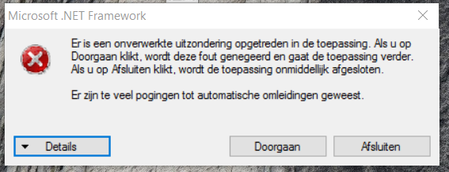
After updating my ReadyCloud client software (to v1.13) or the RN102 firmware (to 6.60) I suddenly experience a .NET-error blocking the (proper) use of IE/Chrome. Any idea (running Win10 o...
clinford
Oct 23, 2016Aspirant
On a Windows 10 Laptop I to have the same problem.
I have uninstalled and removed all c:/users/AppData and reinstalled from the Portal but still that same error. so I can't access any of my Readynas devices.
- FramerVOct 23, 2016NETGEAR Employee Retired
Hi clinford,
claasse4 I think experienced issues regarding the usage of the browser itself and not just the access of the ReadyNAS devices.
Just to clear it out, do you have any issues using your browser other than accessing the ReadyNAS? Can you also post a screenshot of the error that you are getting?
Regards,
- clinfordOct 23, 2016Aspirant
Hi FramerV,
Thanks for your reply, to confirm I ham having the issue when trying to use the ReadyCloud Windows desktop App. I can access the devices via https://readycloud.netgear.com fine.
- FramerVOct 24, 2016NETGEAR Employee Retired
clinford wrote:
Hi FramerV,
Thanks for your reply, to confirm I ham having the issue when trying to use the ReadyCloud Windows desktop App. I can access the devices via https://readycloud.netgear.com fine.
Hi clinford,
Is it also a .NET error, if you are; have you tried the steps done by claasse4?
You may also try to check if you can completely remove the ReadyCloud APP same as with topic posted below:
https://community.netgear.com/t5/ReadyCLOUD/remove-all-traces-of-readycloud-desktop-app/td-p/1070947
Please be aware the step describe there is involving registry editting.
Regards,
- claasse4Oct 24, 2016Aspirant
Hi FramerV,
I indeed had problems accessing the RC-DeskTop and indeed was also missing part of my browser (IE11 & Chrome) functionality (i.e. missing top-level bar required for login). All seems to be fixed by system-recovery (to an earlier date hence not so dramatic as Clinford did ..) and re-installing the DT-client (indeed via the website).
Kind regards,
Coen
- FramerVOct 24, 2016NETGEAR Employee Retired
Hi claasse4,
Thanks for clarifying.
Regards,

Related Content
NETGEAR Academy

Boost your skills with the Netgear Academy - Get trained, certified and stay ahead with the latest Netgear technology!
Join Us!
