NETGEAR is aware of a growing number of phone and online scams. To learn how to stay safe click here.
Forum Discussion

claasse4
Oct 22, 2016Aspirant
Microsoft .NET error after update ReadyCloud client /RN102 6.60 OS
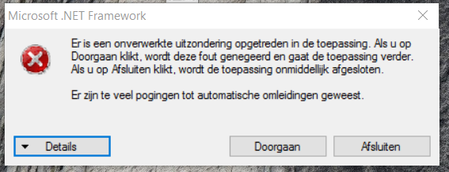
After updating my ReadyCloud client software (to v1.13) or the RN102 firmware (to 6.60) I suddenly experience a .NET-error blocking the (proper) use of IE/Chrome. Any idea (running Win10 o...
Retired_Member
Oct 25, 2016Hello claasse4
This error means the client can not download new installer from readycloud server,ReadyCLOUD engineering added new error handling in ReadyCLOUD client for this issue and they will release new version in the near feature.
can you please do something on your Windows computer to see if it can fix the issue?
***change DNS to 8.8.8.8 on your Windows computer
***disable firewall
- clinfordOct 26, 2016Aspirant
Thanks tried both DNS change and disable firewall and now working but a suitable long term solution as PC on Work Domain and so can't find Domain controller now wirh DNS set to Google: 8.8.8.8.
Alos domain policy is to have firewall, what are the port settings to allow Desktop App to work ?
 StephenBOct 26, 2016Guru - Experienced User
Add back your normal DNS server (but keeping 8.8.8.8 as well). That should still work.
The default port is 6300 (but you should be able to change it). https://community.netgear.com/t5/ReadyCLOUD/RN104-Router-Ports-to-open/m-p/948498/highlight/true#M613
Related Content
NETGEAR Academy

Boost your skills with the Netgear Academy - Get trained, certified and stay ahead with the latest Netgear technology!
Join Us!
