NETGEAR is aware of a growing number of phone and online scams. To learn how to stay safe click here.
Forum Discussion

martinw11
Oct 21, 2015Aspirant
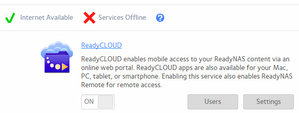
Netgear ReadyNAS 104 ReadyCLOUD Services offline
Hi, ReadyNAS 104, Firmware 6.4.0, has been working for > 1year but now services offline when I look at the Cloud: I can log on to the Cloud portal but it doesn't see the shares on the NAS bo...

martinw11
Oct 28, 2015Aspirant
** Update **
I used the leave process to disconnect the readyNAS to readyCloud and went through the process of rejoining.
It couldn't automatically see it, however, by holding down the backup button for 5 seconds I was presented with a "Manage" button.
Clicking on that brought up the NAS portal yet when I go to the Cloud tab it is still reporting that the "Services Offline"
Some more:
I stopped both the cloud and remote services.
Checked the settings in the remote services and noticed that, somehow, the "Use Proxy" was ticked - I know that the client would not have gone in there so it's a mystery why that suddenly was enabled.I hadn't touched the unit until it was already a problem - Firmware update perhaps??
Unitcked that and restarted the 2 services and now had Services Available - I nearly urinated in my pants with joy.
However, when I went to the ReadyCloud I could not see any of the shared folders.
I checked permissions and all seemed to be in order.
In frutsration, and to get a 5 minute break, I rebooted the NAS.
(For those interested I had 2 different shaped Arnott biscuits which I concluded were actually exactly the same except for the shape)
After the NAS rebooted I could only see the ReadyRemote was on - I turned it off, I turned back on the cloud (which turns them both on)
I then checked on the ReadyCloud and all appears to be back as it should be. I'll do some further testing but it looks like it could resolved by:
Disconnecting the device from ReadyCloud and rediscovering - reboot and check again
OR
It may have been the check box on the ReadyRemote (Proxy) which was upsetting it.
I thank those who participated and apologise for such a long post.
With thanks and regards,
Martin

SteadfastElk
Dec 02, 2015Aspirant
I had exactly the same problem as Martinw11, after updating my Readynas 104 to firmware 6.4.1 today.
Went into the Readynas' local admin panel and under CLOUD turned the services off and then back on.
Now, miraculously the Readynas was recognized in Readycloud again. Didn't even have to do an extra discovery!
Hope this helps someone.
Related Content
NETGEAR Academy

Boost your skills with the Netgear Academy - Get trained, certified and stay ahead with the latest Netgear technology!
Join Us!
