NETGEAR is aware of a growing number of phone and online scams. To learn how to stay safe click here.
Forum Discussion
martinw11
Oct 21, 2015Aspirant
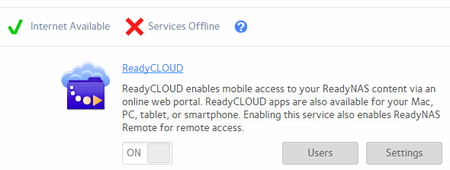
Netgear ReadyNAS 104 ReadyCLOUD Services offline
Hi, ReadyNAS 104, Firmware 6.4.0, has been working for > 1year but now services offline when I look at the Cloud: I can log on to the Cloud portal but it doesn't see the shares on the NAS bo...
JennC
Oct 21, 2015NETGEAR Employee Retired
Hello martinw11,
What's the current firmware version of the NAS?
Are you able to load "Available apps"?
Regards,
- martinw11Oct 21, 2015Aspirant
Hi JennC,
Many thanks for your reply.
As mentioned, the Firmware version is up to date showing 6.4.0 and nothing to update when I ask it to. I can get to the apps tab but there are no apps loaded.
Regards,
Martin
- JennCOct 22, 2015NETGEAR Employee Retired
Hello martinw11,
Can you check under Available apps?
Also, the DNS servers you have, can you make the router IP as the DNS server? Remove 8.8.8.8 and replace with 4.2.2.2.
Reboot the NAS too.
Regards,
- martinw11Oct 28, 2015Aspirant
Hi,
Apologies for the long delay. Unfortunately things get on top of us.
With regards to the suggestion I can answer as follows:
The available apps appear when I go to the Apps tab and look into the available apps.
The addition of the 8.8.8.8 was an attempt to resolve the issues after the issue started. This device has been working for some time without an issue.
The DNS server was originally configured to use the router, I just added a secondary as 8,8,8,8
I have removed the 8.8.8.8 DNS and replaced it with the 4.2.2.2 that you have suggested.
I can still see the available apps, however, I am still unable to connect to the "cloud" and still appears as "Services offline"
In addition, when I logon to the ReadyCloud portal and go to Manage I can see the device and it reports as healthy
It spends a lot of time looking for the shared folders but cannot list them out.
When I try and go to the Admin page I get an error saying that it can only be accessed from the LAN that it is on - which is where I am already and I can access the device from the browser without an issue.
With thanks for your continued support,
Martin
Related Content
NETGEAR Academy
Boost your skills with the Netgear Academy - Get trained, certified and stay ahead with the latest Netgear technology!
Join Us!

