NETGEAR is aware of a growing number of phone and online scams. To learn how to stay safe click here.
Forum Discussion

drhjorgensen
Nov 17, 2020Aspirant
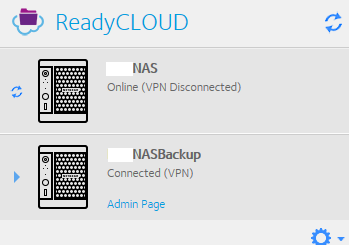
ReadyCLOUD NAS online (VPN Disconnected)
I am getting the dreaded ReadyNAS "Online (VPN Disconnected)" message for a single ReadyNAS. We have two identical ReadyNAS RN31200's in two different locations, each running the latest firmware. Thi...

Marc_V
Nov 18, 2020NETGEAR Employee Retired
Have you tried rebooting the NAS and also checking your NIC settings if you have any DNS Server addresses added?
You may also want to try toggling the ReadyCloud service from the Cloud tab
HTH
drhjorgensen
Nov 18, 2020Aspirant
Yes, Mark, I've done all those things. Several times.
Changed DNS... normally I use DYN's 208.67.222.222 + .220 and I added Google's 8.8.8.8 for DNS
I've toggled the ReadyCloud service many times. Still getting "Services Unavailable" and no idea why... the log doesn't point to what address it's trying to connect to, for example...
Upgraded firmware on the Cisco RV110W router.
Still no luck.. and just out of the blue.
I'm wondering about a Security Certificate problem?
At a loss here...
- CrossieRonnieNov 19, 2020Tutor
I am having the same issue. With VPN Disconnected. I dont want to start changing settings until I know the change is going to work.
Looking back through the forum, this situation has happened before. But there was no solution! So i think its to do with Netgear servers or something on their end.
- drhjorgensenNov 19, 2020Aspirant
So we moved the BackupNAS we have to the office and connected it to the same network switch as the NAS that fails to connect to ReadyCLOUD. The BackupNAS is working fine with ReadyCLOUD. So that tells me there is a problem with the NAS device itself, but nothing in the log points to what the problem might be...
Any ideas?
 StephenBNov 20, 2020Guru - Experienced User
Is the NAS using DHCP?
Related Content
NETGEAR Academy

Boost your skills with the Netgear Academy - Get trained, certified and stay ahead with the latest Netgear technology!
Join Us!
