Forum Discussion

Blueray3
May 28, 2016Guide
ReadyCLOUD not working with apps but works from web
Upgraded to 6.5.0 and migrated to my.netgear. I can see my shares and files with readycloud.netgear login. Upgraded android, IOS and Windows 7 app and using the same login/pwd receive message li...

dschwartzer
Jun 10, 2016Luminary
This sounds like the same problem I am having. Just had to reconstruct my RN202 after a HDD issue. I had previously upgraaded to OS 6.5 and the SSI MyNetgear account and everything worked fine.
I am able to connect to all shares under ReadyCloud on a desktop. Using the iOS app, I log in and the app says my ReadyNAS is "Online". When I select the device, I see all of the shares and at the top it says 'Connecting: but then changes to "Disconnected", but I can still see the shares and the content in the shares, except for the Home folder. In the Home folder I have created a sub folder and that does not appear on the iOS app and it too changes from Connecting to Disconnected.
Any thoughts would be appreciated.
Regards,
David

mrQQ
Jun 12, 2016Apprentice
Same here. Always says disconnected.
- BrianL2Jun 14, 2016NETGEAR Employee Retired
Hi 3square, OPO, dschwartzer & mrQQ,
If you can login but cannot access the shares or got stuck at connecting, try to disable IPv6 on the active ethernet (NIC) interface of your ReadyNAS system. Also, unchecking the encryption checkbox under the cloud settings page would help. Last resort would be leaving the cloud completely by clicking the 'Leave' button (ensure that all ReadyCLOUD private home shares were backed up) and re-login your admin ReadyCLOUD account.
Kind regards,
BrianL
NETGEAR Community Team- dschwartzerJun 14, 2016Luminary
BrianL:
Thanks for your note. Per your instructions, I turned off IPv6 on the NIC card and turned off Encryption on the Security tab. At that point I could get into all of the shares, including the Home share but could not see any of the subfolders in any of the shares. A restart of the server did not help either.
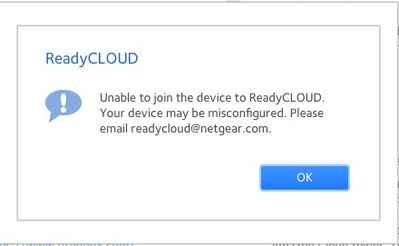
I then left ReadyCloud and tried to rejoin it. Using my original My Netgear email address, I got the error message:
"Unable to join ReadyCloud.
Your device may be misconfigured. Please email [email protected]"
A screen shot is attached.
I should point out that I did eamil readycloud several days ago and got a response from Andrei Ramaniuk. I priovided some aditional information requested but never heard back.
When I used the newer MyNetgear email I set up the other day, I did connect (IPv6 and Encryption are still turned off) and can see all of the content.
I think I need to give it a day or two to see if this lasts since I had successfully connected over the weekend and then it just stopped working. I would still like to get my original ID working as that was supposed to be my primary ID.
Any other suggestions would be appreciated.
Regards,
David

Related Content
NETGEAR Academy

Boost your skills with the Netgear Academy - Get trained, certified and stay ahead with the latest Netgear technology!
Join Us!
