NETGEAR is aware of a growing number of phone and online scams. To learn how to stay safe click here.
Forum Discussion

dmkeng
Sep 02, 2015Aspirant
ReadyNAS Online (VPN Disconnected)
Hi, I have two RN10222D ReadyNAS units, one at my home and the other at my office. I have ReadyCloud Windows app installed on my home computer, office computer and laptop. From either home or offi...
LilRos
Sep 19, 2015Aspirant
What was the outcome of this? I am constantly getting the same promlem with users of our NAS in the office. Sometimes it'll work but mostly not. I have to find a solution otherwise I'll have to look at some other way for remote access for my users.

EskenderNG
Sep 19, 2015NETGEAR Employee Retired
Hi,
I sent a PM to you.
Bye,
Eskender
- CIWYJun 23, 2016Tutor
I am having the same problem, using Ready Nas (ReadyCloud Client v.1.3) on Mac OS X Yosemite.It connects but says VPN disconnected.
Everybody else in the office or from home is able to access it.
Is has been working once, but since then didn't work again. I can access online without trouble.
- BrianL2Aug 14, 2016NETGEAR Employee Retired
Hi BarryfromNL & CIWY,
Was this problem being experienced on another PC? or ReadyCLOUD user account? The problem might be with the app installed on the computer that you've used.
Kind regards,
BrianL
NETGEAR Community Team- DeeeBeeeAug 16, 2016Aspirant
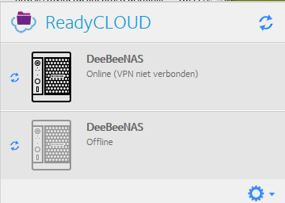
Also the same problem (VPN Disconnected) for me.
Since several weeks I have problems to access my NAS RN102.
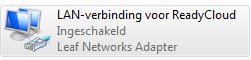
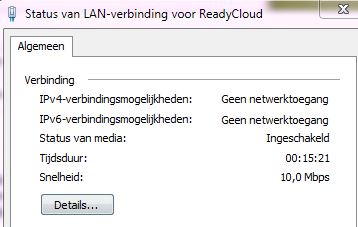
Now for the first time I see in the readycloud software a message (VPN disconnected). When I check the network connection (Leaf networks adapter) I see also some difficulties.
I add some screenshots to give you a view on this info
It would be great to receive a claer and final solution!
.

Related Content
NETGEAR Academy

Boost your skills with the Netgear Academy - Get trained, certified and stay ahead with the latest Netgear technology!
Join Us!
