NETGEAR is aware of a growing number of phone and online scams. To learn how to stay safe click here.
Forum Discussion

JMEAST
May 04, 2017Aspirant
NetgearRN212 offline. Can't access readycloud
I moved the NAS into a different office room and internet is connected via a different access point in the wall. I now can't access NAS as it just says Offline. I urgently need to have access to read...
- May 05, 2017
Hi all
I finally got an IT guy in and he reckoned I'd plugged the network plug in the wrong hole at the back of the NAS. After much restarting and reinputting passwords, it finally worked. I hate technology!
xiao123
May 05, 2017NETGEAR Expert
JMEAST wrote:
I moved the NAS into a different office room and internet is connected via a different access point in the wall. I now can't access NAS as it just says Offline. I urgently need to have access to ready cloud but have no idea on how to make it online and accessible. All lights seem to be on the box, the internet is working. I have admin rights.
Hi JMEAST,
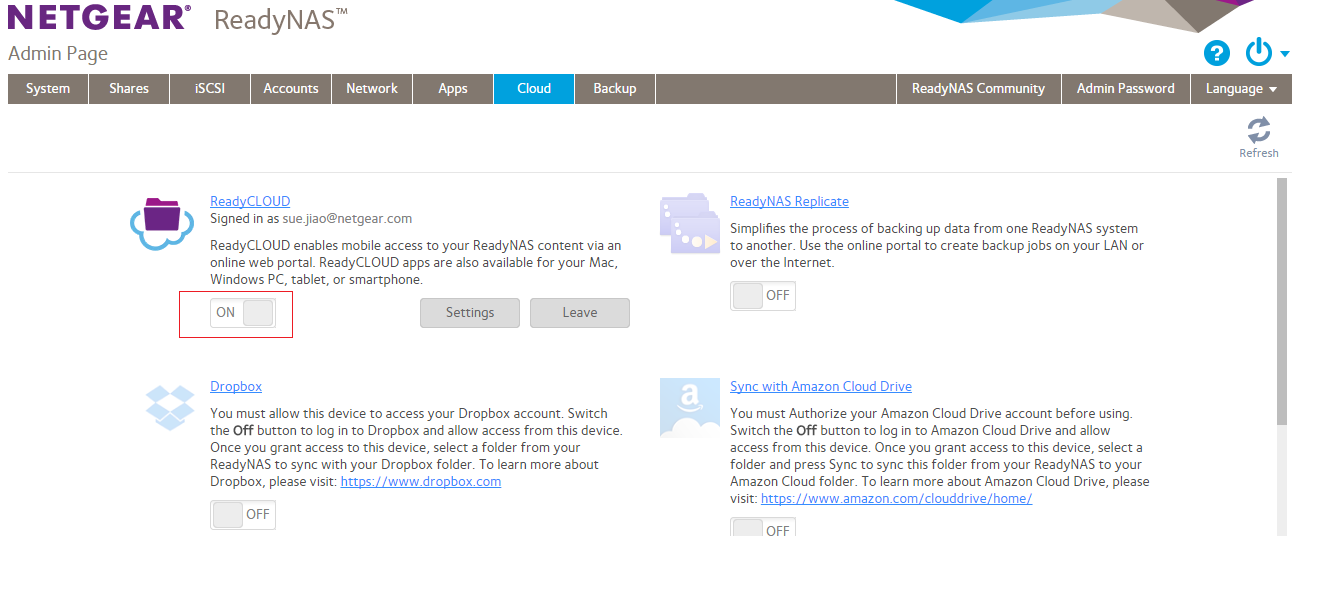
Please check your readycloud service was on or off(see attachment), if its off, then check dns server and gateway setting, set dns to be 8.8.8.8, turn on readycloud service again.
JMEAST
May 05, 2017Aspirant
It says ON.
 StephenBMay 05, 2017Guru - Experienced User
And you are seeing confirmation of both internet and cloud service on the cloud page of the web ui?
Also, what firmware are you running.
- JMEASTMay 05, 2017Aspirant
Hi all
I finally got an IT guy in and he reckoned I'd plugged the network plug in the wrong hole at the back of the NAS. After much restarting and reinputting passwords, it finally worked. I hate technology!
- StephenBMay 05, 2017Guru - Experienced User
JMEAST wrote:
Hi all
I finally got an IT guy in and he reckoned I'd plugged the network plug in the wrong hole at the back of the NAS. After much restarting and reinputting passwords, it finally worked. I hate technology!
Both ethernet ports function identically, but they might have been manually configured differently in the NAS. Also your enterprise firewall rules or DHCP server might be set up for one specific NIC.
Anyway, I'm glad you got it sorted out. You might stick a label on the back of the chassis, to prevent this from happening in the future.
Related Content
NETGEAR Academy

Boost your skills with the Netgear Academy - Get trained, certified and stay ahead with the latest Netgear technology!
Join Us!