NETGEAR is aware of a growing number of phone and online scams. To learn how to stay safe click here.
Forum Discussion

Cosimo
Nov 17, 2017Star
ReadyNAS 102 - I can't access to the folders with admin password
Dear all,
Sorry if this is the wrong section.
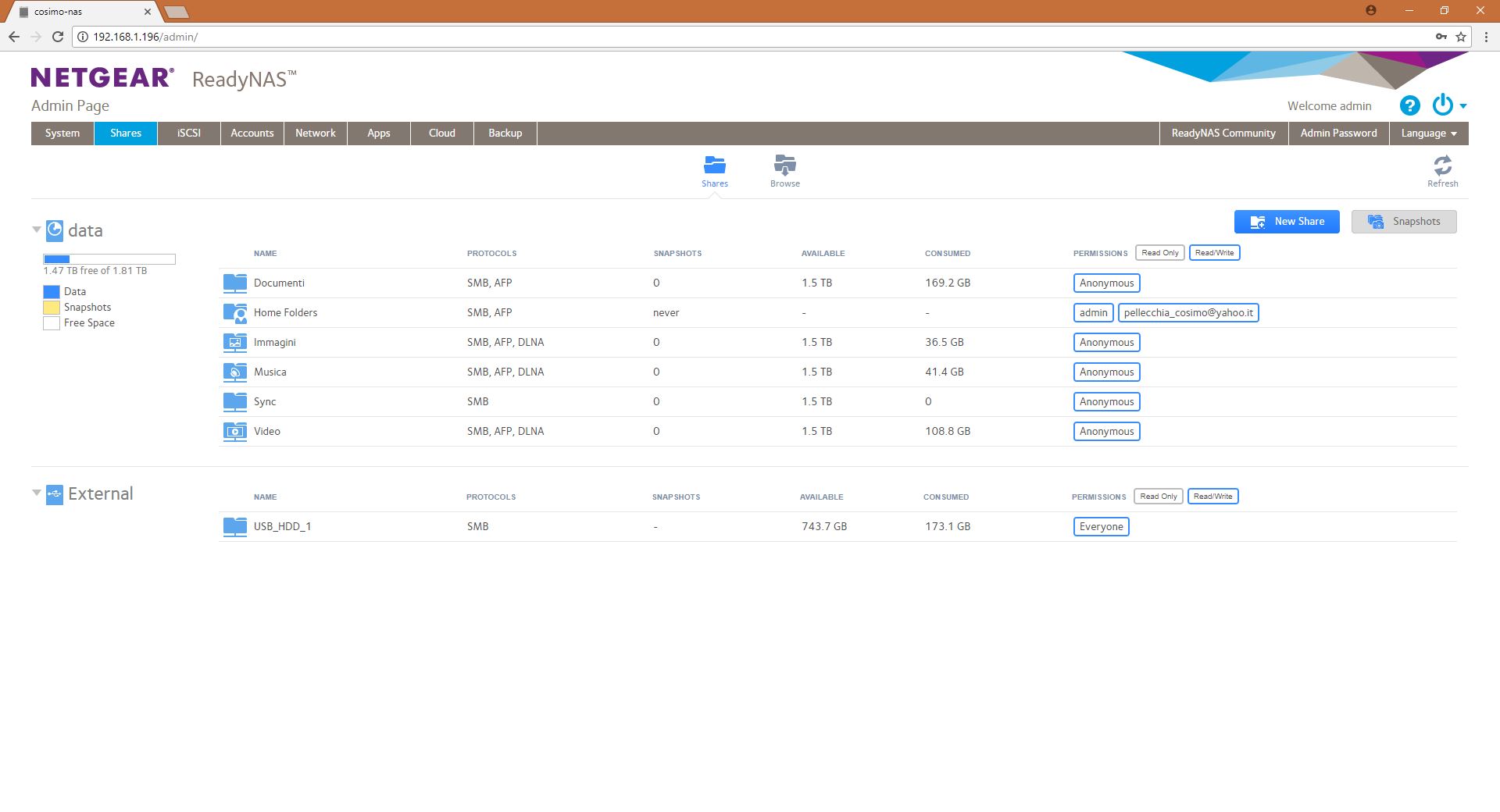
I can't access to the folder in my readyNAS if I sets permissions as "admin";
When I write the correct password for the admin profile, windows replicates: "Can't access etc..."
The only way to access to my folders is to set up the permissions for each folders to "Anonymous"!
Above, the actual setting of shares, that is the only one that work.
I would like to protect some folder, limiting the permissions.
Thank you to anyone can be of some help!
Dear StephenB,
Thank you for the explanation and the help.
Regards, Cosimo.
17 Replies
Replies have been turned off for this discussion
- SandsharkSensei
Can you post a translation of the error message? I can't read it well enough in the screen capture to put it into a translator.
Do you ever access the NAS. or have drives mapped, as a user other than admin? Windows does not allow you to use two sets of credentiaals for the same network device.
Dear Sandshark,
First of all thank you for your help and my apologies for my english.I can access to the NAS clicking on windows network (see image).
Or I can access to the NAS through google chrome using the IP. At that time the NAS ask me for my admin credentials and the password works in that case.
Sorry but it's not clear for me what do you mean for "drives mapped"; Anyway these are the "users" if I go on the Network Access setting of one folder:
Instaed just one user is present on the windows "accounts".
When I try to go into one folder with only admin access, windows show me this:
But if I write the correct password, windows answer to me with that error message that essentially says that probably I do not have the rights to go on and, in the second statement, just as you say, that multiple connections using the same user name are not allowed.
Anyway I tried to create a new user and i tried the access using this new account but doesn't' work anyway...
Thank you....
- SandsharkSensei
The message about "multiple connections using the same user name are not allowed" is the one saying you cannot have two sets of credentials for the same device. You most likely already have credentials for some shares consisting of your Windows user name with no password because they are open to all. Now you are trying to establish another set of credentials using admin, and Windows will not allow it.
First, try opening a command prompt and type net use * /delete. If that does not do it, then go into the Windows Credential Manager (type credent into search and it should show up), delete any credentials associated with the NAS, and then access the share that requires admin. The password should now work and from then on, you will also be logging into the open shares as admin and Windows may ask you for a password even though one is not needed unless you tell Windows to remember your credentials (which puts them in the Credentials Manager).

Related Content
NETGEAR Academy

Boost your skills with the Netgear Academy - Get trained, certified and stay ahead with the latest Netgear technology!
Join Us!