NETGEAR is aware of a growing number of phone and online scams. To learn how to stay safe click here.
Forum Discussion

robjd
Jun 15, 2016Aspirant
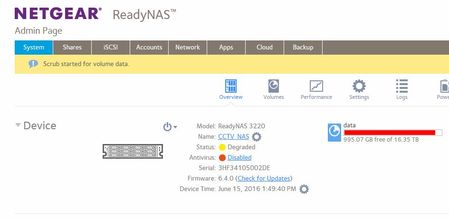
ReadyNas 3220 volume degraded
We cannot write any data to our data share anymore .... it doesnt seem like a security issue. On the Admin page the volume is showing as degraded. i am now running a SCRUB on this volume. Ca...

StephenB
Jun 15, 2016Guru - Experienced User
Running a scrub when the volume is already degraded is risky - if any disk failures occur the volume can be lost.
Whenever you see a degraded volume, the first thing to check is the disk status. That includes downloading the log and reviewing the SMART stats.
- robjdJun 15, 2016Aspirant
Thanks for your reply.
All of the disks are showing 0 errors and ONLINE status.
What should I focus on in the logs please?
- StephenBJun 15, 2016Guru - Experienced User
It might be faster if you use Netgear support.
Your volume is very full, and that might be part of the problem.
- Retired_MemberJun 15, 2016
robjd wrote:What should I focus on in the logs please?
The volume is most likely full(y allocated).
Download the logs, and check btrfs.log
Label: foo  uuid: bar
        Total devices 1 FS bytes used <actual data in volume>
        devid    1 size <volume capacity> used <data allocation> path /dev/sdd
if <data allocation> is the same as <volume capacity>, that's most likely the source of your issue.
- robjdJun 16, 2016Aspirant
Thansk for your response!.
Will check this out.
Rob
Related Content
NETGEAR Academy

Boost your skills with the Netgear Academy - Get trained, certified and stay ahead with the latest Netgear technology!
Join Us!
