NETGEAR is aware of a growing number of phone and online scams. To learn how to stay safe click here.
Forum Discussion

MalcolmSlaney
Mar 23, 2025Aspirant
Restore RAID to ReadyNAS System
How do I restore my ReadyNAS 316 to full RAID? Before this all started I had 5 disk drives, and my recollection that everything was happily RAIDed. I got an error message that Drive 3 was failing...

StephenB
Mar 24, 2025Guru - Experienced User
MalcolmSlaney wrote:
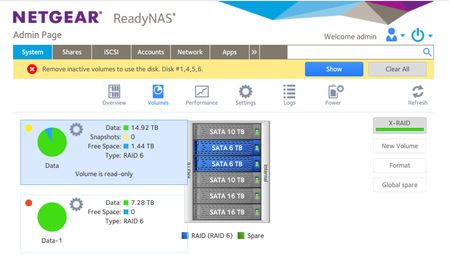
I got an error message that Drive 3 was failing, so I plugged in a new 16TB drive into slot 6. Then all went haywire.
Why? The proper response was to pull Drive 3 and insert the new drive in slot 3.
MalcolmSlaney wrote:
The attached picture shows how my system looks now. Only 2 drives (both 6TB) are listed as RAID, while the other four drives, including the new one, are gray. Yet the I have two volumes with 15TB on one and 7TB on the other.
Does this mean that some of my data is not fully duplicated?
And given that four of my drives are listed as not RAID, does this mean that I can't remove them?
The RAID array has failed in some way. DON'T remove any drives or delete any volumes right now - this will likely result in data loss.
Download the full log zip file from the logs page in the web ui. There are clues in there. If you need help analyzing it, you can upload the full zip file into cloud storage (dropbox, google drive, etc) and send me a private message (PM) with a download link. Make sure the link permissions are set so anyone with the link can download. You send a PM using the envelope icon in the upper right of the forum page.
MalcolmSlaney wrote:
I don't have another system to copy all the data onto. What can I do to get the ReadyNAS to recover?
Unfortunately, RAID is not enough to keep your data safe. If you don't have a backup plan, then at some point you will lose the data. It is just a matter of when. So after you get through this, you should look into setting up a backup plan for your data.
MalcolmSlaney
Mar 24, 2025Aspirant
Thank you Stephen for your response.
I had an empty slot in my NAS, so I thought it was better to add a new good drive than to remove one that was failing (but still usable).
I should have included the logs. I read through them and nothing popped out at me, but I certainly don't understand all the messages I am seeing. Here is the status.log and the volumes.log. I should have included them in the original note. I'll share the entire log zip separately.
I do have a new 16TB disk on order, and worst case I can do a backup and restore. But it seems like ReadyNAS should have enough space and knowledge to restore its current version.
Is there a way to mark a disk as about to be removed so it can move all data off of it?
Thanks.
- Malcolm
Related Content
NETGEAR Academy

Boost your skills with the Netgear Academy - Get trained, certified and stay ahead with the latest Netgear technology!
Join Us!
