NETGEAR is aware of a growing number of phone and online scams. To learn how to stay safe click here.
Forum Discussion

MalcolmSlaney
Mar 23, 2025Aspirant
Restore RAID to ReadyNAS System
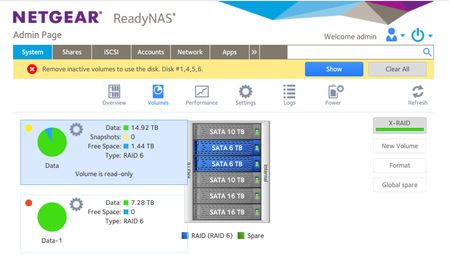
How do I restore my ReadyNAS 316 to full RAID? Before this all started I had 5 disk drives, and my recollection that everything was happily RAIDed. I got an error message that Drive 3 was failing...

Sandshark
Mar 24, 2025Sensei
You don't actually have two volumes. You have two sections of one volume that the OS cannot reconcile as one. So, it labels the second section data-0 since there can't be two with the same name. The blue normally indicates which drives are a part of which volume. data is currently selected, and this shows the NAS sees those two drives as one volume. If you select the data-0 "volume", it will turn others blue. What I find as odd is that is says the size of the two 6TB is over 14TB, which cannot be. But I guess that's just more of the confusion the OS has in assembling the volume.
The end result is that none of your data is accessible and you are going to have to manually re-assemble it into one volume to be able to access it. Some data loss is probable.
The likely cause is that the failing drive did completely fail during the RAID re-sync of the added drive. During re-sync, a RAID is not fully redundant. Whether your data is recoverable, and to what extent, may depend on just how badly failed drive 3 is. StephenB is quite good at helping others recover as much data as they can, so let him help you. But even if you succeed, you most likely are going to need to back up your data to another device so you can ultimately rebuild the volume from scratch. But you will then have a device you can use for continued backups. If the other 6TB drive is as old as the one that failed, you may want to consider leaving that one out in the rebuild.
MalcolmSlaney
Mar 24, 2025Aspirant
Thank you Sandshark. When I do select the disk it does show the other four disks, and suggests they are all RAID'ed.
I haven't probed everything, but it the data I have looked for is there....... but I don't have a lot of confidence in the system!
But it does seem like I have 23T of data, across two volumes... so my soon-to-arrive 16T disk is not enough. Can I back up these two volumes to two different disks?
And what does it mean when it says that disk 1, 4, 5, 6 are inactive? They look active in Data-1 to me... it seems. I'm confused.
-- Malcolm
P.S. I saw advice elsewhere that Raid 6 is not a good solution for consumer disks this big. What should I use?
 StephenBMar 24, 2025Guru - Experienced User
MalcolmSlaney wrote:
P.S. I saw advice elsewhere that Raid 6 is not a good solution for consumer disks this big. What should I use?
There's a lot advice out there, some of which I personally disagree with.
First you need to try to get the volume mounted, so you can back it up. The data is at risk.
Personally I use RAID-5. Though I also have a solid backup plan in place, so I won't lose any data if my main NAS fails.
You are using RAID-6 now. If you want to switch to RAID-5 then you'd either need to use some rather tricky linux commands with ssh, or you'd need to start over and restore your data from backup.
One problem with your setup - to get maximum storage, you need the biggest 4 disks in the array to be the same size.
Before you added the 16 TB disk the other day, you had 2x6TB+2x10TB+1x16TB. This was wasting 18 TB of space. 5x6TB would have given you the same volume size. You really should have four 16 TB in this system if you want to run RAID-6. You'd replace the two smallest with 16 TB (including the failed one in bay 3).
RAID-5 is more flexible in that regard. It just needs the largest two disks to be the same size.
MalcolmSlaney wrote:
When I do select the disk it does show the other four disks, and suggests they are all RAID'ed.
But it does seem like I have 23T of data, across two volumes... so my soon-to-arrive 16T disk is not enough. Can I back up these two volumes to two different disks?
The short answer is that the volume page is confusing because of the errors. As Sandshark says, you only have one data volume.
Removing inactive volumes (following the advice in the screenshot) will destroy any chance of getting your data back, so do not follow that advice.
What you should have now is two RAID groups.
- One is 6x6TB RAID-6. This is assembled into md127 (which you will see in your logs)
- The second is 4x4TB RAID-6 (using the extra space on the two 10 TB disks, plus 4 TBs of space on the two 16 TB drives. This is assembled in md126.
- The remaining space on the 16 TB disks can't be used in RAID-6.
md126 and md127 are virtual disks. The BTRFS file system concatenates them together into your data volume.
The log zip shows that the two virtual disks are being assembled, but some corruption is causing BTRFS errors. The inactive volume status isn't showing up in the logs - instead they show the volume as mounted Read-only. So that is inconsistent with the screenshot. It is possible that the volume failed after the log was taken.
The steps I sent in the PM message should give us some more information on that.
- SandsharkMar 26, 2025Sensei
If you can get to your data and it's really just read-only and not partly unmounted, then, yes, back it up immediately. Using two 16TB drives is fine. You're going to have to manually decide how to divide the data up, but that's not a big deal.
While switching from RAID6 to RAID 5 isn't actually all that tricky via SSH (since you are expanding, not reducing space), you don't even want to mess with that. I have found no way to reliably go from read-only to read/write. You are going to want to at least destroy and re-create the volume if not do a full factory reset. Do you have apps installed? App data is also on the data volume, so you have to also back that up via SSH if you are just going to re-create the volume and not factory default.
Here is what I would do:
- Back up the data to two new 16TB drives using a USB dock connected directly to the NAS and backup jobs.
- Factory default with just the two existing 10TB and 16TB drives, accepting the standard RAID5 XRAID.
- Re-configure everything and restore the data from the new drives.
- One at a time, add each of the 16TB to the NAS and let it sync. You can wait till you actually need the space before adding one or both.
Given your OS is a bit confused, I think this is safer than just destroying the volume(s). And I wouldn't even risk saving and restoring the configuration.
Then, decide what you are going to do for a backup plan in case you aren't as lucky next time.
Related Content
NETGEAR Academy

Boost your skills with the Netgear Academy - Get trained, certified and stay ahead with the latest Netgear technology!
Join Us!

