NETGEAR is aware of a growing number of phone and online scams. To learn how to stay safe click here.
Forum Discussion

Kitias
Apr 05, 2011Aspirant
Windows 7 NV+ Compatibility/Support
Has there been any update on when the NV+ will support Windows 7? Mine is sitting collecting dust. It's almost to the point of ditching it completely and getting one from a company that supports a...

PapaBear1
Apr 23, 2011Apprentice
Are you using any third party Anti-Malware such as McAfee or Symantic?
Are you using any third party firewalls?
Since you can connect with RAIDar and then use the Setup in RAIDiator, I am not sure why you cannot connect to the shares.
Do you perhaps have a user name and a password set up on the shares? If so, is the user name and password the same as you used for Windows 7?
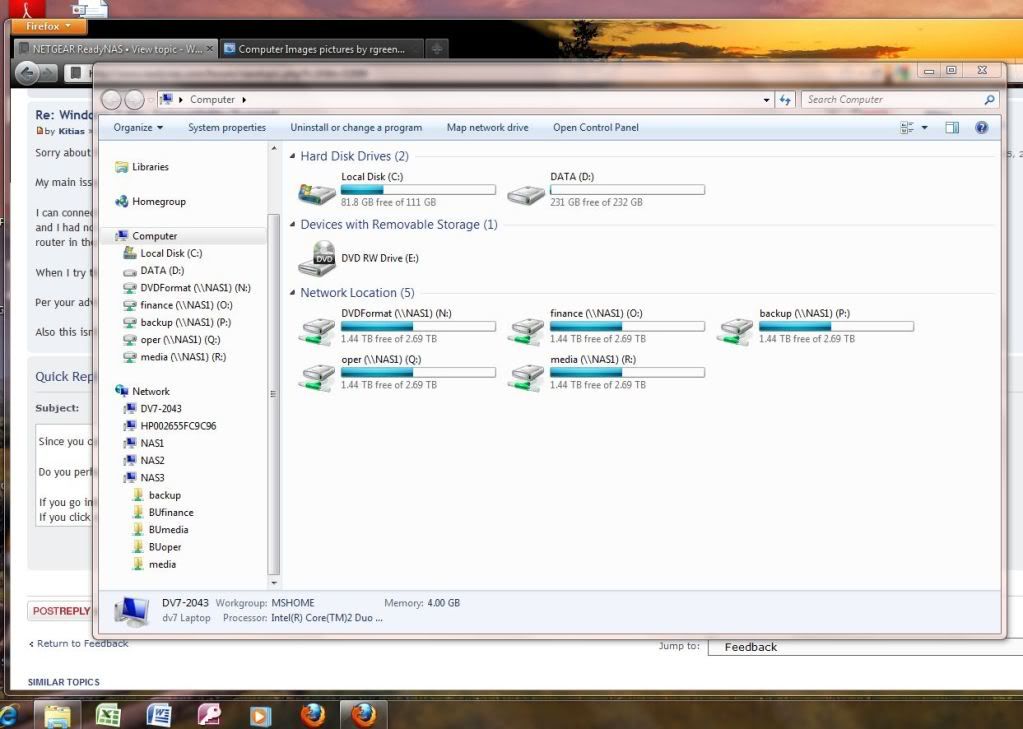
If you go into Windows Explorer (or Computer) in Win 7, in the lower portion of the left hand window (folder tree) all network connections should be shown. Your NAS should be shown. If you click on the arrow ahead of the NAS name, it will show the shares. In the image below in the left hand pane, you should see my NAS3 and the 5 shares. In the right hand window the 5 network connections with drive letters are the 5 mapped shares of NAS1 (NVX BE).
From the time Windows 7 came out on Oct 22, 2009 until I got my first NVX in June, 2010 the only NAS I had was my NV+ and had no problem accessing the files or mapping the shares.
Can you perhaps tell us how you are trying to access the files and/or shares?
From the tree in Computer or the same tree in Windows Explorer you should be able to drill all the way down to an individual file listing and then by double clicking on the file, open it with the application that created it. If you cannot, what error messages are you getting?
By the way, if you have a spare hard drive, you do not need to reload/reinstall the various operating systems. On my main machine (custom build with a Gigabyte brand MB) I currently have Win7HP 64bit, VistaHP 32bit and XP Pro 32bit, each installed on it's own hard drive. I then use the Boot Menu to select the drive (and OS) I want to boot from. I have a 5 year old HP that I have a similar arrangement between Vista and Win7, but since it is a manufactured machine, I have to use the BIOS setup to select the boot drive. So the next time you want to change Operating Systems, just disconnect the cables to the current drive with Win7 and connect the new drive and install XP. I have a triple boot because I sometimes need to open the older versions to answer questions on another forum. If you install the second OS on a second drive make sure you disconnect the other drive during the OS install. Otherwise it will affect the boot manager of the other drive. Once installed you can connect both drives and either OS can see the files on the other drive.
Are you using any third party firewalls?
Since you can connect with RAIDar and then use the Setup in RAIDiator, I am not sure why you cannot connect to the shares.
Do you perhaps have a user name and a password set up on the shares? If so, is the user name and password the same as you used for Windows 7?
If you go into Windows Explorer (or Computer) in Win 7, in the lower portion of the left hand window (folder tree) all network connections should be shown. Your NAS should be shown. If you click on the arrow ahead of the NAS name, it will show the shares. In the image below in the left hand pane, you should see my NAS3 and the 5 shares. In the right hand window the 5 network connections with drive letters are the 5 mapped shares of NAS1 (NVX BE).
From the time Windows 7 came out on Oct 22, 2009 until I got my first NVX in June, 2010 the only NAS I had was my NV+ and had no problem accessing the files or mapping the shares.
Can you perhaps tell us how you are trying to access the files and/or shares?
From the tree in Computer or the same tree in Windows Explorer you should be able to drill all the way down to an individual file listing and then by double clicking on the file, open it with the application that created it. If you cannot, what error messages are you getting?
By the way, if you have a spare hard drive, you do not need to reload/reinstall the various operating systems. On my main machine (custom build with a Gigabyte brand MB) I currently have Win7HP 64bit, VistaHP 32bit and XP Pro 32bit, each installed on it's own hard drive. I then use the Boot Menu to select the drive (and OS) I want to boot from. I have a 5 year old HP that I have a similar arrangement between Vista and Win7, but since it is a manufactured machine, I have to use the BIOS setup to select the boot drive. So the next time you want to change Operating Systems, just disconnect the cables to the current drive with Win7 and connect the new drive and install XP. I have a triple boot because I sometimes need to open the older versions to answer questions on another forum. If you install the second OS on a second drive make sure you disconnect the other drive during the OS install. Otherwise it will affect the boot manager of the other drive. Once installed you can connect both drives and either OS can see the files on the other drive.
Related Content
NETGEAR Academy

Boost your skills with the Netgear Academy - Get trained, certified and stay ahead with the latest Netgear technology!
Join Us!
