NETGEAR is aware of a growing number of phone and online scams. To learn how to stay safe click here.
Forum Discussion

paynterf123
Nov 22, 2019Aspirant
Can access existing shares but not new ones on ReadyNas NV+
I have a ReadyNAS NV+ that I have been using for years with Win 7 & Win10 boxes for online backups. I recently created a new share to be the root archive for a new PC, but I can't seem to access it....
 Nov 27, 2019
Great to hear that it's all working, so thx for following up. I'm glad I was able to help.
paynterf123
Nov 23, 2019Aspirant
Thanks for the reply!
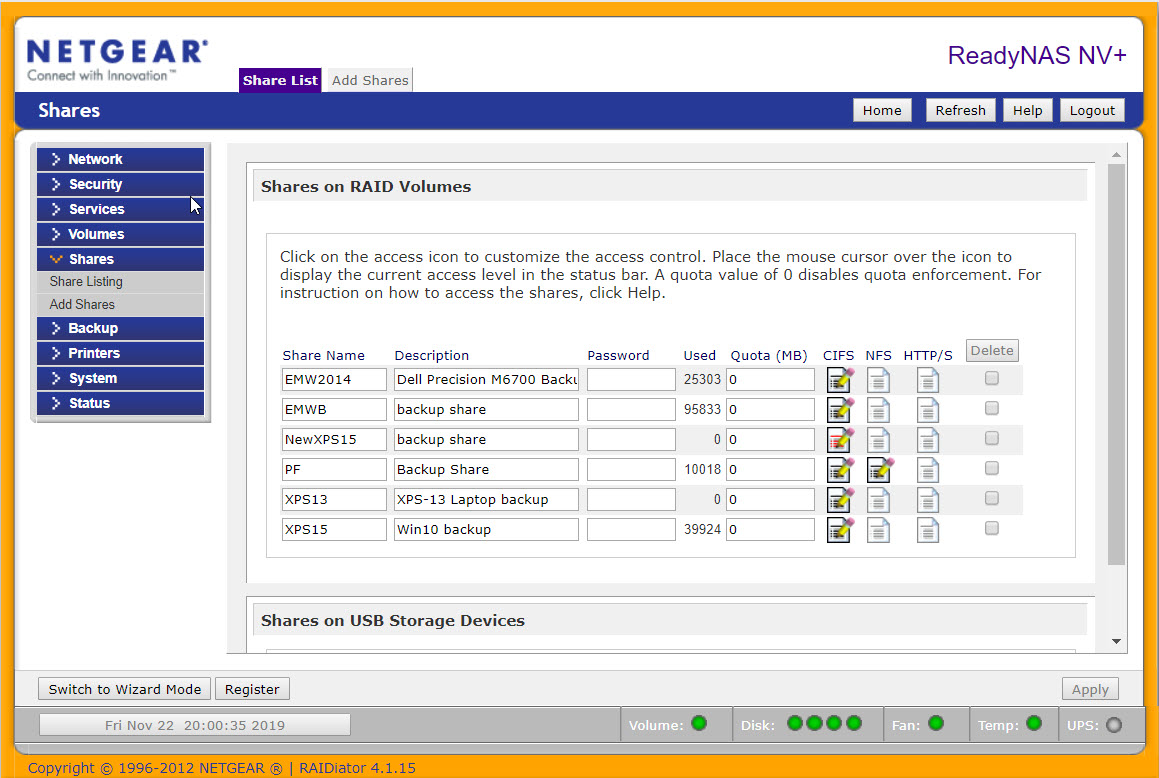
Yes, the "owner" and "group" entries for the new share are the same. The "owner" in this case is the name of the share (NewXPS15) and the group is 'nogroup'. All the other accessible shares are configured similarly. See attached screenshot. I have included below the results from the 'net use' commands you suggested (I edited the post to replace my actual password with '[password]'). The noted SMB connection was the one that connects my AJC Active Backup app to an existing share. This connection was accomplished using the AJC Backup 'Configuration Wizard' as I have done many times in the past.
I did some research on 'error 5', but couldn't find anything helpful...
TIA,
Frank
C:\WINDOWS\system32>net  use * /delete /y
You have these remote connections:

                    \\192.168.1.203\xps15
Continuing will cancel the connections.

The command completed successfully.


C:\WINDOWS\system32>net use t: \\192.168.1.203\NewXPS15 /user:admin [password]
System error 5 has occurred.

Access is denied.
StephenB
Nov 23, 2019Guru - Experienced User
Try changing the owner to be "nobody", and then reset the permissions using the checkbox a bit further down that page.
Also, try the net use commands again, but this time use \\192.168.1.203\C for the second command. That should map the full data volume. If that works, try navigating into the new share, and see if that is successful.
- paynterf123Nov 23, 2019Aspirant
Thanks for the additional hints:
changed owner for NewXPS15 to 'nobody', checked the 'Set ownership and permissions.... box, and clicked 'Apply'. Then I tried connecting to the share using AJC Backup and it failed with the same 'Enter Network Credentials' dialog. Same thing using 'Net USE' command (with elevated privileges).
I then tried the NET USE command you suggested, as follows:
C:\WINDOWS\system32>net use t: \\192.168.1.203\C /user:admin [password]
System error 1244 has occurred.

The operation being requested was not performed because the user has not been authenticated.
Any other ideas?
- StephenBNov 23, 2019Guru - Experienced User
paynterf123 wrote:
I then tried the NET USE command you suggested, as follows:
C:\WINDOWS\system32>net use t: \\192.168.1.203\C /user:admin [password]
System error 1244 has occurred.

The operation being requested was not performed because the user has not been authenticated.
Any other ideas?
Is the admin password still the default netgear1? It won't work if unless the admin password was changed.
Did you precede that command with the net use * /delete /y ? If not, then try again (starting with the delete).
- paynterf123Nov 23, 2019Aspirant
Hi,
I didn't do the net use * /delete /y, so here's the re-try:
C:\WINDOWS\system32>net use * /delete /y
You have these remote connections:

                    \\192.168.1.203\xps15
Continuing will cancel the connections.

The command completed successfully.


C:\WINDOWS\system32>net use t: \\192.168.1.203\C /user:admin [password]
System error 1244 has occurred.

The operation being requested was not performed because the user has not been authenticated.


C:\WINDOWS\system32>
I changed the admin password a long time ago ;-).
TIA,
Frank
Related Content
NETGEAR Academy

Boost your skills with the Netgear Academy - Get trained, certified and stay ahead with the latest Netgear technology!
Join Us!