NETGEAR is aware of a growing number of phone and online scams. To learn how to stay safe click here.
Forum Discussion

jerry_va1
Jul 22, 2014Aspirant
Access by device name, get rid of SMB 3.5.21
Oh joy, 2 NASboxes with CIFs-protocol-based shares. "NASbox2" appears on all my Windows PCs as "NASbox2 (NASbox2)" and access proceeds seamlessly without password challenges. NASbox (the first one) appears on Win machines as "Samba 3.5.21 (NASbox)". I want to get rid of Samba 3.5.21. How can I make my device just present itself by its device name to Windows, leave Samba out of the picture, and stop asking for Linux-world-based passwords?
Background: these are a fresh young NASbox2 and a crusty Linux installation on a heavily-used NASbox (#1). Both are ReadyNAS NV+ v1's running on firmware 4.1.12. Both are CIFs access, set to be "open" in accord with advice here: http://www.readynas.com/forum/viewtopic.php?p=262416#p262416] with Advanced Options for each share set to nobody, nogroup read/write The security mode on both is "SHARE" not "USER", but, on the troubled NASbox (#1), the security mode was screwed with by me (I'm sorry, I'll never do this again; see below).
NASbox (#1) went through slight corruption when the Linux opsys packed out its entire hard drive partition with large logs (two @700MB ea) that an admin here fixed personally and by hand for me (worth more than a smiley, thank you). Sharing was affected somehow, and that's when my device changed from appearing in Windows as the share "NASbox (Nasbox)" to being listed as "Samba 3.5.21 (NASbox)". I can't turn off Samba, it runs CIFs, but I don't want it to present its security model to Windows.
I have written nothing new on the old NASbox (#1) during this traumatic time, so permissions should all be the same, uniform (user, owner, group . . . don't ask me, I do not want this "security", the NSA reads everything anyway). No new writes is good, because I have sinned. Before an admin resolved the NASbox (#1) corruption crisis, I tried changing security modes between "GROUP" and "USER".
PASSWORD HELL:
Right now, I can't access my shares remotely at all because I am asked for a password I do not know. After the admin's fix of NASbox #1 while in "GROUP" Security Mode, access was possible under the user and password admin and my admin password. The user might have been my user name (NASbox/jerry) -- sorry I didn't write it down. Now, with #1 back in SHARE mode (same mode as NASbox2, which shares so effortlessly), and with ADVANCED CIFS changed to "nobody" "nogroup", my (unwanted) password challenge on a Windows machine is "Nasbox\Guest". The following passwords are not acceptable:
netgear1
my actual admin pwd
the pwd used on this and every other Windows machine in the house
How can I be a "guest" if nobody will let me in?
Let's look at the bright side. I have not been a good student of Linux security or Andrew Tridgell's Samba technology, and now I am about to get a little smarter.
With thanks for any help,
--jerry-va
Background: these are a fresh young NASbox2 and a crusty Linux installation on a heavily-used NASbox (#1). Both are ReadyNAS NV+ v1's running on firmware 4.1.12. Both are CIFs access, set to be "open" in accord with advice here: http://www.readynas.com/forum/viewtopic.php?p=262416#p262416] with Advanced Options for each share set to nobody, nogroup read/write The security mode on both is "SHARE" not "USER", but, on the troubled NASbox (#1), the security mode was screwed with by me (I'm sorry, I'll never do this again; see below).
NASbox (#1) went through slight corruption when the Linux opsys packed out its entire hard drive partition with large logs (two @700MB ea) that an admin here fixed personally and by hand for me (worth more than a smiley, thank you). Sharing was affected somehow, and that's when my device changed from appearing in Windows as the share "NASbox (Nasbox)" to being listed as "Samba 3.5.21 (NASbox)". I can't turn off Samba, it runs CIFs, but I don't want it to present its security model to Windows.
I have written nothing new on the old NASbox (#1) during this traumatic time, so permissions should all be the same, uniform (user, owner, group . . . don't ask me, I do not want this "security", the NSA reads everything anyway). No new writes is good, because I have sinned. Before an admin resolved the NASbox (#1) corruption crisis, I tried changing security modes between "GROUP" and "USER".
PASSWORD HELL:
Right now, I can't access my shares remotely at all because I am asked for a password I do not know. After the admin's fix of NASbox #1 while in "GROUP" Security Mode, access was possible under the user and password admin and my admin password. The user might have been my user name (NASbox/jerry) -- sorry I didn't write it down. Now, with #1 back in SHARE mode (same mode as NASbox2, which shares so effortlessly), and with ADVANCED CIFS changed to "nobody" "nogroup", my (unwanted) password challenge on a Windows machine is "Nasbox\Guest". The following passwords are not acceptable:
How can I be a "guest" if nobody will let me in?
Let's look at the bright side. I have not been a good student of Linux security or Andrew Tridgell's Samba technology, and now I am about to get a little smarter.
With thanks for any help,
--jerry-va
9 Replies
Replies have been turned off for this discussion
 StephenBGuru - Experienced Userif you use \NASbox\admin as the user name, and the NAS admin password, are you getting access?
I realize that is not what you want. It still would be helpful to know if it works.
Also, when you say "passwords are not acceptable" do you really mean "passwords are not accepted"? jerry_va1AspirantSET YOUR PASSWORD
If you want a NASbox to approve your Windows password, you better tell that NASbox system what password Windows will (might? pray that it will?) present.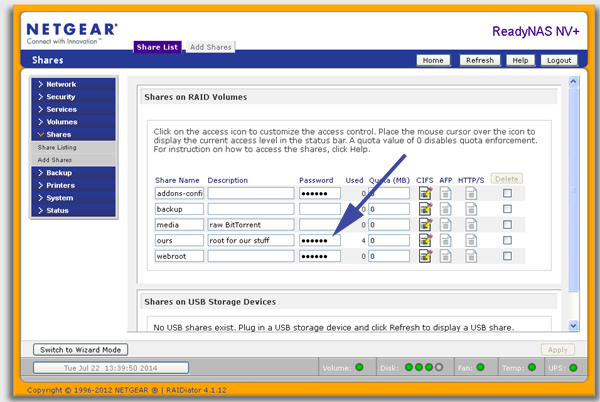
After entering the pwd used on all Windows boxes in the house, access was restored following pwd challenge and presentation of pwd entered at arrow above.
This implies that Windows (XP SP2) is presenting password credentials OK to the share server (NASbox #1).
(Where's the CONTROL PANEL or whatever place to look if Windows is not presenting a correctly-authorized user to shares servers?)
It has been suggested elsewhere in this forum that entering and then clearing a pwd will end pwd challenges altogether for GUEST users:
http://www.readynas.com/forum/viewtopic.phpa?f=23&t=68424&p=421424&hilit=guest+Password#p421424
Anyone tried it? After asking for community help, I shouldn't make lots of changes to the box.Re: Enter Network Password Problem
Sun Mar 16, 2014 4:01 pm
. . . Set an password in the share list, save.
Remove the password in the sharelist and save again, now you can connect again as guest.
So why are two "identical" ReadyNAS boxes sharing as
NASbox2 (Nasbox2) good
Samba 3.5.21 (Nasbox) Not a change made (knowingly) by me.
--jerry-va- jerry_va1Aspirant
StephenB wrote: if you use \NASbox\admin as the user name, and the NAS admin password, are you getting access?
I realize that is not what you want. It still would be helpful to know if it works.
Also, when you say "passwords are not acceptable" do you really mean "passwords are not accepted"?
THE CHANGE FROM GROUP TO SHARE SECURITY MODEL
In Group security mode, I had access as admin with the admin password.
In 6 years of prior usage I just accessed my shares with **no** password challenge.
I must have been the SHARE security mode -- a default I neither paid attention to nor documented :oops:
I put the machine back into SHARE mode, and checked to apply the change to the contents of that share . . . took quite a while for the confirmation pop-up.
I did not specify any password. The NASbox would not take "blank" for an answer, and no other password in use around here was accepted either.
TELL THE BOX YOUR PWD
I then entered a pwd in the FrontView page imaged above. I'm still challenged for a pwd, but now I have one.
In all those years gone by, I was not challenged by the NAS server on a Windows machine -- the Windows machine just saw the Workgroup NAS and entered the share.
The main problem here is ignorance, not NASbox technology.
--jerry-va - StephenBGuru - Experienced UserIt might be more useful to get clarify exactly what is happening now, and not worry about the past. I understand what you want to get back to.
So you are prompted for a password only (and cannot specify an user name)?
And the password you specified can now be entered?
Did you try setting a password for the share, and then clearing it?
BTW, my NAS are all in user security mode, and I do not need to enter passwords for any of them. Guest access is enabled on the CIFS path, and I entered my NAS admin credentials into the Windows credential manager on each pc. - jerry_va1AspirantStephenB wrote:
So you are prompted for a password only (and cannot specify an user name)?
jerry-va: Yes. On the pwd challenge pop-up, the user is greyed-out and filled in, Nasbox\Guest. It used to be Nasbox\Admin before I went to "nobody, nogroup" for more open access. I'm willing to go back to better security once I know how.
And the password you specified can now be entered?
jerry-va: Yes.
Did you try setting a password for the share, and then clearing it?
jerry-va: Thanks, I'd love to try this first thing tomorrow (bedtime around here). Also, after going to the forum for help, I didn't want to make a whole lot of changes in the situation. BTW, having entered my pwd once, I don't have to enter it again . . . but I'm still not clear on when the session ends . . . with a client PC reboot surely.
BTW, my NAS are all in user security mode, and I do not need to enter passwords for any of them. Guest access is enabled on the CIFS path, and I entered my NAS admin credentials into the Windows credential manager on each pc.
jerry-va: I'm happy to use a better security mode once the fear of forever losing everything subsides; e.g., by having a terabyte owned by a user/group that I make disappear with a switch between SHARE and USER modes . . . We have WinXP (and even one Windows2000 machine), so there may be an appropriate NET USE command but there is no Windows Credential Manager. A couple Windows7 disks recently arrived (can't find a retail version, waited too long, only OEM versions out there now), but . . . other issues more pressing.
Thanks for looking at this. I wish the forum search engine did phrases, I'm sure many others have gone around this block faster than I can.
--jerry-va - mdgm-ntgrNETGEAR Employee RetiredYou could do a google search e.g.
"my phrase" site:readynas.com - StephenBGuru - Experienced User
Windows 2000 is too old to have this. But XP does have a credential manager.jerry-va wrote: ...We have WinXP (and even one Windows2000 machine), so there may be an appropriate NET USE command but there is no Windows Credential Manager.
Click Start, and then click Control Panel.
In Control Panel, click User Accounts under Pick a category to open the User Accounts dialog box.
Open the Stored User Names and Passwords dialog box; to do so, use the appropriate method:
If you log on with an account with administrative privileges: Under or pick an account to change, click your user account to open the What do you want to change about your account? dialog box. Under Related Tasks, click the Manage my network passwords.
Otherwise: Under Related Tasks, click Manage my network passwords. - jerry_va1AspirantWindows Credential Manager - WinXP too
Dear StephenB,
Thanks, the commands for mgmt of network credentials in XP are much as you said,
CONTROL PANEL / USER ACCOUNTS / Pick a task...CHANGE AN ACCOUNT /
Pick an account to change JERRY COMPUTER ADMINISTRATOR
What do you want to change about your account:
LEFT SCRN PANEL: MANAGE MY NETWORK PASSWORDS
So in this house with 4PCs and 2 ReadyNAS, the only users are Jerry and Robin.
I understand passwords -- FrontView has an empty box for pwds, and you bloody well better put one in if you expect to be friends with your NASbox and agree on passwords and the meaning of life.
Conceptually, on the ReadyNAS end, can we separately specify who can **log in** vs specifying **who owns the files**? The first is a network convenience. To me, the second specification is a dangerous Linux-world user and group ownership model that can cost me access to my own data.
Could you say where/how we specify user names on the ReadyNAS end, and whether this is only possible in USER not SHARE mode? And, if I specify USER, do I need to specify GROUP membership for the USER? Any general advice on what most people do? Don't feel obligated to deal w/all these questions!!![\b] . . . just trying to convey what's missing/misconceived in my conceptual framework for access control vs file ownership.
Hope this might help others too,
--jerry-va - StephenBGuru - Experienced UserWell, in my case I am fine with wide open data on the NAS on my local LAN.
What I do is
(a) user mode security
(b) On the CIFS tab I set default access to READ/WRITE, check "guest access", and set "do not allow ACL to be more restrictive than this". Rights below that checkbox are set to read/write
(c) on the advanced option tab, set the owner/group to nobody/nogroup. Set the rights underneath it to "read/write", and check "Grant rename and delete privileges to non-owner of files"
Whenever you change settings (or if you have file access problems) go into the advanced option tab, and check the "Set ownership and permission for existing files" box. The click apply (lower right). The checkbox will clear, and the resetting of ownership happens in the background. You will see a pop-up when it completes, and it will also be logged. That procedure solves your fears on the "dangerous linux world" - which is not so dangerous, and not as different from windows as you are thinking.
Then on the XP systems, enter the credentials on network passwords to use "admin" for the NAS and the admin password for the NAS.
I am not sure if your Win 2K system can remember the network password or not (or if your windows logon is all that is needed). I haven't run Win 2K in over 10 years (and honestly don't want to go back there...). If it doesn't work, then try creating a user account on the NAS that matches the windows logon/windows password on that machine. The default "user" group is fine. Or just get something newer.

Related Content
NETGEAR Academy

Boost your skills with the Netgear Academy - Get trained, certified and stay ahead with the latest Netgear technology!
Join Us!
