NETGEAR is aware of a growing number of phone and online scams. To learn how to stay safe click here.
Forum Discussion

Zippyduda
May 02, 2018Aspirant
Deleting large file fails and crashes NAS
Hi all.
I have a 300GB file that I want to delete however when I try to do it via Windows or SSH it fails and crashes the NAS, meaning I have to remove the power to reboot it (it doesn't respond to...
 May 06, 2018
You could try a single truncation via ssh
truncate -s 0 myfile.ext
Progressive truncation just uses different parameters for -s (size). For instance, -s 100G or -s 100M.
Echo is another tool that can truncate a file.
echo > myfile.ext
Either way, turn snapshots off before you do this. Perhaps also disable checksums and quota if they are enabled (look on the volume settings wheel).
If it works, I suggest running a balance afterwards. If that also locks up, then post back.
Zippyduda
Jun 14, 2018Aspirant
Attached multiple images showing the free space, relevant settings are off and the Windows message.
StephenB
Jun 14, 2018Guru - Experienced User
It looks like it shouldn't be doing this.
Perhaps try rebooting the NAS (mostly under the theory that it is simple to do).
How old is your data volume? If it is very old, there might be some hidden snapshots.
- ZippydudaJun 14, 2018Aspirant
Already tried rebooting it sadly :(
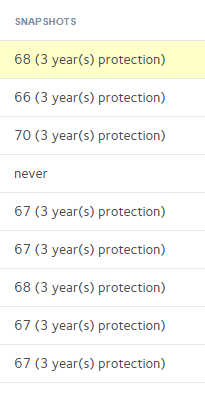
Is it possibly because of all these snapshots?
I swear I used to be able to see these as yellow on the key/legend on the left.
- StephenBJun 14, 2018Guru - Experienced User
Normally they are shown in yellow.
One option is to back up the data, reset the NAS, and restore the data from the backup. Not elegant, and if it helps you'll never know the root cause. But it might be the fastest way to solve it.
- ZippydudaJun 17, 2018Aspirant
Looks like under Snapshots I have snapshots going back to 2015! Will get to deleting them and see how it does.
This is what I see via command line currently:
root@:~# df -h
Filesystem Size Used Avail Use% Mounted on
/dev/md127 3.7T 2.4T 1.3T 66% /data
/dev/md127 3.7T 2.4T 1.3T 66% /apps
/dev/md127 3.7T 2.4T 1.3T 66% /home
/dev/md127 3.7T 2.4T 1.3T 66% /var/ftp/Backup
/dev/md127 3.7T 2.4T 1.3T 66% /var/ftp/Music
/dev/md127 3.7T 2.4T 1.3T 66% /var/ftp/DedicatedServer
/dev/md127 3.7T 2.4T 1.3T 66% /var/ftp/Documents
/dev/md127 3.7T 2.4T 1.3T 66% /var/ftp/Pictures
/dev/md127 3.7T 2.4T 1.3T 66% /var/ftp/readydrop
/dev/md127 3.7T 2.4T 1.3T 66% /var/ftp/Videos
/dev/md127 3.7T 2.4T 1.3T 66% /var/ftp/Workncdu 1.8 ~ Use the arrow keys to navigate, press ? for help
--- / ---------------------------------------------------------------------------------------------------------------------------------------------------------------------------
1.3TiB [##########] /data
1.3TiB [######### ] /var
1.3TiB [######### ] /run
Related Content
NETGEAR Academy

Boost your skills with the Netgear Academy - Get trained, certified and stay ahead with the latest Netgear technology!
Join Us!