NETGEAR is aware of a growing number of phone and online scams. To learn how to stay safe click here.
Forum Discussion

nsne
Dec 01, 2016Virtuoso
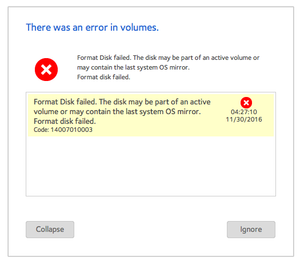
"Format disk failed" – Unable to format new HDD
I just got a new 8TB drive and tried to add it to my ReadyNAS. Unfortunately, I'm getting the following error: "There was an error in volumes. Format Disk failed. The disk may be part of an activ...

nsne
Dec 27, 2016Virtuoso
Seagate NAS 8TB ST8000VN0002. It's on the HCL. I've had one of the exact same model spinning in the NAS for several months and it's been fine.
I had found another thread on these forums where the user appeared to be having the same problem. He said he left the disk in for 24 hours and the NAS finally recognized it. I tried to do the same thing, but overnight the NAS shut down on account of disk temperature:
| Tue Dec 27 2016 4:56:12 | Disk: System is shutting down because disk in channel 3 (Internal) exceeded safe temperature threshold (96 C). | |
| Tue Dec 27 2016 4:56:10 | Disk: Disk in channel 3 (Internal) exceeded safe temperature threshold (96 C). |
The disk in bay 3 is the "grayed out" one — it isn't even active!
As I said, I've run countless tests on the HDD, examined it for hidden partitions, completely wiped and overwritten it, and put it to use in other applications. Every test SeaTools has to offer says it's fine.
Last night I put a known "good" disk in Bay 3 (a Samsung 2TB) just to see if it was a problem with the bay hardware. The disk showed up as red (not gray) in Frontview and would have allowed me to format it.
So the NAS is really choking on this particular ST8000VN0002, but there's no real indication why.
nsne
Dec 27, 2016Virtuoso
Out of curiosity, it is possible to swap the current disk in bay 4 to bay 3 and then try the problematic HDD in bay 4?
- nsneDec 28, 2016Virtuoso
I've already begun the RMA process.
I'm kind of bummed, though. I thought Netgear would be interested in troubleshooting this issue because of its peculiarity. If every other computer I own, Mac and PC, has no problem accessing the disk, and it passes all extended tests with flying colors, then why is the ReadyNAS choking?
- nsneDec 28, 2016Virtuoso
I'm all for taking an extended Christmas break (heaven knows I could use one myself), but please see the datestamp on my first post in this thread. This has been going on for a month. So far Netgear's troubleshooting has been very general (e.g., factory reset) and hasn't addressed the formatting issue specifically.
- mdgm-ntgrDec 29, 2016NETGEAR Employee Retired
Was there anything different about that disk e.g. the disk firmware?
It does seem like what you encountered was quite odd.
On the community responses are made as and when seen fit. Some folks at NETGEAR such as myself contribute as and when we see fit but we do like to encourage some user to user discussion. - nsneDec 29, 2016Virtuoso
So far as I could tell, the disks were the same in every way. Same model, same firmware, purchased from the same retailer.
- mdgm-ntgrDec 30, 2016NETGEAR Employee Retired
Let's hope the replacement disk works better.


Related Content
NETGEAR Academy

Boost your skills with the Netgear Academy - Get trained, certified and stay ahead with the latest Netgear technology!
Join Us!
