NETGEAR is aware of a growing number of phone and online scams. To learn how to stay safe click here.
Forum Discussion

Worlding
May 11, 2018Aspirant
How to set gigabit ethernet?
Hi
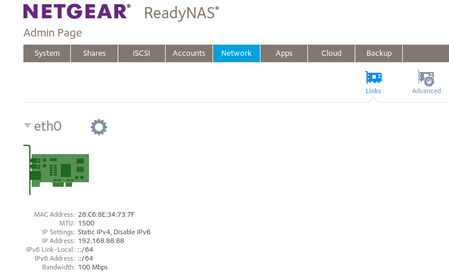
The documentation states that my device (ReadyNAS RN10200) must support a speed of one gigabit.
But the real speed is a 100 megabit. At home there is a gigabit router. Tell me, please, how t...
 May 11, 2018
The NAS autonegotiates the speed, and there is no way to force it to ignore the negotiation and just use gigabit.
100 mbit doesn't use all the wires in the cable (but gigabit does). So usually this is a cabling problem or a connector issue.
So first try a different ethernet cable - cat 5E or better.
If that doesn't solve it, try using a different LAN port in the router.
I've seen some rare cases where putting a gigabit switch between the router and the NAS resolves this issue - so if you have a gigabit switch you could also try that.
Worlding
May 11, 2018Aspirant
I disabled in the router (Mikrotik) the support of 10/100 megabit network on one of 5 ports (this port is connected to NAS). Only 1000 megabit network remained on this port. And it all worked!
StephenB
May 11, 2018Guru - Experienced User
Worlding wrote:
I disabled in the router (Mikrotik) the support of 10/100 megabit network on one of 5 ports (this port is connected to NAS). Only 1000 megabit network remained on this port. And it all worked!
Great.
You might want to keep an eye on the transfer speeds for a while, and maybe after a couple of days download the logs and look at the ethernet statistics in network_settings.log - just to make sure there isn't an underlying electrical/hardware issue that affects performance.
Related Content
NETGEAR Academy

Boost your skills with the Netgear Academy - Get trained, certified and stay ahead with the latest Netgear technology!
Join Us!
