NETGEAR is aware of a growing number of phone and online scams. To learn how to stay safe click here.
Forum Discussion

Nottub
May 04, 2012Aspirant
I need a Screenshot of Backup Source
As much as I try I do not seem to be able to set up a back up. I cannot connect and don't know if it's the PC (Win XP) the Modem/ Router (Virgin Media Superhub) or my ReadyNas DUO V2. If I knew I ...

Nottub
May 10, 2012Aspirant
SUCCESS - Well for me it worked.
After 1hr 17mins on the phone to a Netgear representative, who nearly gave up.
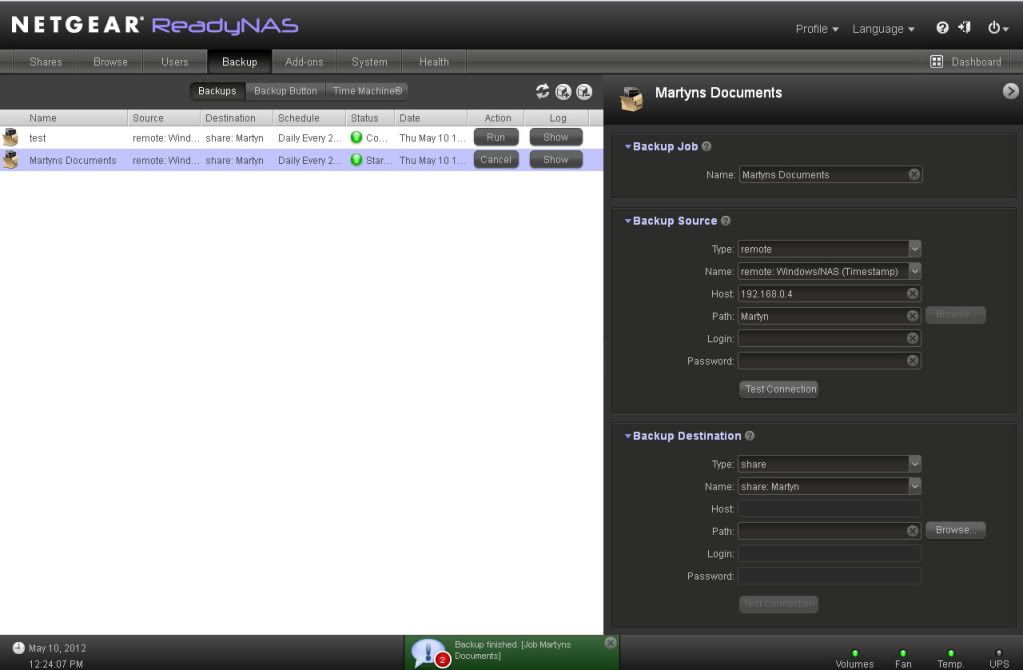
Here are the settings that eventually worked for me. However please read past the screenshots for some critical information.
This is based on setting up a back up on a folder within 'My Documents' called 'Martyn' which was set up as a shared folder. My XP IP address 192.168.0.4. This was to be save to a folder added to the NAS called 'Martyn'.
Settings 1 (Back up screen)
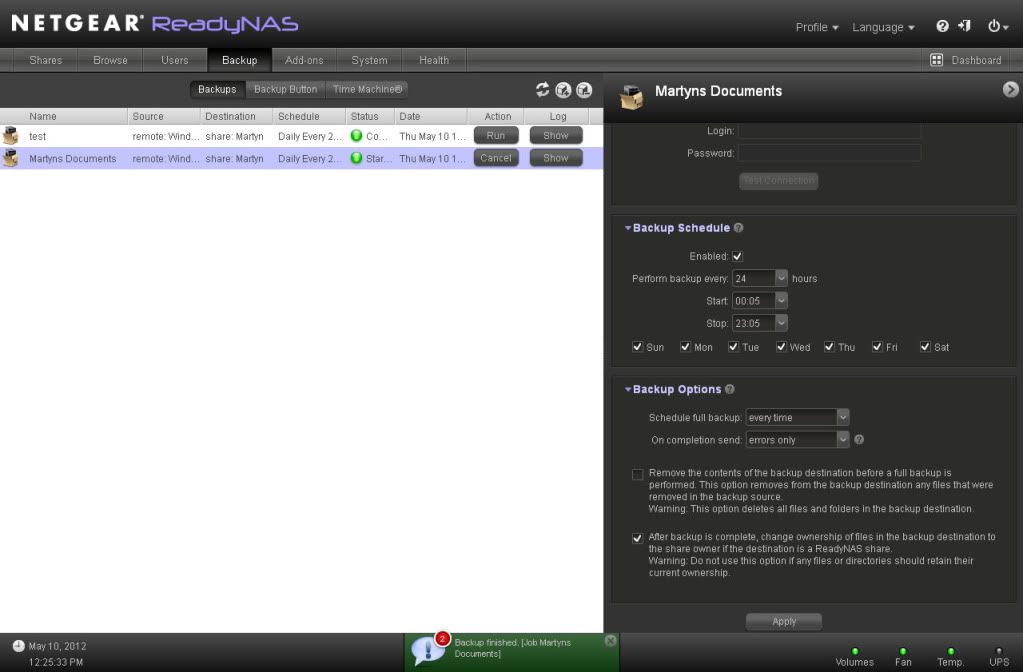
Scroll down this 'Back Up' Screen and notice the tick in the 'After back up ..... Something I had not done, and didn't know I had to do (ignore the every time option in the Full back up option as this was me playing around).
This didn't run to start with as I had an error which read 'Error encountered copying data from remote source path //192.168.0.4/Martyn ==> /Martyn/os_reinstall, due to permission denial on one or more files. [Job Martyns Documents]. Not sure what this was as it looked like all the documents had backed up correctly to the NAS Drive. However looking down the list there were a few files missing (in my case numerous .pdf files). I couldn't see any difference between the equivalent document that had copied to one that hadn't. A quick search on the net and I found someone who cut and pasted their affected folder to another location then copied it back. I tried again and it worked.
I hope the firmware can be updated to overcome this protected file problem and that the documentation can be improved to show these extra steps.
Let me know if this works for you.
Cheers
Martyn.....
After 1hr 17mins on the phone to a Netgear representative, who nearly gave up.
Here are the settings that eventually worked for me. However please read past the screenshots for some critical information.
This is based on setting up a back up on a folder within 'My Documents' called 'Martyn' which was set up as a shared folder. My XP IP address 192.168.0.4. This was to be save to a folder added to the NAS called 'Martyn'.
Settings 1 (Back up screen)
Scroll down this 'Back Up' Screen and notice the tick in the 'After back up ..... Something I had not done, and didn't know I had to do (ignore the every time option in the Full back up option as this was me playing around).
This didn't run to start with as I had an error which read 'Error encountered copying data from remote source path //192.168.0.4/Martyn ==> /Martyn/os_reinstall, due to permission denial on one or more files. [Job Martyns Documents]. Not sure what this was as it looked like all the documents had backed up correctly to the NAS Drive. However looking down the list there were a few files missing (in my case numerous .pdf files). I couldn't see any difference between the equivalent document that had copied to one that hadn't. A quick search on the net and I found someone who cut and pasted their affected folder to another location then copied it back. I tried again and it worked.
I hope the firmware can be updated to overcome this protected file problem and that the documentation can be improved to show these extra steps.
Let me know if this works for you.
Cheers
Martyn.....
Related Content
NETGEAR Academy

Boost your skills with the Netgear Academy - Get trained, certified and stay ahead with the latest Netgear technology!
Join Us!
