NETGEAR is aware of a growing number of phone and online scams. To learn how to stay safe click here.
Forum Discussion

BigEd1
Oct 02, 2016Aspirant
Migrate ReadyNAS Pro 6 to ReadyNAS 526X? Questions: Diskless? Easiest reliable migration approach?
I have a ReadyNAS Pro 6 with 6 1TB drives and will need to upgrade. Since I'm running out of space and this unit is EOL it seems time to move on. I'm thinking I should get a ReadyNAS 526X. I'm thi...

bedlam1
Jan 01, 2017Prodigy
Sounds like you are good to go.
The PC is just another device on your network, I presume the Rsync job was performed on that network
NAS to NAS directly i.e. no PC involvement
You could try running the backup job again as an incremental update and see what happens.

BigEd1
Jan 01, 2017Aspirant
My concern with the PC rebooting was that I kicked off the Rsync job using the PC and the web gui. Would that have caused the Rsync job to be effected if the PC did reboot while it was running?
How do I do an incremental backup? I don't see that option anywhere.
- bedlam1Jan 01, 2017Prodigy
If you did not delete the Backup job (and did not select option to run full job every time), just run them again
 StephenBJan 02, 2017Guru - Experienced User
BigEd1 wrote:
My concern with the PC rebooting was that I kicked off the Rsync job using the PC and the web gui. Would that have caused the Rsync job to be effected if the PC did reboot while it was running?
No, what happens on the PC doesn't matter once the job is started.
BigEd1 wrote:
How do I do an incremental backup? I don't see that option anywhere.
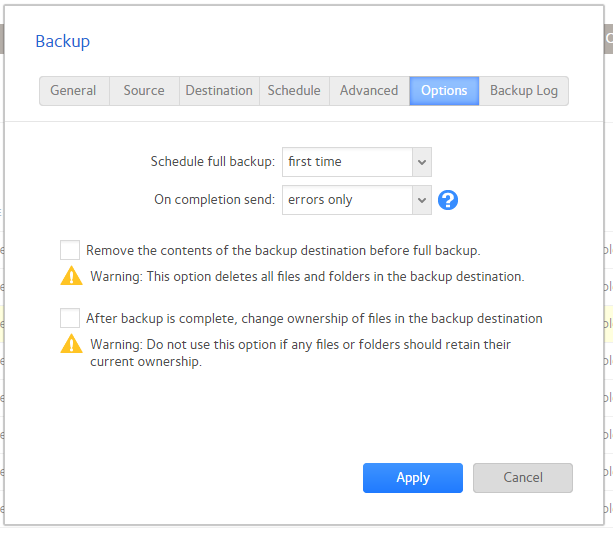
The default settings are to do a full backup the first time, and incremental after that. So just running it again is fine. If you want to double-check, open the settings for the backup job and click "options"
The "schedule full backup" line controls how often full backups are done.
Related Content
NETGEAR Academy

Boost your skills with the Netgear Academy - Get trained, certified and stay ahead with the latest Netgear technology!
Join Us!
