NETGEAR is aware of a growing number of phone and online scams. To learn how to stay safe click here.
Forum Discussion

F_L_
Mar 13, 2017Tutor
Missing volume after power failure
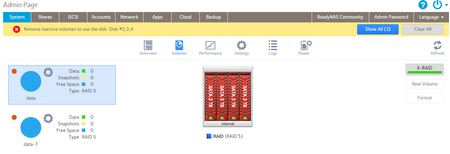
I had a power failure that lasted too long so my UPS shut down my Ultra 4 (OS 6.6.1) When booting it up again I had this screen: I am missing my Volume and ofc my shares too and it seems th...
- Mar 15, 2017
F_L_ wrote:Then I get:
root@Ultra:/# mount --bind / /mnt
root@Ultra:/# du -h --max-depth=1 /mnt
1.8G    /mnt/data
There's your issue... /mnt/data should be empty.
Do you have replicate jobs running? It's common that it pushes data to /data even though the data volume is not mounted, filling up the OS volume.
Then, once the data volume is mounted on /data, you can no longer see what was in the folder itself but the OS volume is still full.
As you have temporarily mounted the OS volume back to /mnt, you should check what's in /mnt/data and clear it to free up space on your OS volume. WARNING: Be careful what you're doing, you want to clear /mnt/data, NOT /data (where your actual data volume is mounted)!

F_L_
Mar 14, 2017Tutor
Still, should a disc with high count make the whole raid collapse? And without any warning?
I have email alerts set up and I have not received anything related to faulty/damaged discs.
I´m not an expert but it seems that this might not be the root cause for the failure, specially since it has been reported from several recently.
If I remove one disc from the NAS, can I mount it in Linux and extract (some) data?

jak0lantash
Mar 14, 2017Mentor
F_L_ wrote:should a disc with high count make the whole raid collapse? And without any warning?
I am NOT saying this is the case here. But the sake of the argument, if you take the case of an erroring disk that corrupts the RAID array, yes a single disk can bring down the whole volume.
There is a lot of misconception around the level of protection given by RAID technologies. Maybe product marketing is partially responsible for the myth that RAID redundancy is enough protection, but technically it's far from being enough. Nothing replaces a good external/offsite backup.
Even regarding backups, there is a lot of misconception. For example, "syncing" between two devices is not a backup. It's quite the opposite, you increase the surface of vulnerability.
The best option for data redundancy is a mix of all things, with the right balance. RAID redundancy, external backups, snapshots/versioning, checksums, etc.
Disaster Recovery and High Availability are yet completely different things. Taking the example of an imaginary and very resilient backup guarantying data integrity. It may allow to recover specific files to an absolute certainty which would make it an amazing backup solution, but may be a pain to recover all data at once or require a huge amount of time to complete, which would make it a terrible solution for DR. A backup has nothing to do with HA.
In your case, based on the logs you showed, as soon as mdadm starts assembling the second sub-array, the kernel spews a lot of call traces. This is exactly the type of situation that RAID redundancy can't protect you against.
I do not know what is happening and one would need to investigate directly on the machine to understand it and explain to you if possible.
I know I'm not solving your problem, but I hope this helps you understand the situation anyway.
- F_L_Mar 14, 2017Tutor
Thank you for your answer.
I must admit that my knowledge about raids is limited and I thought it was unlikely that one disc could cause something like this. If this now is the case..
I know the importance of backup and I have some.
For now I just want to see what my options are.
If/how I can retreive some of the data, without sending discs to Netgear, or if I should consider the data gone.
If the data is lost, should I execute a factory reset and reinstall the NAS?
mdgm didn´t say which disc that was faulty but I´m assuming the oldest one (the 2tb)
- jak0lantashMar 14, 2017Mentor
F_L_ wrote:I thought it was unlikely that one disc could cause something like this
It is unlikely, but it's possible.
- StephenBMar 14, 2017Guru - Experienced User
F_L_ wrote:
mdgm didn´t say which disc that was faulty but I´m assuming the oldest one (the 2tb)
PM him and ask. It might not be the oldest. If you have a Windows PC you can also test the disks yourself (seatools for seagate, lifeguard for western digital). Label the disks by slot number, so you will be clear on the order.
F_L_ wrote:
For now I just want to see what my options are.
Netgear's recovery service is generally done remotely, though it is possible that they might need the NAS or the disks shipped. It is expensive (these services generally are): https://kb.netgear.com/69/ReadyNAS-Data-Recovery-Diagnostics-Scope-of-Service?cid=wmt_netgear_organic
Some users have had good luck with ReclaiMe data recovery software. The benefit there is that you can see what it can recover before you pay for it.
If you do want to try recovery yourself, you could try to "clone" the disks to new ones (sector by sector copy). That preserves the original state, minimizing any risk of further damage to the arrary.
- F_L_Mar 14, 2017Tutor
This is insane....
Today we had another power failure in the house and when the NAS went back it was all good!?
So except from the obvious, take as much backup as I can.
What should I do?
No disk are reporting faulty when looking at the drive info.

Related Content
NETGEAR Academy

Boost your skills with the Netgear Academy - Get trained, certified and stay ahead with the latest Netgear technology!
Join Us!
