NETGEAR is aware of a growing number of phone and online scams. To learn how to stay safe click here.
Forum Discussion

Remco96
Apr 02, 2017Aspirant
Need to restore from Time Machine but it can't find it!
I have a ReadyNas Duo V2 running on my home LAN for Time Machine with iMac. Two HDD 2TB are installed; perfectly OK. about 800 GB is in use (this is because of my Time Machine iMac backup). Now ...

JennC
Apr 04, 2017NETGEAR Employee Retired
Hello Remco96,
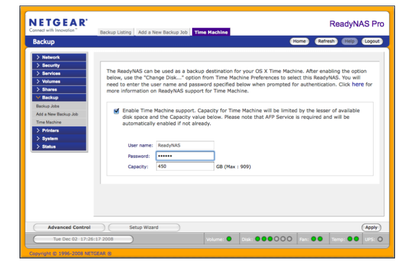
Not sure why "root" is there, I think I normally see that in the username box when connecting to NAS via Time Machine, it is like the default on that window that pops up but it should be ReadyNAS as the username and password should be the one you have set on the Frontview's Time Machine settings like the one in the image below:
Time Machine has nothing to do with CIFS so do not delete or change anything through CIFS or settings on the CIFS.
Regards,
JennC
Apr 05, 2017NETGEAR Employee Retired
Hello Remco96,
You changed the password of the ReadyNAS user to 123, are you referring to the Time Machine settings on ReadyNAS? Whatever password you have set on it, please take note of it then maybe you can try the following:
Change Keychain Password
- Turn Time Machine off.
- Launch Keychain Access, located in /Applications/Utilities.
- In the Keychain Access window, select System from the sidebar's keychain list.
- Locate the keychain entry whose name starts with the name of your Time Capsule or NAS. Example: If your Time Capsule's name is Tardis, its keychain name will be Tardis.local or Tardis._afpovertcp._tcp.local.
- Double-click the keychain entry for your Time Capsule or NAS.
- A window will open, displaying various attributes of the keychain file.
- Click the Attributes tab, and then place a check mark in the Show Password box. Supply your admin password to authenticate your access.
- The password for your Time Capsule or NAS will display.
- If the password isn't correct, enter the new password in the Show Password field, and then click Save Changes.
- Quit Keychain Access.
- Turn Time Machine on.
Source: https://www.lifewire.com/time-machine-backup-volume-not-mounted-2259981
Make sure the password you have set on the ReadyNAS Time Machine settings is the same with Keychain password.
Regards,
- Remco96Apr 05, 2017Aspirant
Thank you for the help again. I was able to check the password like you described. It was not matching with the password 123, it was an password I used before. So I was happy and thinking the problem would be solved. But still it isn't.
In Time Machine I connected again and use username and password. Connection OK. Ready to start creating a new backup.When I restart I still cannot manage to login. It still says, password incorrect. Username ReadyNAS.
There is an option to select ''Other''. There is a field to add the smb adress. Is this maybe something to try?
Or create a backup of the NAS and use that one to restore my Mac?
- Remco96Apr 05, 2017Aspirant
Maybe of your interest to know:
Version RAIDiator 4.1.15.
- mdgm-ntgrApr 06, 2017NETGEAR Employee Retired
Have you checked the Keychain on your Mac to make sure the old password is not saved there?
We don't support Time Machine backups over SMB at this time. If that's added it would be for OS6 which doesn't run on your NAS not for RAIDiator. - Remco96Apr 06, 2017Aspirant
Yes, double double double checked it. It is okay. And when I disconnect and reconnect to the Time Machine I have to enter username and password and it works.
It alsos displays when the last backup is made. So everything normal.
Only via CMD R it will not accept it. Username ReadyNAS.... very time consuming this issue....
- Remco96Apr 06, 2017Aspirant
Any suggestions?
I have connected an old backup HDD via USB and it displays directly backup date etc; a click away to restore.
Also connected the NAS to the same networkswitch. Still the same issue.
And it is still possible to disconnect the NAS in Time Machine. Reconnect with username and password to connect; displays last backup date 30 March. So what can cause that it refuses to restore?
Any suggestions?
Otherwise:
Is there a possibility to backup the contact from NAS to external USB disk?
- Remco96Apr 08, 2017Aspirant
How to continue?
- Remco96Apr 10, 2017Aspirant
Hello there Netgear?
Still need some support with the restore of the data that is stored on my Netgear ReadyNAS...
- Remco96Apr 10, 2017Aspirant
Well... I still need support...
- Remco96Apr 10, 2017Aspirant
I have received an e-mail saying: A reply to a topic you are following has been accepted as a solution!
But the problem is still the samen so please I like to get my data back.
Is it possible to move both disks in a new ReadyNAS NAS solution or something like that?
Can it be something else?
Can I go to a support store in the Netherlands for assistance?
Thank you for your help.
- Remco96Apr 10, 2017Aspirant
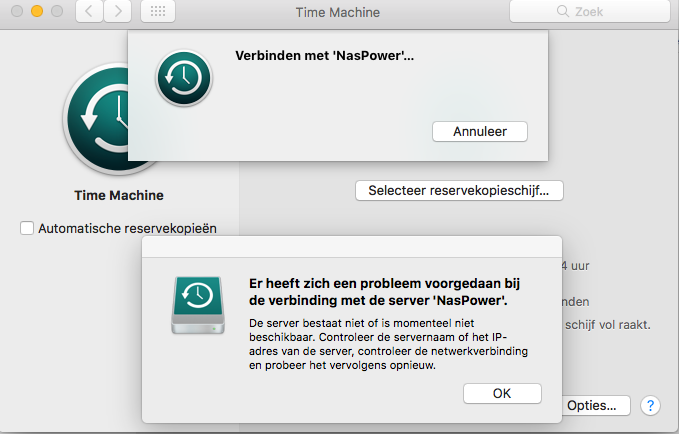
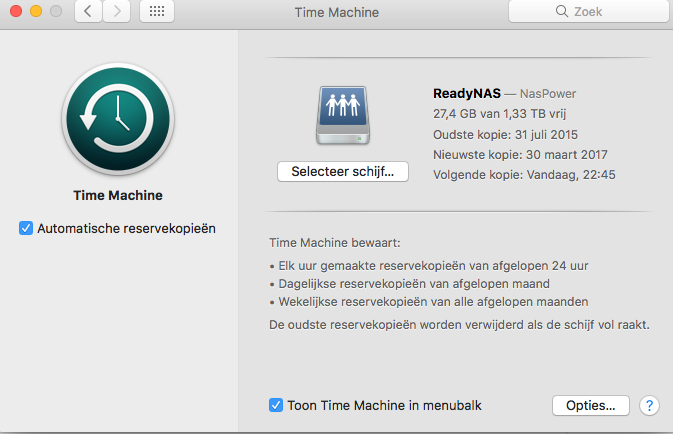
So, when I remove the NAS via TimeMachine I can reconnect agian. The first menu tells me something is wrong with the connection. See screenshot:
It says, there seems to be a problem connecting to server NasPower. The server doesn't exist or is not available. Check servername or IP adres of the server and try again.
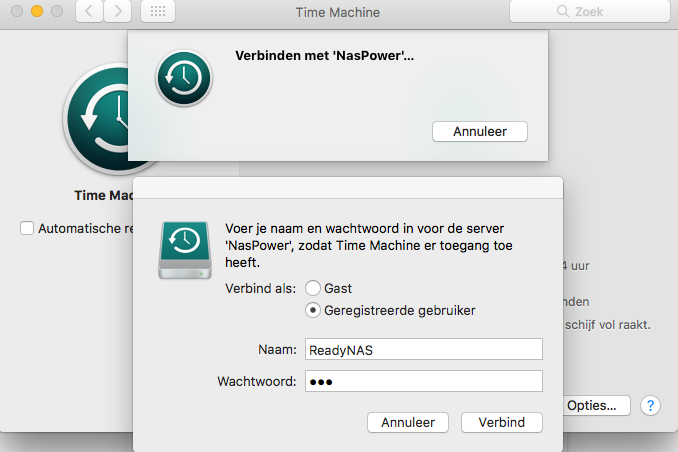
When I press OK it displays:
Submenu with username and password. When I fill in the username and password as I configured in Frontview it will connect.
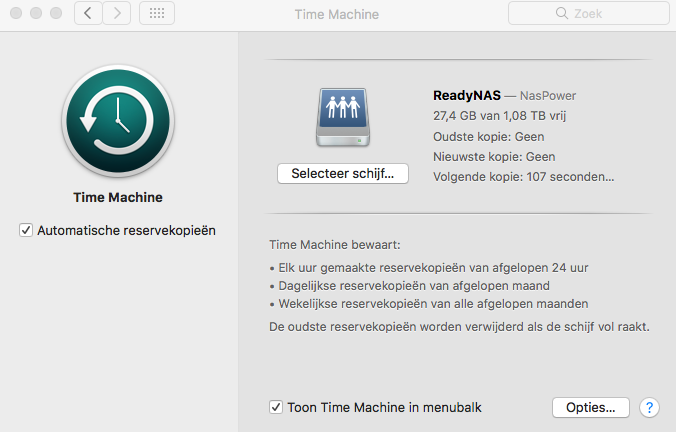
And it shows my last backup is made March 30th... so it is there.
It should be easy to restore...
- Remco96Apr 11, 2017Aspirant
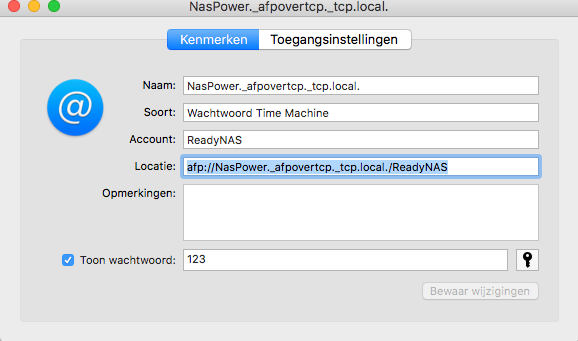
Is this okay?
afp://NasPower._afpovertcp._tcp.local./ReadyNAS
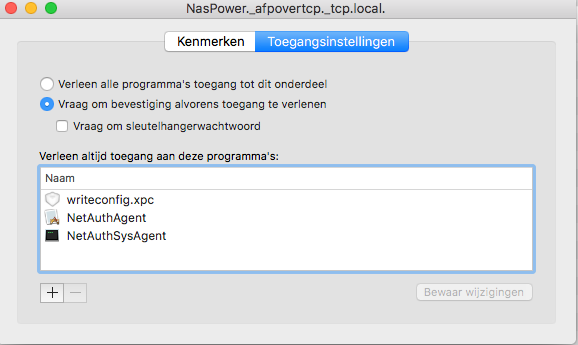
Do I maybe need to change the setting above to Access for all programms?
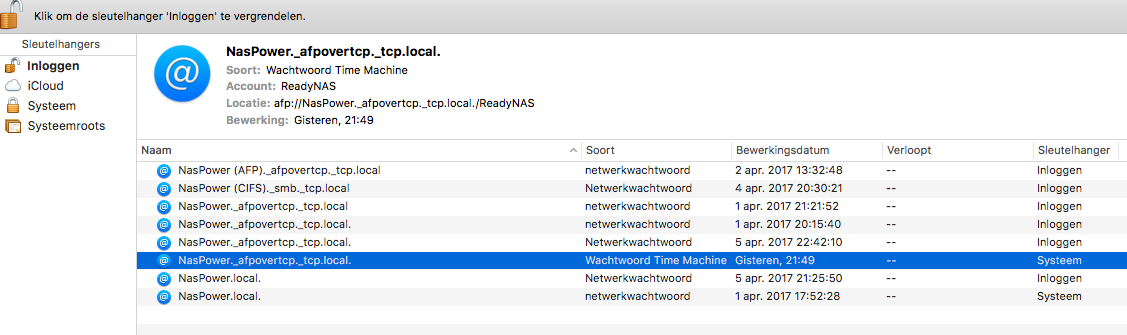
So, only the System Keychain for Time Machine has a password. All the other don't.
- BcorrodPMAJul 31, 2017Aspirant
Remco96 - did you ever get resolution to this issue - because I have experienced exactly the same thing. I have been using my ReadyNAS as the Time Machine backup server for 4 Macs in my family for years. I have twice successfully restored a fresh machine from the exact same ReadyNAS Time Machine backup (once for a hardware failure, once for a stolen machine) and in both cases it worked brilliantly - 200+GB restored in a few hours, with every setting in every application exactly as I had left them.
I recently bought a new MacBook Pro, and figured it would be easy to do the same thing - simply go into migration assistant and log into the Time Capsule and let 'er rip.
Unfortunately I had exactly the same experience that you did. I could set up a new identity on the new machine, and direct TimeMachine to back up that identity to the NAS with no problem. But when I used Migration Assistant to try to connect to the time capsule on the ReadyNAS, it presented me with exactly the same dialog boxes that you had in your screenshot:
1) it shows the ReadyNAS as a source, select it and hit the "continue" button below
2) it presents a "connect" dialog box with "root" pre-filled as the username
3) changing the username to ReadyNAS and using the password configured in FrontView doesn't work - gives the "shaking dialog" treatment for an incorrect username/password
4) changing the username to a valid AFP username, and entering the correct password is accepted (the dialog doesn't shake) but it doesn't find a valid timecapsule to restore from (not surprising, because the AFP credentials are for a different share on the ReadyNAS)
5) Using the "Other" button to enter the fully qualified path to the time capsule also doesn't work (tried both smb://[path] as well as afp://[path])
6) Spent 3 hours on the phone with a level 3 Apple server engineer trying to debug - his conclusion was that there were changes in the file access protocols in OSX Sierra that were evidently not being supported in the current version of the ReadyNAS firmware.
Thus while it currently looks like everything is OK with all my machines backing up to the ReadyNAS as they always have -- I think I am actually un-protected from a hardware fault, because all my machines are now running Sierra and the TimeMachine Restore function is no longer able to access those backups!!!
I was only able to setup my new MacBook Pro by restoring it from my old MacBook Air - which took about 10 hours instead of the 3-4 I would have expected from the time machine.
- Remco96Aug 14, 2017Aspirant
No, it is still not solved. And Netgear gave some hints but they did not helped me out to solve this issue. So, I still would like to restore my backup... that is was all about buying a Netgear NAS.
- BcorrodPMAAug 14, 2017Aspirant
I did another round with Apple support - as they also could not understand how I could be successfully seeing/using AFP volumes on my ReadyNAS, successfully executing time machine backups to another volume -- but not being able to access those backups using any of the Apple "restore" applicactions (Recovery or Migration Assistant). At their suggestion I took a separate machine (I used an older MacAir) and installed the High Sierra beta, to see if that version of Migration Assistant or Recovery had the same issue with not allowing authentication to the ReadyNAS backups. It exhibited exactly the same behavior that you described in your post (default to 'root' userid, not accepting credentials that were configured into the Time Machine service on the NAS, either directly in that dialog box or via a fully-qualified path using the 'other server' option in the restore utilities.
Very frustrating that I have not been able to get Apple to tell me what protocol I need to get a NAS to support in order to have restore from Time Machine work - nor have I been able to get anyone from NetGear to even acknowledge that this is a problem, or tell me what other model/upgrade might be required to get this back functioning the way it had been working for years before.
 rybskejAug 31, 2017Aspirant
Firmware v4.2.31 (latest as of August 31, 2017), 4x2GB drives RAID-5.
I have exactly the same issue as reported on the first post of this thread.
I'm trying to recover a MacOS 10.11 system to a new 10.12.6 system.
I am trying to use Migration Assistant. I get stuck trying to enter my credentials ReadyNAS/[password]. These credentials work fine with the TimeMachine control panel in all my systems. But not with Migration Assistant in 10.12. I haven't yet tried
I have several machines from OS 10.5 to 10.11 backed up on this system. I've been using ReadyNAS products since 2010, and have recovered from many complete drive failures and also done general system migrations, all with Migration Assistant and this and older ReadyNAS units.
Has anyone had any success yet with either NetGear support or Apple support? I'm going to try the NetGear path first.
- BcorrodPMAAug 31, 2017Aspirant
No, still have not gotten an answer from either Apple or NetGear. There is a post on an Apple community board that claims that Apple has never endorsed a configuration that uses a Time Machine client to back up to a NAS - that the only thing they will "support" is
1) A direct-connected drive
2) A server running OSX-server
3) An AirPort server
A senior Apple support engineer told me that there were significant changes made to the way that the file system encrypts storage for different identities with the Sierra release. This is consistent with my experience that everything worked great up through Mavericks but I have not been able to access time machine backups using Recovery or Migration Assistant with either Sierra or (using a different machine) running the High Sierra beta.
I also have not been able to get any answer at all out of NetGear. I even went through Sales (since my ReadyNAS is pretty old, and might be due for a replacement anyway) - and asked them which current model could I buy that would support Restore from Time Machine to a client running Sierra. The Sales associate had no idea, didn't recognize the NetGear model numbers that I was quoting from their own product page - and I had to send him a screenshot of his own website to show him where it listed Time Machine support as a feature (but didn't mention anything about OS compatibility). He took my contact info to have a sales engineer call me back - that was 3 weeks ago and have not heard a peep from them.
- mdgm-ntgrSep 08, 2017NETGEAR Employee Retired
One thing you could do if all else fails is to copy the Time Machine backups over to a USB disk and see if you can restore from that.
The Duo v1 (runs RAIDiator 4.1.16) and the Ultra 4 Plus (runs RAIDiator-x86 4.2.31) are using quite old versions of AFP/Time Machine support now. These devices will only receive critical security fixes if there are any further firmware updates as it has been some years since they've been discontinued.
Our OS6 models use the latest version of AFP/Time Machine support for Linux. You can see this when looking at the version of the Netatalk package in the GPL code.  Newsat11Sep 09, 2017Luminary
I've got bad news...you probably forgot your password. When Time Machine is configured, the ReadyNAS will ask you to create a password specifically for Time Machine. The default username for the operation is ReadyNAS, if you did not change it, you'll only need the password. If you did change it, you'll have to remember the username, and password, that you used to configure the backup process. The odds of Keychain saving the password you used are very low considering how the web interface is configured. For security reasons, this password is not recoverable. I don't even think it has a hint option when it's configured.
- shelitiedogOct 13, 2017Tutor
Just had this exact problem performing an SSD upgrade to my iMac late 2010 model. It has been happily using Time Machine Backups to the ReadyNAS NV+ v2 for years and had already come to my rescue a few years back after a hard disk failure. So was very surprised when coming to do the restore using a Mac OS 10.13 High Sierra boot USB it could not authenticate to the ReadyNAS. The system was running HIgh Sierra already. Using the correct username "ReadyNAS" and the correct password just get the shaking box.
With luck I have managed to work around the problem.
- I still have a Mountain Lion boot USB.
If you look in your purchased section of the App Store you should see these older versions of the OS available to download (assuming you still have a working Mac to access and can make a boot USB)
This connected to the Time Machine backup on the ReadyNAS with no problem. - Full restore completed :-)
- First boot I got the dreaded No Entry symbol on the Mac :-(
- I booted from the High Sierra boot USB, ran Disk Utility and selected First Aid on the drive
It worked, the system booted up as expected with the files restored :-) :-)
Really need a new firmware release for the ReadyNAS to fix the core problem but hope this helps someone.
- I still have a Mountain Lion boot USB.
- tikzakDec 10, 2017Initiate
I have the same problem: trying to set up a new mac from the Time Machine on a Duo v2. I believe I typed the right user name and password, but received a shaking dialogue box (for whatever reason, the authentication to the ReadyNAS Duo wasn't considered correct by mac OS). There are quite a few security updates on Sierra and High Sierra, not sure where the problem is. Since this is not an officially Apple supported hardware product, Apple doesn't have any obligation to support it. I think now Netgear has to come up with a solution fast, otherwise it doesn't make sense for the customers to continue using this product: if I can't access it, what's the benefit of having a backup copy?
Netgear has to come clean to share with its customers the cause(s) of the problem, followed by whether they intend to fix it, and if the answer is yes, a timeline. The storage backup hardware has long life spans. If they advertised that it supported Apple's Time Machine, they should fulfill their promise. Last time I checked, it's still a reputable technology company in the Silicon Valley, not a store front peddling made-in-china junk in amazon.
- BlackIc3May 01, 2018Guide
I have the same problem too. Completely agree with your comments about Netgear support for Time Machine.
- mdgm-ntgrMay 01, 2018NETGEAR Employee Retired
Can you provide your logs (see the Sending Logs link in my sig)?
- BlackIc3May 02, 2018Guide
Thanks, I've sent the logs.
 AmidalaMay 04, 2018NETGEAR Employee Retired
Today I try two NAS box (ReadyNAS Pro 4 , 4.2.31 and RN426, 6.9.3), Mac 10.13.
At first, run time machine backup to NAS; then restore from Time machine backup. Whether it's Firmware v4.2.31 or v6.9.3, both can find, both can restore. Are our test steps the same?
I use the same Mac , Backup to NAS and Restore from NAS. If you're on the same Mac, can you find it? Or do you do other things? For example, reboot NAS or Mac after backup?

Related Content
NETGEAR Academy

Boost your skills with the Netgear Academy - Get trained, certified and stay ahead with the latest Netgear technology!
Join Us!
