NETGEAR is aware of a growing number of phone and online scams. To learn how to stay safe click here.
Forum Discussion

Vez
Jul 22, 2016Aspirant
Poor read performance - 6.5.0 On Ultra 4 Plus
I upgraded to 6.5.0 a while ago, mainly to get the new plex updates, and have read of a slight performance hit, and I expectedthat. However write performance is exceptional, able to write at 100M...
 Oct 04, 2016
Might have found a solution:
https://community.spiceworks.com/topic/1581799-readynas-516-extremely-slow-nfs-performance
Will test a little later.
Vez
Sep 26, 2016Aspirant
Revisiting this as I have finally resolved the dropbox issue:
I/O graph:
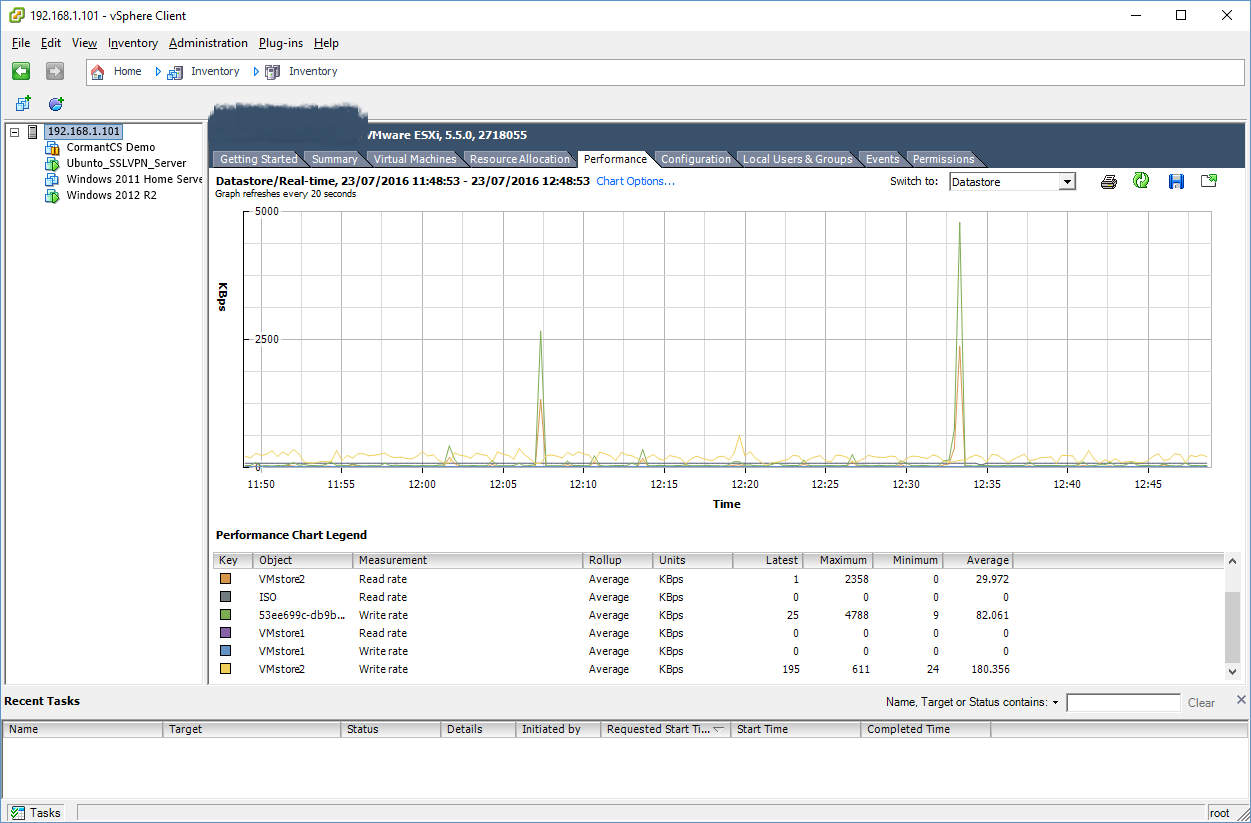
So as you can see, its sat doing literally nothing, yet renders down the SMB file transfer to circa 35 mbs.
This is particularly ponient again, as I am just creating a couple of new VM's (one at a time I may add) and now am back at 30mbs read spead from my windows workstation! (Graph taken from the time of original issue).
Could this be a memory related constraint?
Vez
Oct 03, 2016Aspirant
It appears if you have a folder shared via both CIFS and NFS, you get this impacted CIFS performance.
I have removed CIFS from said VMware stores and everything is flying again. Read and Write on CIFS is now constantly maxing my Gbit connection to my workstation.
I will attempt to get vCenter up and running to see if this is actually the issue or not.
- VezOct 04, 2016Aspirant
Yes both dissabled.
I spoke way too soon, it took me most of the evening to build a windows8 VM.
I attempted a test of speed from an RDP to VMDK via an already provisioned server, Heady heights of 400kbps, and then it stopped after 10 seconds.
If would appear something is preventing NFS from functioning correctly, the fastest I have seen an ESXi host transfer data via NFS peaked at 4mbs.
Again CIFS is crippled whilst NFS is "busy" doing more or less nothing in the grans scheme of things.
(Can you give me info on VMware Certification for the 626x - though I am incredibly hesitant to invest if this cant be resolved).
- VezOct 04, 2016Aspirant
Might have found a solution:
https://community.spiceworks.com/topic/1581799-readynas-516-extremely-slow-nfs-performance
Will test a little later.
- mdgm-ntgrOct 04, 2016NETGEAR Employee Retired
You can have a read of How to enable async mode in ReadyNAS OS 6 for improved NFS performance
- VezOct 04, 2016Aspirant
Finally it appears my VMware cluster is functional again without crippling itself and the rest of the NAS.
Still interested to know performance stats for the 626x however, as this will likely be a pending purchase.
- mdgm-ntgrOct 05, 2016NETGEAR Employee Retired
What would you like to know?
I can't test things with my RN626X at the moment as it's tied up at the moment with another project, but I could ask a colleague.
I did test transcoding video using my RN626X and that was a big step up from my 516 which is a big step up from the Pro 6 which is much better than the Ultra 4 Plus. I'm sure you'll love the performance that the RN626X provides.In the live Q&A recently we were asked:
"what is the difference between Readynas rn626x & RN716X - so the older model actually has more ram, speed but the newer model is cheaper? both 10GB"
The answer was:RN716X is Intel Xeon Ivy Bridge E3-1265Lv2 2.5GHz (3.5GHz Turbo) Quad Core with 16GB ECC
RN626X is Intel® D-1521 Quad Core 2.4GHz Xeon Server Processor with 8GB DDR4 ECC RAM
The E3-1265Lv2 uses a 22nm manufacturing process, while the D-1521 processor is much newer and uses a 14nm process. The D1521 will operate faster at a lower clock speed.

Related Content
NETGEAR Academy

Boost your skills with the Netgear Academy - Get trained, certified and stay ahead with the latest Netgear technology!
Join Us!
