NETGEAR is aware of a growing number of phone and online scams. To learn how to stay safe click here.
Forum Discussion

pong1
Apr 17, 2013Aspirant
Problems OS6 and AFP?
after years of finding lots of useful information here i finally gave up guest and registered.
i'm not sure this is the right part of the forum but in fact for me os 6 it looks a lot like beta after i sold my first rnd314, got it back from an angry customer after 2 days, tried it myself and sent it back to distribution after hours of frustration.
did somebody tried afp with these new boxes? for us it worked ok with sthe standard shares and guest account but as soon as you start using user/groups with different rights things get really crazy.
you can log in but the share is not displayed correctly in the finder sidebar, when you click on it after logging in you get a authorisation failed. only way to access it is over go to folder /Volumes/sharename
as a cosmetic glitch you get always NAS, NAS(AFP) and NAS(CIFS) in the sidebar, even after disabling smb and time machine.
the point where i lost patience and sent the puppy back was when i called our dealer support at netgear and they said "no, we know nothing about problems, the box is new so we don't have any information". very helpful. don't think this os is ready for primetimes.
first i was angry to have no official way to upgrade my own pro6 and also feared discussion with our customers. know i'm glad there are hurdles and i didn't upgrade already.
i'm not sure this is the right part of the forum but in fact for me os 6 it looks a lot like beta after i sold my first rnd314, got it back from an angry customer after 2 days, tried it myself and sent it back to distribution after hours of frustration.
did somebody tried afp with these new boxes? for us it worked ok with sthe standard shares and guest account but as soon as you start using user/groups with different rights things get really crazy.
you can log in but the share is not displayed correctly in the finder sidebar, when you click on it after logging in you get a authorisation failed. only way to access it is over go to folder /Volumes/sharename
as a cosmetic glitch you get always NAS, NAS(AFP) and NAS(CIFS) in the sidebar, even after disabling smb and time machine.
the point where i lost patience and sent the puppy back was when i called our dealer support at netgear and they said "no, we know nothing about problems, the box is new so we don't have any information". very helpful. don't think this os is ready for primetimes.
first i was angry to have no official way to upgrade my own pro6 and also feared discussion with our customers. know i'm glad there are hurdles and i didn't upgrade already.
21 Replies
Replies have been turned off for this discussion
 chirpaLuminaryNETGEAR reps haven't come on this forum to even communicate what level of support will be available for it. From what is seen so far, there is 4.1/4.2/5.3 customers just helping each other, and some rogue 6.0 users running it unsupported on older systems. But there hasn't been too many actual 6.0 box owners coming on here yet (except to say Genie doesn't work).
You will likely have to contact NETGEAR again, and ask for a L3 tech support agent, hopefully they would have more hands on than the L1/L2 you get directly on the line. pong1Aspirantjust a bit more information regardigns the afp problems: you can't authorize over the finder sidebar. you always get authorisation failed. when you use the "connect to server" menu, it works, but the mounted share is bound (at least optical in the finder) not to NSA(afp) but to NAS, which should be the timemachine announcement. and to make things even more difficult, it'S shown there, but as soon as you select it you get and authorisation failed.
i know that official netgear support has vanished here in the forum. and after seeing this afp mess with os6 i'm a bit hopeless regarding the future of the product line. i can't imagine that someone at netgear really tried afp before shipping the first boxes. looks like an public beta test to me. i mean the problems are not hidden ones. as soon as you start with users - bang. perhaps they tried guest access and nothing else.
i'm not going to contact tech support again, i didn't get the impression they wanted to help. we send screenshots and logs but they were unable to try it out themselves (no testbox because new, wtf).
so i sent the box back and until i read somewhere that afp works perfectly again with os6 we sell synology or qnap in the meantime.
i they are not willing to gibve some ressources for support including testing in house, no idea where this will end.- chirpaLuminaryI don't buy the 'no test boxes available' statement, they can run it in a Virtual Machine.
- pong1Aspirantbefore us our customer called support directly. they at least tried a factory reset with him and then they looked at the problems via team viewer and i think also connected directly to the box. but they couldn't help and said they never saw anything similar. so either they have no macs to try afp or they just don't do it.
it's not a mountain lion problem btw. we tried it with 10.6.x, 10.7.x and also the latest 10.8.3 and the problems were the same with all versions. - mdgm-ntgrNETGEAR Employee RetiredAfter changing AFP settings for your shares did you try rebooting the NAS?
- pong1Aspirantyou mean after enabling afp? in fact afp is enabled by default and guest access works. problems starts when you enable user rights. we restarted the box also after configuring users without any changes.
but i can't do any further testing at the moment because i returned the box already. can't use it without working afp. 98% of our customers are mac-only so without working afp these revolutionary new os is useless for us and our customers.
i hope there will be some positive feedback here, perhaps after 6.1 or whatever. at least 6.0.4 didn't work at all for us.
i also placed a link on the readynas facebook page to this thread in the hope for some feedback. can't imagine that nobody out there uses these new boxes with afp. - mdgm-ntgrNETGEAR Employee RetiredI may check later and see if I can reproduce this. I am a Mac user.
 LeiaNETGEAR Employee RetiredThere're 2 ways access NAS shares via afp:
1. In Mac client: Finder->Go->Connect to Server...
Enter afp://nas_ip. Click "Connect".
Then enter username/password.
Then you can see all shares enabled afp and can read by logined user.
This way works on 6.0.4.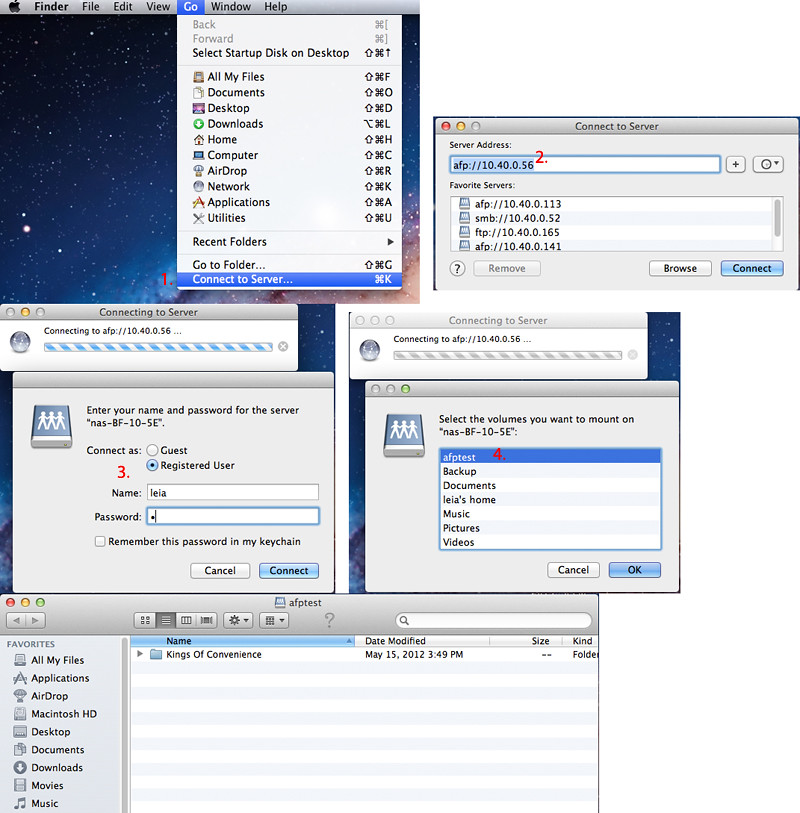
2. I guess you used this way to access via afp.
In Mac client, Finder->Sidebar SHARED All... Select your nas(AFP), click "Connect As" (in the top right of the finder window, under the search bar) to login. Then all shares you have read permission listed there.
It doesn't work on 6.0.4, but in latest 6.0.5 test build, this issue has been fixed.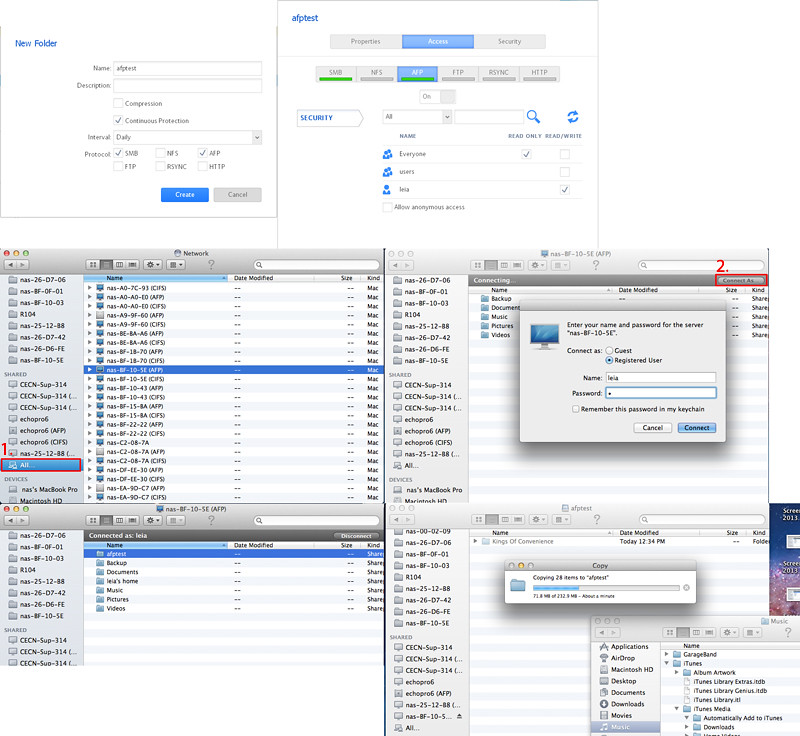
So you can use the 1st way to access nas shares via afp for now. We will release 6.0.5 soon.
Thanks a lot for your post.
-Leia- mdgm-ntgrNETGEAR Employee RetiredWhat about the issue pong mentioned of disabled protocols (SMB/CIFS, Time Machine) still being advertised over Bonjour (i.e. still appearing in the Finder sidebar)?
What about ownership/permissions for AFP shares for different users? Have you tested that? - LeiaNETGEAR Employee RetiredFor Bonjour, OS 6 now, it's installed by default. There're 3 services enabled by default: afp, cifs and frontview. And if you turn on timemachine, timemachine will be enabled for bonjour then.
Turn on/off afp or cifs of NAS cannot enable/disable bonjour afp/cifs services.
For access via afp by different users different permissions. Yes, I created 3 users, one RW, one RO and the other no access right. Seems ok for me. Cloud you please point what's failed for you?mdgm wrote: What about the issue pong mentioned of disabled protocols (SMB/CIFS, Time Machine) still being advertised over Bonjour (i.e. still appearing in the Finder sidebar)?
What about ownership/permissions for AFP shares for different users? Have you tested that?

Related Content
NETGEAR Academy

Boost your skills with the Netgear Academy - Get trained, certified and stay ahead with the latest Netgear technology!
Join Us!
